Best home theater projectors with keystone correction: real‑world buying guide
Balancing brightness, contrast, and image quality in real rooms
Every home theater projector lives in a room with its own light challenges, so brightness and contrast must be judged together. Manufacturers often quote brightness lumens or ANSI lumens figures, yet these numbers only tell part of the story about image quality. A bright projector with poor contrast ratio can look washed out, especially when ambient light leaks through curtains or reflects from pale walls.
For a dedicated home cinema space with dark paint and controlled light, a projector with around 1 500 to 2 000 ANSI lumens can already deliver great picture quality. In a multipurpose living room where you watch streaming content with some lamps on, you may need 2 500 to 3 000 brightness lumens to maintain a good image. The key is to pair that light output with a strong native contrast ratio and accurate color calibration, so blacks stay deep and skin tones remain natural.
Many LED based projectors, including some models in the Anker Nebula line, trade raw brightness for long life and stable color. These products can be the best home choice for smaller screens up to about 100 inches, especially when you watch mostly at night. If you want to compare several LED options, a detailed guide to top LED home theater projectors helps clarify which projectors prioritize contrast and which chase headline lumen numbers, and lab tests from sites like ProjectorCentral can confirm real‑world brightness.
High dynamic range video places extra demands on tone mapping, which is the process that fits HDR brightness information into the projector’s limited light range. A best projector for HDR will let you adjust tone mapping curves, so bright highlights do not crush and dark scenes keep shadow detail. When keystone correction is active, check that the HDR processing still preserves fine gradations and does not introduce banding at the edges of the image.
Short throw and standard throw projector designs behave differently with ambient light, because the angle of light hitting the screen changes. A short throw projector placed close to the wall can reduce shadows from people walking in front, but it may emphasize any texture or imperfections in the screen surface. Always evaluate image quality in the same type of room where you plan to use the theater projector, and remember that a slightly lower brightness with better contrast can look subjectively better than a very bright but flat image.
Keystone correction versus lens shift and placement flexibility
Keystone correction is only one tool among several that help align a projector image on your screen. Lens shift moves the projected image optically without tilting the projector body, which preserves full resolution and sharpness. When you can afford a projector with generous lens shift, you often need less digital keystone, and the resulting picture quality is noticeably cleaner.
Many mid range home theater projectors offer vertical lens shift but limited or no horizontal shift, which still helps when ceiling mounting above the screen center. Premium products aimed at best home cinema enthusiasts may provide both vertical and horizontal lens shift, giving you freedom to mount off center or on a high shelf. In such cases, keystone correction becomes a fine tuning tool rather than the primary method of alignment.
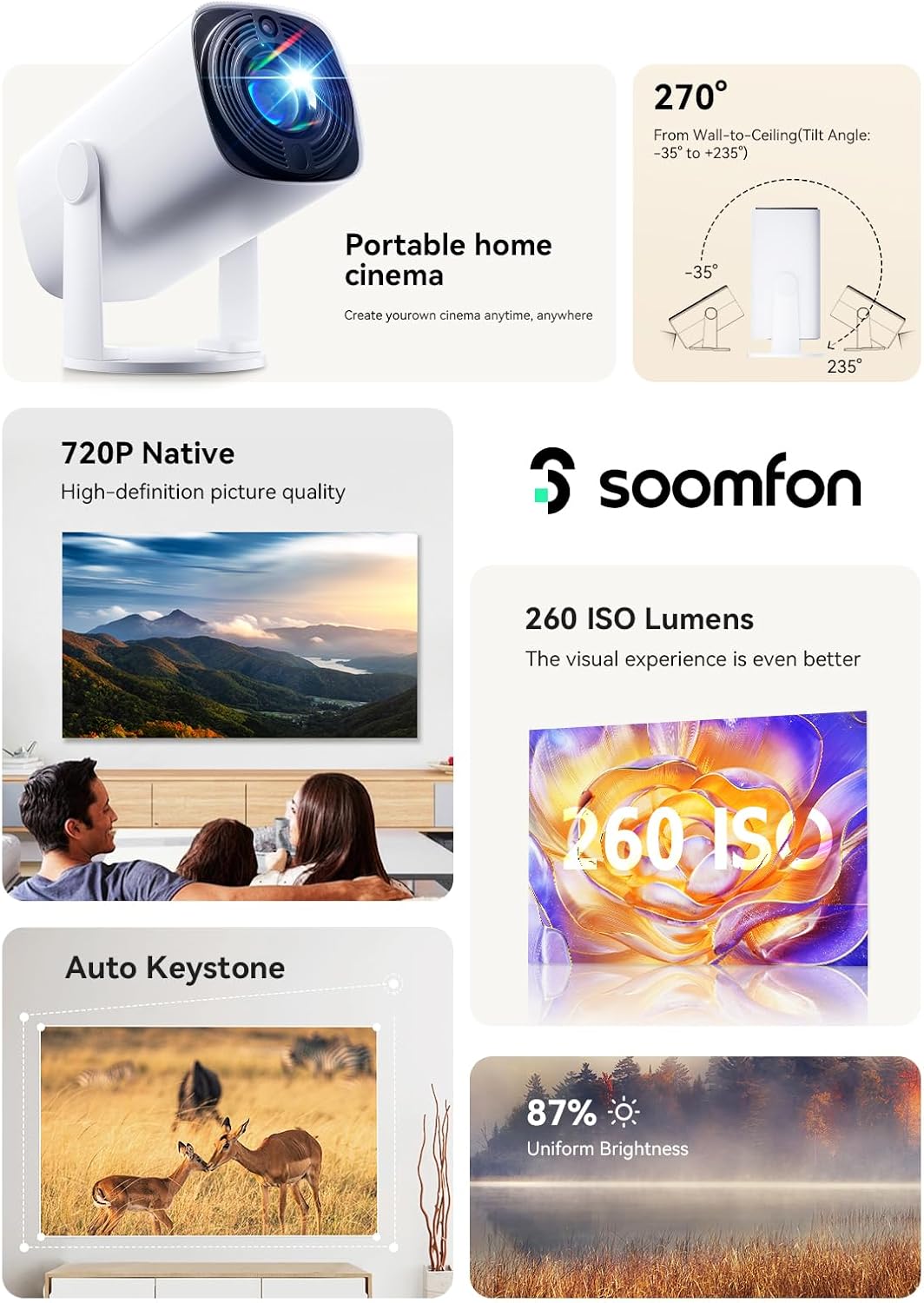
Portable projector designs and compact mini projector models usually skip lens shift to save space and cost. These projectors rely heavily on automatic keystone correction, sometimes combined with auto focus and screen detection. That makes them very convenient for casual streaming sessions, but you should understand that heavy digital correction can slightly reduce edge sharpness and effective contrast.
When comparing the best home theater projectors with keystone correction, consider how your room layout affects placement. A short throw projector on a coffee table may need only minimal keystone if the table height matches the screen center, while a long throw projector at the back of the room might require more adjustment. If you plan to buy directly from smaller brands or crowdfunding campaigns, read analyses of the new economics of buying a projector direct before trusting ambitious specifications, and cross‑check claimed keystone ranges and lumen ratings against independent test data.
Some Anker Nebula projectors, for example, emphasize ease of use with automatic vertical and horizontal keystone plus built in streaming platforms. These features make them a good fit for renters who cannot drill ceiling mounts or install fixed screens. In contrast, a more traditional theater projector with manual lens shift and limited smart features may suit a permanent home cinema room where you value precise alignment over portability.
Smart features, streaming, and connectivity in modern projectors
Home theater projectors have evolved into full media hubs, with built in streaming apps and wireless casting. When you evaluate the best home theater projectors with keystone correction, you should also weigh how you plan to feed video into the system. A projector with integrated streaming can reduce clutter, but external devices often offer faster updates and broader app support.
Look for at least two HDMI inputs, so you can connect a streaming stick, a Blu ray player, or a game console without constant cable swapping. Some projectors add an HDMI port with eARC, which simplifies sending high quality audio to an AV receiver or soundbar. If you choose a portable projector or mini projector for flexible use, check whether it supports dual band Wi Fi and Bluetooth audio, because these features affect both convenience and lip sync stability.
Smart projectors such as several Anker Nebula models run Android TV or similar platforms, giving direct access to major streaming services. This approach works well for casual viewing, but long term software support can lag behind dedicated streaming boxes. When the streaming platform ages, the core projector with its lens, light engine, and contrast ratio may still be excellent, so external devices can extend its useful life.
Keystone correction interacts subtly with smart features, because auto keystone often triggers when you move the projector to aim at different walls or screens. In a best home setup, you might use one profile for a living room wall and another for a retractable screen, each storing unique keystone, brightness, and color settings. This flexibility lets you maintain good image quality whether you watch a bright sports broadcast or a dark drama series.
Connectivity also affects gaming performance, where input lag and motion handling matter as much as raw brightness lumens. Some theater projector models offer a dedicated game mode that reduces processing, including certain tone mapping steps, to cut latency. When you enable heavy keystone correction, test whether game mode still feels responsive, because extra processing can sometimes add a few milliseconds that sensitive players notice.
Comparing prices, value, and long term costs
Price differences between home theater projectors can be dramatic, yet the best value rarely sits at the extreme ends. Budget projectors under a few hundred euros often advertise very high brightness numbers, but these figures may not follow ANSI lumens standards and the contrast ratio can be poor. Mid range products from established brands usually offer more honest specifications, better image quality, and more reliable keystone correction.
When you compare price brackets, consider the total cost of ownership, including replacement lamps or potential laser light engine longevity. A lamp based projector with a lower initial price might require a new lamp after a few thousand hours, while a laser or LED model can run much longer with stable color and brightness. Over time, the more expensive projector with a solid state light source can become the best home investment, especially if you watch several hours of streaming content every day.
Value also depends on how you use keystone correction and placement flexibility. If your room allows a centered mount with minimal keystone, you might prioritize higher contrast and better tone mapping over advanced auto correction features. In a small apartment where a portable projector moves between rooms, paying more for robust automatic keystone and quick setup can be a good tradeoff.
Some buyers are tempted by very cheap mini projector products that promise cinema sized images for the price of a dinner. These devices often struggle with accurate color, limited brightness, and noisy fans, especially when pushed to large screen sizes. For a more satisfying home cinema experience, it is usually wiser to save for a projector with verified ANSI lumens ratings and a realistic contrast ratio, even if the initial price is higher.
To understand why lumen claims have become so inflated, a detailed analysis of the lumens arms race explains what really matters once every box claims 3 000 lumens or more. That context helps you focus on meaningful specifications such as calibrated brightness, black level, and color accuracy. In practice, a projector with slightly lower headline brightness but better calibrated image quality often looks great in a real home theater.
Practical setup tips for keystone, screens, and room conditions
Getting the best image from a home theater projector starts with careful physical setup before touching keystone controls. Place the projector with its lens roughly level with the center of the screen, and use the zoom and focus to fill the frame. Only then should you apply small amounts of keystone correction to square the edges.
If your projector includes lens shift, always use that feature first, because it preserves full resolution and contrast. Keystone correction should handle only minor remaining misalignment, ideally under about 10 degrees of tilt. Larger corrections can stretch pixels unevenly, which softens text and reduces the crispness of fine details in 4K video.
Screen choice also influences how forgiving your setup can be. A high gain screen can boost perceived brightness in rooms with some ambient light, but it may narrow the viewing angle and exaggerate hotspotting from a short throw projector. Neutral gain screens around 1.0 often provide the most natural balance of brightness, color, and contrast for mixed content including streaming, sports, and films.
Room treatment plays a major role in perceived contrast ratio and image quality. Dark walls, ceilings, and furnishings reduce reflections that wash out blacks, allowing even a mid range projector with modest brightness lumens to look great. Simple steps such as blackout curtains and a dark rug near the screen can make a good projector perform like a far more expensive model.
When you calibrate picture modes, start with a cinema or movie preset that aims for accurate color rather than maximum light output. Adjust brightness and contrast controls so that near black and near white details remain visible, then fine tune tone mapping for HDR content if your projector allows it. Save separate profiles for day and night viewing, because the same settings rarely work equally well in both bright and dark conditions.
Choosing between portable, short throw, and traditional theater projectors
The final decision between a portable projector, a short throw model, or a traditional long throw theater projector depends on your living space and habits. Portable projectors and mini projector designs excel when you value flexibility, casual streaming, and quick setup more than absolute image fidelity. These compact products often include built in speakers, batteries, and automatic keystone correction, making them easy to carry between rooms or even outdoors.
Short throw projectors sit close to the screen, typically around 1 to 1.5 metres for a 100 inch image. This placement reduces shadows and cable runs, and it can be ideal for smaller apartments where a long throw projector would end up in a hallway. However, short throw optics are sensitive to alignment, so even small tilts can require significant keystone correction, which means careful placement and a stable stand are essential.
Traditional long throw home theater projectors usually offer the best combination of contrast ratio, lens shift, and overall image quality for dedicated rooms. They work well when you can mount the projector on the ceiling or a rear shelf, align it carefully, and minimize the need for keystone correction. In such setups, you can fully exploit calibrated brightness, accurate color, and refined tone mapping to create a best home cinema experience.
Some Anker Nebula models blur the lines between categories by offering relatively bright output, integrated streaming, and compact designs that still aim for good picture quality. These projectors can serve as a first step into home cinema for people who are not ready to commit to permanent installations. As your expectations grow, you might later upgrade to a more specialized theater projector while keeping the portable unit for travel or secondary rooms.
Whatever category you choose, remember that the best home theater projectors with keystone correction are those that fit your room, your viewing habits, and your budget while preserving as much native image quality as possible. Pay close attention to how each projector with keystone behaves at different screen sizes and distances, because real world performance often differs from brochure promises. By matching projector type, brightness, and correction tools to your environment, you can achieve a great cinematic experience without overspending.
Key figures shaping the home theater projector market
- According to a report from Futuresource Consulting, global home projector shipments passed 4 million units recently, reflecting steady growth as more households build home cinema spaces. Futuresource’s 2022 and 2023 home projection updates highlight continued demand for 4K and smart models.
- Data from ProjectorCentral show that many popular home theater models cluster between 1 500 and 3 000 ANSI lumens, confirming that extreme brightness is less important than balanced contrast and color in darkened rooms. Their regularly updated database and 2023 buyer’s guides illustrate this sweet spot.
- Several major brands now rate LED and laser light engines for up to 20 000 to 30 000 hours, which can mean more than a decade of typical evening use without a light source replacement. For example, Epson, BenQ, and Anker Nebula list these figures in 2022–2024 product manuals.
- Industry measurements indicate that some budget projectors overstate brightness by 50 % or more compared with standardized ANSI lumens tests, underlining the need to rely on independent reviews and calibrated measurements. Sites that publish side by side meter readings have documented these gaps repeatedly over the last few years.
- Surveys of home cinema enthusiasts consistently show that screen sizes between 100 and 120 inches remain the most common, a range where careful keystone control and placement have a strong impact on perceived image quality. Community polls on major AV forums in 2021–2023 echo this preference.