
Summary
Editor's rating
Value for money: good picture, some compromises for the price
Design and build: compact, smart gimbal, but not ultra-light
Ease of use, auto features and daily comfort
Image quality, brightness and gaming: where it actually delivers
What this projector actually offers in real life
Sound quality and power usage (no battery here)
Pros
- Sharp, colorful 4K image with triple RGB laser and good brightness in dim rooms
- Integrated gimbal with auto focus/keystone makes setup fast and flexible
- Google TV with official Netflix and Wi‑Fi 6 built in (no need for extra streaming stick)
Cons
- No Dolby Vision and limited Dolby Atmos support compared to some rivals
- UI can feel a bit laggy and brightness struggles in very bright rooms

Specifications
View full product page →| Brand | JMGO |
A portable 4K laser that actually feels high-end (mostly)
I’ve been using the JMGO N1S 4K triple laser projector for a bit now as my main living-room and bedroom "TV". I picked it because I wanted real 4K, decent brightness, and something I could move around without drilling holes or messing with a ceiling mount. On paper, 1700 ISO lumens, triple RGB laser, Google TV and Netflix all-in-one sounded like a pretty solid package. I went in a bit skeptical because a lot of projectors look great on spec sheets and then fall flat in real life, especially with colors and fan noise.
Out of the box, it gave me a good first impression: compact, feels like a serious device, not a toy. But it’s not magic either – you still need to manage your room light, tweak the picture, and understand its limits. I used it for movies at night, some daytime sports with blinds half-open, and a decent amount of PS5 and Switch gaming. I also tried it in a different room and once in the garden on a big portable screen.
Overall, it’s a strong all-rounder, but it’s not perfect. The image quality is the main reason to buy it – that part is genuinely satisfying once you dial it in. The smart part (Google TV) is convenient but not as smooth as a good standalone streaming box. And while it’s called "portable", it’s more "easy to move around the house" than something you’d happily throw in a backpack every day.
If you’re expecting it to replace a TV in a bright room at noon, you’ll be disappointed. If you mostly watch at night or in dim light and want a big 100–150" image without installing a massive TV, this thing makes a lot of sense. I’ll break down where it shines and where it’s just decent so you know what you’re actually getting.
Value for money: good picture, some compromises for the price
On value, the JMGO N1S 4K sits in that mid-to-high price zone where you start expecting more than just "pretty good". For the money, you’re mainly paying for: triple laser color, real 4K resolution, integrated gimbal, and built-in Google TV with Netflix. If those four things line up with what you want, it’s a solid proposition. Compared to cheaper 1080p LED projectors, the step up in sharpness and color is obvious. Compared to some similarly priced projectors from bigger brands, you sometimes get better colors here but lose Dolby Vision or Atmos support.
Where the value feels strong is if you want one device that does everything without external boxes: big 4K image, built-in streaming, usable speakers, and easy setup. You don’t have to worry about ceiling mounting or buying a separate streaming stick. The included carrying bag and the gimbal add real day-to-day value – these aren’t just gimmicks. Also, the 1-year warranty and apparently responsive support (from what I’ve seen in user reviews) are reassuring, especially with a less mainstream brand.
On the downside, at this price point, the lack of Dolby Vision and proper Atmos pass-through is a bit disappointing. Some competitors are starting to offer those, especially in the ultra-short-throw category. Also, the occasional UI lag and the fact that the projector still struggles in bright rooms mean you’re paying a fair bit for something that really shines only in controlled lighting. If you mainly watch during the day in a bright living room, a big TV might give you better value.
For me, the value is good but not mind-blowing. If you can grab it on sale, it becomes very attractive. At full price, it’s justified if you care about picture quality in a dark room and the convenience of an all-in-one, portable-ish 4K laser setup. If you’re more focused on advanced HDR formats and top-tier audio integration, you might want to look at other models or be ready to accept those limitations here.
Design and build: compact, smart gimbal, but not ultra-light
Design-wise, the JMGO N1S 4K feels like a proper home gadget, not a plastic toy. It weighs around 4.4 lbs (about 2 kg), which is light enough to carry around the house with one hand, but you still feel it’s a solid block of hardware. The integrated gimbal is the main design highlight. You can tilt the projector up and down about 127° with one hand, and it stays where you leave it. For practical use, this is way better than stacking books or fiddling with tripod legs every time you move it.
The overall shape is a compact cube-ish unit on a swivel base. It doesn’t scream "gamer" or "office" – it’s pretty neutral, so it blends into most rooms. Ports are on the back and are easy to reach: HDMI 2.1, power, etc. It’s simple and functional. The fan vents are also placed so that you don’t blow hot air directly at you when you’re sitting behind it. Noise is there, but I’ll say it’s acceptable – you notice it in quiet scenes if you sit close, but with normal volume it fades into the background.
Where the design helps a lot is setup flexibility. Because of the gimbal and auto keystone, I could drop it on a coffee table, point it at the wall, and get a usable picture in seconds. I also tilted it up to project on the bedroom ceiling – it works, though you feel the weight of the unit when you move it at that angle. I didn’t ceiling mount it because several users warned that the auto picture adjustments get confused when it’s upside down. Honestly, the whole point of this design is to avoid mounting, so I kept it mobile.
The included EPP carrying case is a nice touch. It’s not premium luggage but it protects the unit well if you want to take it to a friend’s house or use it in the garden. Just keep in mind: this is "portable" like a decent camera with a lens, not like a mini pico projector you throw in a small bag. If you’re planning to move it every single day, you’ll feel the weight and bulk a bit, but for occasional moves around the house or trips, it’s totally fine.
Ease of use, auto features and daily comfort
Daily use is where you feel if a projector is actually practical or just a toy that comes out once a month. The JMGO N1S 4K is quite comfortable to live with, but you need to understand a couple of things. The auto focus and auto keystone work well most of the time. You put it down, angle it, and within a few seconds the image sharpens and squares itself. This is especially handy if you’re using it in multiple rooms. However, I noticed that if you move it just a tiny bit, it sometimes re-triggers the whole process, which can be annoying if you’re in the middle of something.
The FlexiSmart Adaptive System 2.0 eye protection is also there – basically, if someone walks in front of the beam, it reduces brightness to protect eyes. It’s a nice feature if you have kids or pets running around. In practice, it worked okay; it dimmed when someone crossed the image, then came back up. Not a reason to buy the projector on its own, but better than nothing. As for noise and heat, after an hour or two of use, the unit gets warm but not crazy hot. Fan noise is audible in a silent room, but with normal listening volume, it blends in. If you’re very sensitive to fan noise, this might bug you, but I’ve heard louder projectors.
Google TV makes the whole experience more "TV-like". You turn it on, and you’re straight into your apps and recommendations. Voice control with Google Assistant works decently for launching apps or searching content. That said, the UI lag here and there does take away some comfort. Sometimes there’s a one-second pause opening settings or hopping between heavy apps. It’s not like it freezes, but it doesn’t feel ultra-slick either. If that bothers you, plugging in a stronger external streamer (Shield, Apple TV, Fire TV) via HDMI solves it, but then you lose part of the all-in-one appeal.
One thing that’s worth noting: some users had trouble when ceiling mounting because the auto correction features behaved oddly. I stuck to placing it on shelves, TV stands, and tables, and in that scenario, it’s smooth. For someone who wants a "put it down, turn it on, watch" experience in multiple rooms, the N1S 4K is comfortable. If you want a permanently installed, perfectly calibrated home cinema setup, you’ll still want to spend some time in the menus and maybe even turn off some of the "smart" adjustments.
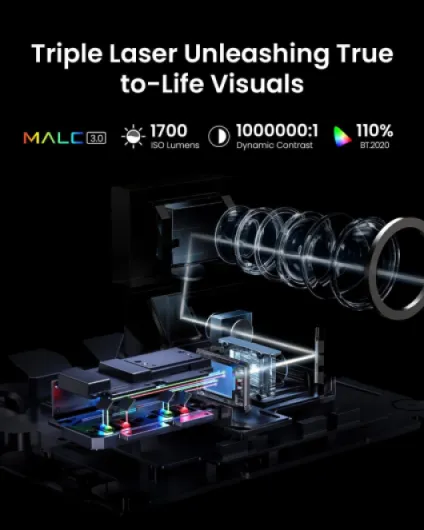
Image quality, brightness and gaming: where it actually delivers
On performance, the JMGO N1S 4K is strong where it matters most: picture clarity and colors in a dim room. Native 4K makes a visible difference compared to 1080p, especially on text, HUDs in games, and fine details like hair or foliage. Sitting around 3–3.5 m from a 100–120" screen, you get a sharp, clean image that doesn’t look muddy. The triple laser helps with color punch; HDR10 content in particular looks rich once you tune the settings a bit. Out of the box, I found the image a bit too processed with motion smoothing and other stuff turned on, so I disabled or toned down MEMC and some contrast enhancements.
Brightness is good but not TV-level. At night, the 1700 ISO lumens feel plenty on a 100–120" screen. Blacks are not OLED-deep, obviously, but for a projector they’re acceptable as long as you control ambient light. During the day with blinds half closed, it’s still watchable, but you lose that cinema feel and dark scenes suffer. On a white wall, it already looks fairly good; on a proper screen with some ambient light rejection, it gets noticeably better. If you plan to push it to the full 200" size, expect a drop in perceived brightness – for me, the sweet spot is 90–120".
For gaming, the advertised low latency and HDMI 2.1 actually do help. With game mode and ALLM active on PS5, input lag feels low enough for casual and even some competitive play. I’m not counting frames, but compared to my TV, it didn’t feel noticeably worse. 120 Hz at 1080p is supported, but honestly, most console games I play run at 60 Hz anyway, so the benefit is limited. The main thing is that motion feels clean and the projector doesn’t add obvious delay. MEMC can make games look weird and soap-opera-ish, so I left it off for gaming.
One thing I did notice: the system UI and app switching can feel slightly sluggish at times, even though video playback itself is fine. That’s probably the MT9629 chipset being okay but not high-end. It’s not a deal-breaker, but if you’re used to a very snappy Apple TV or Nvidia Shield, you’ll sense the difference. Overall, in terms of pure image and gaming performance, it’s a pretty solid unit. The weak spots are more on the software smoothness and daytime brightness side than on raw picture quality at night.
What this projector actually offers in real life
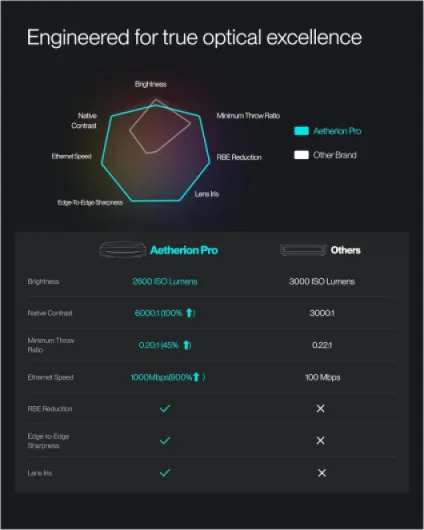
On the spec sheet, the JMGO N1S 4K is pretty packed: pure RGB triple laser, 4K UHD (3840 × 2160), 1700 ISO lumens, up to 200" image, Google TV with official Netflix, Wi‑Fi 6, HDMI 2.1, low-latency gaming, MEMC, HDR10, and built-in 10W Dolby Audio speakers. In practice, the three big things that stand out are: picture sharpness, color punch, and the gimbal with auto focus/keystone. Those three are what make it feel a notch above the usual cheap LED projectors.
The triple laser part isn’t just marketing. Colors really do look more intense than a normal single-laser or LED unit. Reds and greens pop a lot, sometimes a bit too much out of the box. I had to lower saturation and play with the picture modes to get something more natural. JMGO claims 110% BT.2020 and 151% DCI‑P3 coverage – I can’t measure that, but compared to my older 1080p LED projector, the difference is obvious. Skin tones look better once you tweak the color temperature and turn off some of the extra processing.
Brightness-wise, 1700 ISO lumens is usable in a lit room but clearly happier in dim light. At night on a 100–120" screen, it looks strong and detailed. With curtains open during the day, you lose a lot of contrast and black levels turn grey. It’s still watchable for news or cartoons, but for movies you’ll want the room as dark as possible. Compared to a mid-range TV, it loses in brightness but wins on immersion thanks to the size.
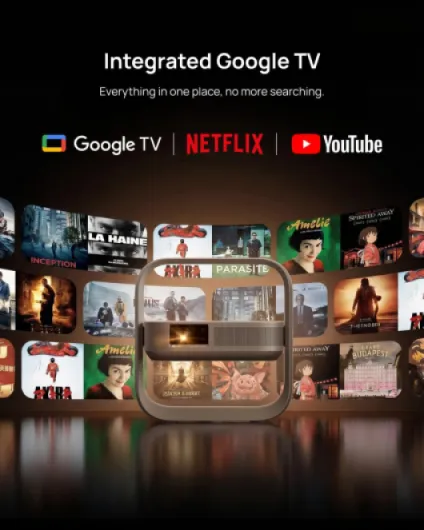
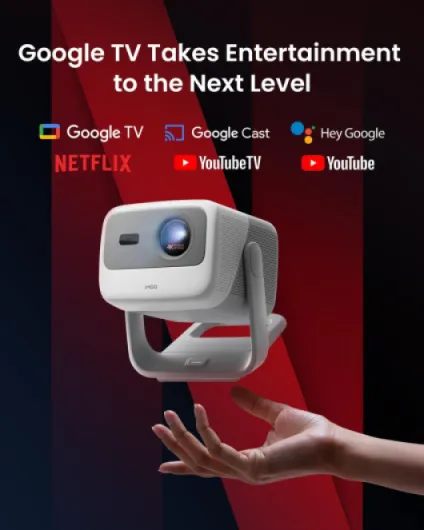
The Google TV part is handy: you plug it in, connect Wi‑Fi, log into Google, and you have Netflix, YouTube, Disney+, etc. No need for a Fire Stick or Chromecast. That said, the interface isn’t as smooth as a decent standalone streamer. There’s the occasional UI lag when switching apps or opening heavy menus. It’s not unusable, but it reminds you this is a projector first, smart box second. Overall, the feature set is strong, but you have to accept a few compromises on software polish and daytime use.
Sound quality and power usage (no battery here)
Audio-wise, the JMGO N1S 4K is better than I expected for a compact projector, but it’s still a built-in speaker system, so keep your expectations realistic. The dual 10W Dolby Audio speakers give you clear dialog and decent volume for a medium-sized room. For casual Netflix, YouTube, or cartoons, it gets the job done. There’s some sense of width, but don’t expect real surround or deep bass. Explosions and music lack the punch you’d get from even a basic soundbar with a sub.
For movies and gaming, I ended up using HDMI eARC to send sound to my external system. That’s where things get a bit tricky. While the projector supports Dolby Audio, it doesn’t support Dolby Atmos pass-through properly, which lines up with some of the Amazon reviews. In my case, I could get 5.1 working fine, but when I tried to force Atmos from some streaming apps, it either didn’t show up or fell back to a simpler format. If you’re buying this expecting full Atmos and advanced audio formats like on some higher-end UST projectors, you might be frustrated.
There is no built-in battery, so this is not a "true" wireless projector. You can, however, run it off a high-output power bank if it supports the required power (you’ll need something serious, not a cheap little one). I tried it once with a beefy power station for an outdoor session and it worked, but this is more a bonus use-case than the main scenario. Plan on using it plugged into the wall most of the time. Power consumption is obviously higher than a small LED pico projector, but that’s normal given the brightness and triple laser.
In short: sound is fine but not home-theater level, and there’s no internal battery. If you already have a soundbar or AV setup, you’ll want to hook it up through HDMI or eARC and forget the internal speakers for serious viewing. If you don’t, the built-ins are perfectly OK to start with, especially in a bedroom or smaller living room. Just don’t buy this expecting it to replace a full-blown audio system.
Pros
- Sharp, colorful 4K image with triple RGB laser and good brightness in dim rooms
- Integrated gimbal with auto focus/keystone makes setup fast and flexible
- Google TV with official Netflix and Wi‑Fi 6 built in (no need for extra streaming stick)
Cons
- No Dolby Vision and limited Dolby Atmos support compared to some rivals
- UI can feel a bit laggy and brightness struggles in very bright rooms
Conclusion
Editor's rating
The JMGO N1S 4K triple laser projector is a strong choice if your priority is a big, sharp, colorful 4K image in a dim room, without building a full-blown home cinema. The combination of triple RGB laser, 1700 ISO lumens, and native 4K delivers a picture that’s genuinely satisfying for movies and gaming, as long as you control the light in the room. The integrated gimbal and auto focus/keystone make setup painless, and Google TV with official Netflix means you can plug it in and start watching right away, no extra dongles needed.
It’s not perfect, though. Daytime performance in bright rooms is only okay, the smart interface can lag a bit, and the audio side is limited: no real Dolby Atmos, no Dolby Vision, and built-in speakers that are fine but not cinematic. Also, while it’s called portable, it’s more "easy to move between rooms" than something you’ll carry everywhere. If you already own a good streaming box and an audio system, some of the smart features are less important, and you might compare it more strictly on image quality and price.
If you watch mostly at night, want a 90–120" image, and like the idea of dropping a single box on a table and having a full setup, the N1S 4K is a pretty solid option. People who are picky about HDR formats, Atmos, or who need perfect daytime visibility might be happier with a bright TV or a projector that focuses more on advanced video standards. In short: great for casual to serious home cinema in controlled light, good for gaming, and decent value overall if you know its limits and can live with them.