
Summary
Editor's rating
Value for money: good tool if you accept its limits
Design and practicality: compact box, some quirks
Build quality, heat, and long-term use
Brightness and image performance: strong light, average resolution
What the PA503X actually offers in real life
Day-to-day effectiveness for work, teaching and home use
Pros
- Very bright image that stays usable in rooms with ambient light or for outdoor evenings
- Simple plug-and-play setup with laptops, consoles and streaming sticks via HDMI
- Long lamp life in Eco modes, making it suitable for frequent use in schools and offices
Cons
- Low native resolution (1024 x 768, 4:3) which is not ideal for modern movies and games
- Weak built-in 2W speaker and only one HDMI port, so you quickly need extra gear
- Menu and remote feel dated and a bit confusing for first-time setup

Specifications
View full product page →| Brand | ViewSonic |
A budget projector that’s actually bright enough
I’ve been using the ViewSonic PA503X for a mix of things: work presentations, a couple of backyard movie nights, and some casual console gaming. I went for it because I wanted something bright enough to use in a normal room without having to blackout all the windows, and I didn’t want to spend the price of a high-end home cinema projector. On paper you see 3600–4000 lumens and 22,000:1 contrast and you wonder how much of that is just brochure talk. After a few weeks of use, I’d say the brightness claim is fairly honest, while the contrast is more “fine for presentations, okay for movies” than true cinema quality.
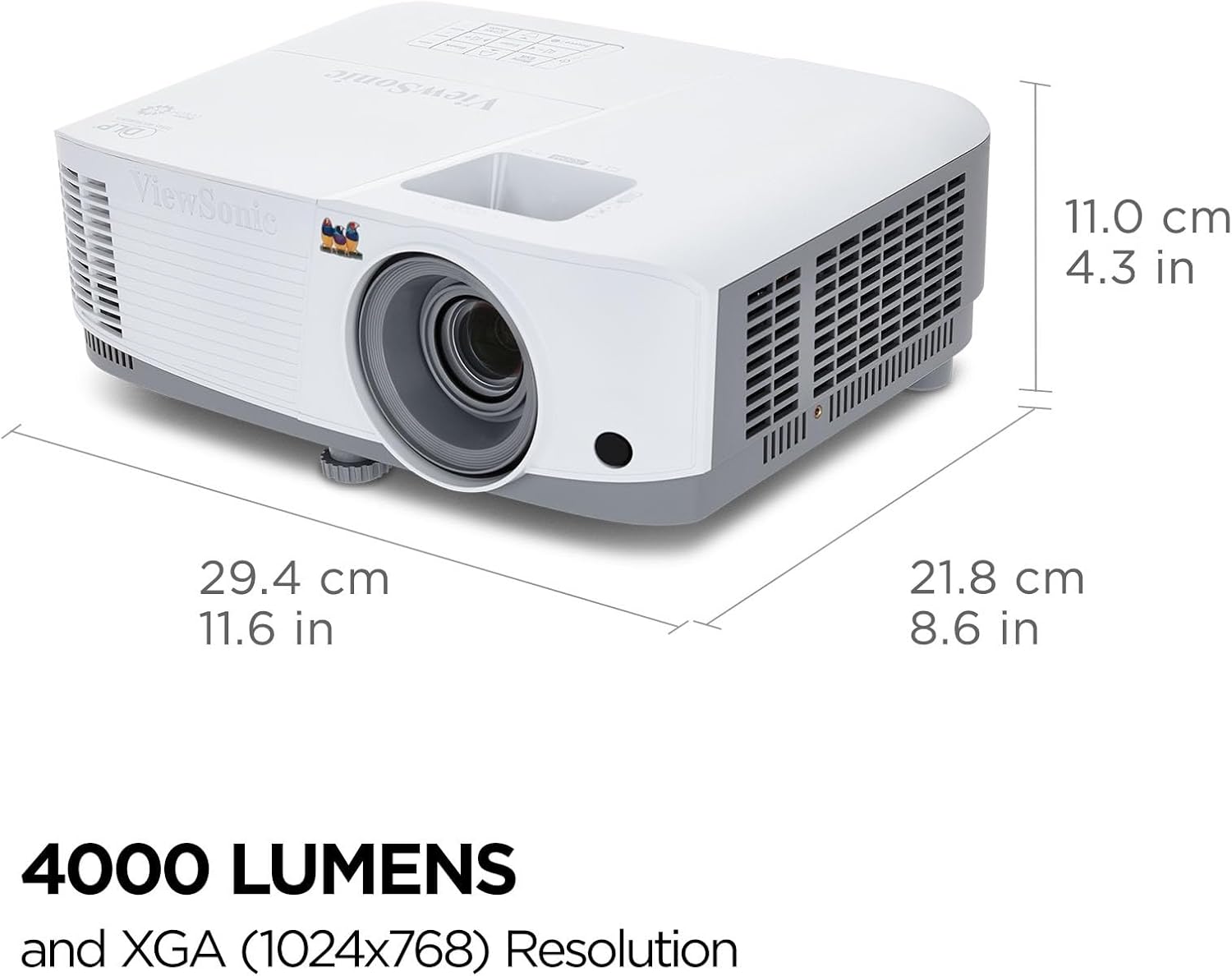
The first thing that stood out is that this projector is clearly built with business and classroom use in mind. The native resolution is 1024 x 768 (XGA), so it’s 4:3, not widescreen. For PowerPoints and spreadsheets, that’s totally fine. For movies and games, you do get black bars and you feel the lower resolution compared to a 1080p projector. If you’re coming from a cheap 720p mini projector, this will still feel like a step up in sharpness and brightness. But if you’re used to a modern 1080p TV, don’t expect the same level of detail.
In everyday use, the projector is pretty straightforward: plug in HDMI, power it on, and it just works. I’ve used it with a laptop, a PS4, and a streaming stick via HDMI, and there were no handshake or compatibility issues. The vertical keystone correction helps a lot when you just throw it on a coffee table or a desk and don’t feel like fiddling with a mount. It’s not perfect, but it gets the image close enough for casual setups. For a work meeting or a school class, that’s really all you need.
Overall, my first impression is that this is a very practical, no-frills projector. It’s not trying to be a fancy home cinema machine. It’s more like a reliable tool you can drag around for training sessions, lessons, or a movie on a white wall. It has some clear downsides — weak speaker, only one HDMI, no smart features — but if you mainly care about a bright, readable image and you’re okay with XGA resolution, it does the job pretty well.
Value for money: good tool if you accept its limits
In terms of value, the PA503X sits in a sweet spot for people who need brightness and reliability more than fancy features. You’re basically paying for a strong lamp, decent optics, and a brand that doesn’t lie too much on specs. Compared to the cheap no-name projectors you see advertised with fake “9500 lumens” and built-in Android, this ViewSonic is more honest. It’s brighter in real life, more stable, and better for serious use like classes or work. The trade-off is that you don’t get 1080p resolution, you don’t get apps, and you get only one HDMI.
If your main use is business or education, I’d say the value is pretty solid. You get a bright, transportable projector that can handle lit rooms, and the lamp life in Eco mode should keep running costs low. For a school, small company, or church, buying one or two of these makes sense. They’re simple, predictable, and you can hook up any laptop or media player easily. The fact that so many user reviews mention good performance in classrooms and events matches what I’ve seen.
For pure home cinema, the value is a bit more debatable. You can find 1080p projectors for a similar price, but many of them won’t be as bright or as reliable, especially in non-dark rooms. So it comes down to your priorities: if you mostly watch at night in a dark room and care a lot about sharpness, I’d say go for a 1080p model instead. If you want something that can also be used in the afternoon with some daylight, or outside, then the brightness of the PA503X starts to justify itself, even with the lower resolution.
Overall, I’d summarize the value like this: good deal if you need a practical workhorse, less convincing if you’re chasing the best image quality for movies. There’s better picture quality out there at similar prices, but not many options that combine this level of brightness, brand support, and lamp life. As long as you go in knowing what it is — a bright XGA projector, not a high-end home cinema rig — you’ll probably feel you got your money’s worth.
Design and practicality: compact box, some quirks
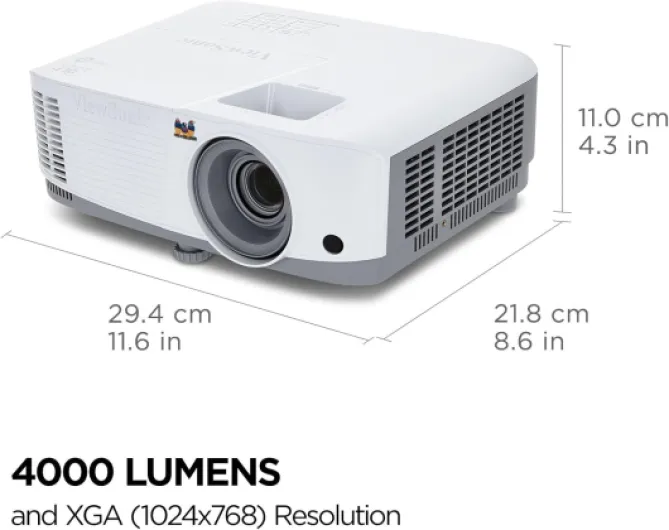
Design-wise, the PA503X is pretty straightforward. It’s a white, boxy projector, not especially pretty, not ugly either. It weighs around 4.85 pounds (a bit over 2 kg), so it’s light enough to carry around in one hand, but it doesn’t feel like a toy. I’ve moved it between rooms, taken it to a friend’s house for a movie night, and it fits easily in a standard laptop/backpack if you’re a bit careful. For something that can throw up to a 300-inch image, the size is reasonable.
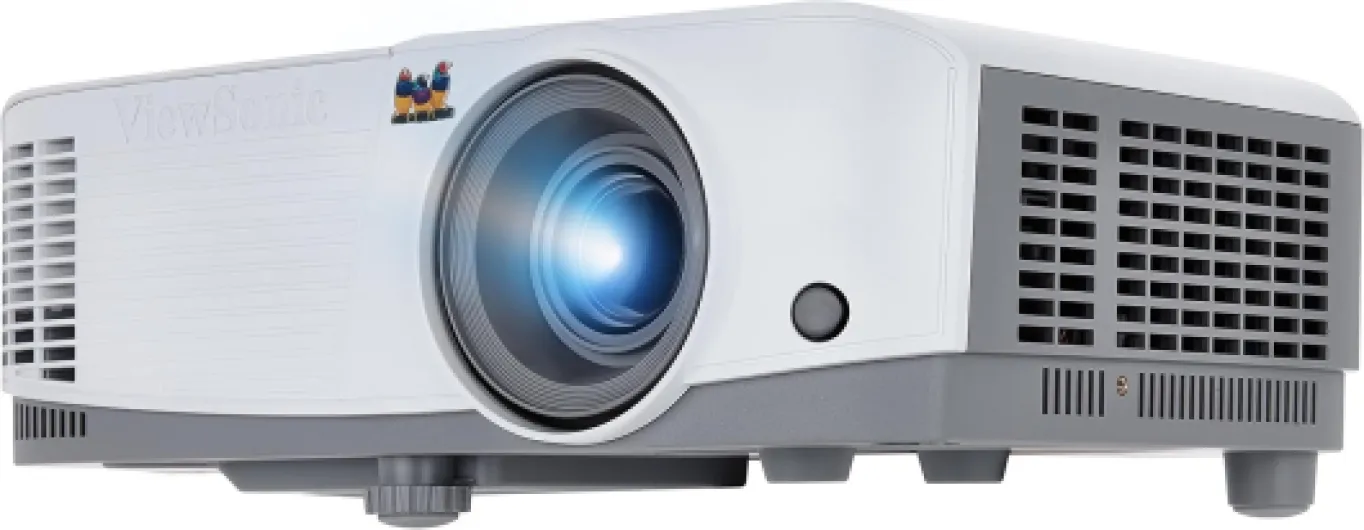
The layout is simple: lens on the front side with a manual zoom and focus ring, basic buttons on the top (power, menu, navigation), and the ports at the back. The vertical keystone adjustment is done via the menu/remote; there’s no fancy lens shift. There is a small adjustable foot under the front so you can tilt the image up. In practice, I usually just drop it on a coffee table, extend the front foot a bit, and then fix the keystone with the remote. It’s a two-minute job, but if you’re the kind of person who hates menus, you’ll find it a bit tedious the first few times.
One thing I didn’t love is the menu layout and the remote. The menu feels dated, with small text and a slightly confusing structure. The remote works, but the buttons are cramped and not always intuitive. It’s the kind of remote you constantly look down at instead of operating by feel. After a few days you get used to where things are, but the first setup session is a little annoying, especially when you’re trying to fine-tune colors and brightness. For a device that will often be used by non-techy people (teachers, office folks), I wish the interface was clearer.
On the positive side, the cooling vents and general airflow seem well designed. The projector does blow warm air out the side, but it hasn’t overheated on me, even during a 6-hour event session. Fan noise is present, especially in the normal lamp mode, but it’s the usual projector hum, not a high-pitched whine. In Eco mode the fan quiets down a bit. During a movie with external speakers, I barely notice it. During a silent PowerPoint in a small room, you hear it, but it’s not unbearable. In short, the design is functional and transport-friendly, but the user interface and remote feel a generation behind.
Build quality, heat, and long-term use
From a durability point of view, the PA503X feels like a typical mid-range office projector. The plastic casing is not premium, but it doesn’t creak or flex when you pick it up. The lens housing feels solid enough, and the focus/zoom rings have some resistance so they don’t drift out of place easily. I’ve moved it around quite a bit — from table to shelf to a different house — and it hasn’t picked up any rattles or weird noises. For something that will probably get thrown in bags or moved between rooms, that’s important.
The lamp life is one of the selling points: up to 15,000 hours in SuperEco mode. In real life, you’ll probably use a mix of Normal, Eco, and maybe SuperEco depending on the room. Even if you only get half of that number, it’s still several thousand hours, which translates to years for most people. The fan does work hard in Normal mode, and the projector gets warm on the side, but not to the point where I’m worried about it. I’ve done a couple of long sessions (5–6 hours) and it just kept going without warnings or shutdowns.
The only thing I’d keep an eye on over time is dust. Like most DLP projectors, if you use it in a dusty environment, you might eventually see small spots or need to clean filters. There’s no crazy sealing here, it’s a normal consumer device. So if you’re using it in a workshop or a very dusty classroom, I’d at least keep it covered when not in use and maybe blow it out gently every now and then. For regular home or office use, I don’t see any special risk.
Long-term, ViewSonic as a brand has a decent reputation for monitors and projectors, and user reviews around 4.5/5 lines up with my experience so far. It feels like a workhorse: not fancy, but built to be used often. I wouldn’t baby it, but I also wouldn’t toss it around like a rugged device. If you mount it on the ceiling or keep it on a stable shelf, I don’t see any reason it wouldn’t last several years, especially if you stick to Eco modes to preserve the lamp.

Brightness and image performance: strong light, average resolution
In terms of raw performance, the brightness is the clear strong point. ViewSonic lists 3600–4000 ANSI lumens, and while I can’t measure it precisely, the real-world result is a very bright image. I’ve used it at around 100–120 inches in a living room with some ambient light, and text from a PowerPoint or a browser window is sharply readable. For outdoor use, I tried it on a backyard wall at sunset and it stayed perfectly visible as long as it wasn’t full daylight. Once it gets dark, you can easily go bigger — 150 inches and beyond — without the image turning into a washed-out mess.
The catch is the native resolution: 1024 x 768. For office work, this is fine. Spreadsheets, documents, and slides look clean, and people in the back of a classroom can read them without issues. For movies and gaming, you do feel the limitation. When I connected a PS4, games were playable and reasonably sharp, but you don’t get the crispness of 1080p. Fine text in game menus looks a bit jagged, and details in dark scenes are not as clear. If you’ve never used a Full HD projector, you might not care; if you’re used to 1080p or 4K, this will feel dated.
Contrast is officially 22,000:1, but like most projector specs, that number is optimistic. Blacks are more like dark grey, especially in a room with some light. For presentations, that’s totally acceptable. For movie nights, it’s decent but not cinematic. I found that switching to Movie mode, lowering brightness a bit, and dimming the room helped a lot. Colors in Standard mode tend to be a bit overblown; with some tweaking, you can get a more balanced picture. Once tuned, skin tones look okay and cartoons/animation look quite good thanks to the brightness.
Input lag isn’t officially advertised for gaming, but for casual console use it felt fine. I played some racing and platform games and didn’t feel any serious delay. I wouldn’t pick this as a dedicated gaming projector if you’re into competitive shooters, but for couch co-op, sports games, or Mario Kart style stuff, it’s more than okay. Overall, the performance is very solid for presentations and mixed use, and acceptable for movies and games as long as you know you’re dealing with XGA, not 1080p.
What the PA503X actually offers in real life
On paper, the ViewSonic PA503X looks like a classic office projector: XGA (1024 x 768) resolution, DLP technology, around 3600–4000 ANSI lumens, and up to 15,000 hours of lamp life in Eco mode. In practice, the brightness is the main strength. I’ve used it in a living room with the curtains half open, and slides and text were still clearly readable. For movies, daylight obviously washes out the blacks, but the image is still perfectly watchable, which is more than I can say for many cheap “300” or “5000 lumen” projectors that lie about their numbers.
The connection options are basic: you get HDMI, VGA, and a bit of legacy stuff, but that’s about it. There’s only one HDMI port, which is honestly the first limitation I hit. I had a laptop and a streaming stick and found myself swapping cables more than I’d like. There’s no real media player built in, no Wi-Fi, and no Ethernet. This thing expects you to plug in a laptop, console, or Blu-ray player and let that device do the smart stuff. For a classroom or conference room where a single laptop is usually connected, that’s fine. For a living room setup with multiple devices, it’s slightly annoying.
The projector has several color modes (Standard, Presentation, Movie, etc.) and ViewSonic’s so-called SuperColor tech. Out of the box, I found the colors a bit unbalanced in the brighter modes: whites can look a bit harsh and skin tones can lean a bit off. After spending some time in the menu, dialing down the brightness and tweaking color temperature, I got a more natural picture, especially in Movie mode. It’s not reference-grade, but for slides, YouTube, and Netflix, it’s absolutely acceptable.
Where it’s clearly oriented is towards business, education, and occasional home cinema. The 4:3 aspect ratio makes sense for slides and old-school content, less so for modern films and games which are 16:9. You can still display them, the projector just adds bars. If your main goal is to watch movies every night, I’d say look at a 1080p 16:9 model. But if you’re a teacher, trainer, or you need a projector for church, small events, and the odd movie night, this one fits that profile quite well.
Day-to-day effectiveness for work, teaching and home use
In everyday use, the PA503X does what it’s supposed to do: throw a big, bright image with minimal fuss. I’ve used it in three main situations: office-style presentations, teaching-style sessions in a medium room, and weekend movie nights. For presentations, it’s honestly ideal. You plug in a laptop via HDMI or VGA, set the keystone, and you’re good. The image is bright enough that people don’t complain about not seeing the slides, even if the blinds aren’t perfect. Text is sharp enough at 1024 x 768 for bullet points, charts, and basic graphs. This is where the projector feels most at home.
For teaching / classroom use, it works the same way. I know a teacher using it for English classes, and the feedback was that students at the back could read everything and watch videos without straining. The lamp life in Eco/SuperEco mode is another practical point: up to 15,000 hours on paper. I obviously haven’t reached that, but running it in Eco for a few weeks didn’t cause any issues. If you’re using it a couple of hours a day, you’re looking at years before needing a new lamp, which keeps running costs reasonable compared to some older projectors.
For home cinema and casual events, it’s a bit more mixed but still decent. For a backyard movie night, the brightness really helps — you can start the film before it’s fully dark and people still see the picture. Indoors, on a plain wall, 100–120 inches looks good enough for Netflix or sports. The main limitation is, again, resolution and black levels. If you’re picky about image quality and used to good TVs, you’ll notice the softness and greys. If you just want a big picture for friends and family, most people won’t complain. During a 6-hour stage event, this projector ran non-stop and held up well, no flickering, no overheating, which says a lot about reliability.
Where it’s less effective is as an all-in-one entertainment device. The built-in 2W speaker is weak, and there’s no smart OS, no Wi-Fi, and only one HDMI. So you end up with at least one extra box: a streaming stick, a laptop, or a Blu-ray player, plus some kind of speaker. If you accept that and treat the PA503X as a bright dumb display, it works well. If you were hoping for a simple “plug a USB stick and go” setup, this isn’t it.
Pros
- Very bright image that stays usable in rooms with ambient light or for outdoor evenings
- Simple plug-and-play setup with laptops, consoles and streaming sticks via HDMI
- Long lamp life in Eco modes, making it suitable for frequent use in schools and offices
Cons
- Low native resolution (1024 x 768, 4:3) which is not ideal for modern movies and games
- Weak built-in 2W speaker and only one HDMI port, so you quickly need extra gear
- Menu and remote feel dated and a bit confusing for first-time setup
Conclusion
Editor's rating
The ViewSonic PA503X is, in simple terms, a bright, no-nonsense projector that does its job well if you use it for the right things. It shines (literally) in offices, classrooms, churches, and small events where you need people to clearly see slides or videos in rooms that are not completely dark. The XGA resolution is enough for text and simple graphics, and the strong brightness means you don’t have to fight with curtains all the time. It’s also fairly compact and light, so moving it around isn’t a hassle. Reliability during long sessions has been good so far, and Eco modes should keep the lamp going for years.
On the flip side, this is not the ideal choice if your main goal is a home cinema setup. The 1024 x 768 resolution, 4:3 aspect ratio, and modest contrast hold it back compared to modern 1080p or 4K gear. The built-in 2W speaker is weak, the menu system feels dated, and having only one HDMI port is limiting if you have several devices. There’s no smart OS, no Wi-Fi, no USB media playback, so you need external sources and speakers to get a complete setup.
If you’re a teacher, trainer, or you often run presentations or events and want something that just works and is bright enough in real rooms, this projector makes sense and feels like good value. If you’re a movie buff or a gamer who cares a lot about image sharpness and black levels, you should probably look at a 1080p model instead, even if it means sacrificing some brightness. For mixed use — work during the week and casual movie nights on the weekend — it’s a solid middle-ground as long as you accept its limits.