
Summary
Editor's rating
Is it worth the money compared to cheaper screens?
Heavy, discreet, and a bit noisy
Build quality and long-term feel
Picture quality in real living-room conditions
What you actually get out of the box
Motor, auto-sync and daily usability
Pros
- Noticeable contrast and color improvement over a white wall or basic white screen, especially with some ambient light
- Floor-mounted, no drilling needed, easy to hide when not in use
- Large 120" size with wide viewing angle and UST-optimized ALR surface
Cons
- Motor makes scraping noises when raising, which doesn’t feel very premium
- Auto-sync USB dongle can behave unpredictably depending on the projector
- Heavy and bulky; not convenient to move and may need extra support on some floors or walls

Specifications
View full product page →| Brand | NothingProjector |
A big screen without drilling into your walls
I’ve been using the NothingProjector 120" motorized ALR screen for a few weeks with an ultra short throw laser projector in my living room. Before this, I was projecting straight onto a white wall, so the bar was honestly not very high. Still, I wanted something that would hold up in normal daylight and that I could put away when not in use. I don’t have a dedicated home theater room and I really didn’t want to start drilling holes or hanging a fixed frame.
In practice, this screen basically turns the living room into a decent cinema setup, especially in the evening. During the day, with blinds half open and a couple of lamps on, the picture stays watchable and much better than the wall. It’s not magic, you still see a difference when you kill the lights, but the ALR layer clearly does something. The jump in contrast and perceived sharpness compared to the bare wall is pretty clear even for non-techy people in the house.
What pushed me to try this specific model was the combo of features: floor standing, no drilling, motorized rise, and an ALR surface that’s supposed to be tuned for UST projectors. The Amazon reviews are pretty positive (4.8/5), but I always take those with a grain of salt. I was mainly curious about three things: build quality, real-world performance in ambient light, and whether the motorized system feels solid or cheap.
Overall, it does the job and I don’t regret getting it, but it’s not perfect. The unit is heavy, the auto-sync dongle is a bit finicky, and there are some noises from the mechanism that don’t sound premium. If you expect something plug-and-play like a TV, you’ll probably be annoyed at first. If you’re used to projector setups and a bit of fiddling doesn’t scare you, it’s a pretty solid upgrade over a wall or a basic white pull-down screen.
Is it worth the money compared to cheaper screens?
Price-wise, this sits clearly above basic manual screens and well above the "project on the wall" approach. You’re paying for three things: the ALR surface tuned for UST, the motorized floor-stand format, and the general convenience of being able to hide the screen when not in use. If you only watch movies at night in a dark room, honestly, you could get away with a much cheaper white screen or even a painted wall and spend the difference on a better sound system.
Where this screen starts to feel like a good deal is if you use your UST projector like a TV replacement in a normal living room. In that case, the ALR performance and the ease of setup (no drilling, no ceiling mount) are worth the extra money. The fact that it’s floor-mounted is a big plus if you’re renting or just not into DIY. Compared to a fixed-frame ALR screen, you’re paying a bit more for the motorization and losing a bit of pure image uniformity, but you gain flexibility and a cleaner look when it’s retracted.
Compared to other motorized ALR UST screens, this model feels pretty solid and feature-complete. You get the auto-sync option (even if it’s a bit flaky), the micro-perforation for sound transparency, and a decent viewing angle. The Amazon rating (4.8/5 from 30+ reviews) lines up with my experience: not flawless, but good enough that most people are happy once installed. If you’re very picky about mechanical noise, or if you absolutely need reliable auto-sync, you might feel slightly short-changed.
Overall, I’d say the value is good but not mind-blowing. It’s not cheap, but it does what it’s supposed to do: it makes a UST projector much more usable in a real room and looks tidy when not in use. If you already spent serious money on a 4K laser projector, this screen makes sense as a complementary purchase. If you’re on a tight budget or just getting into projectors, I’d start with a simpler screen and upgrade later if you feel the need.
Heavy, discreet, and a bit noisy
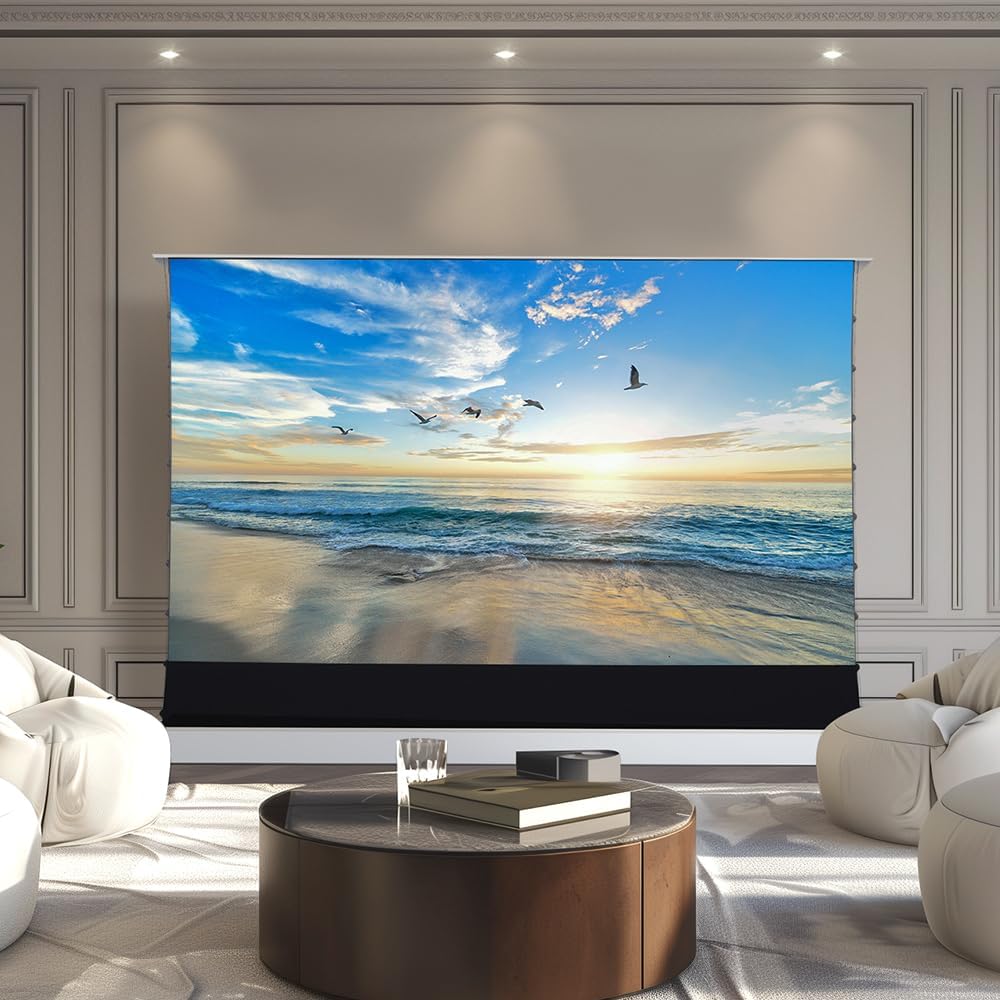
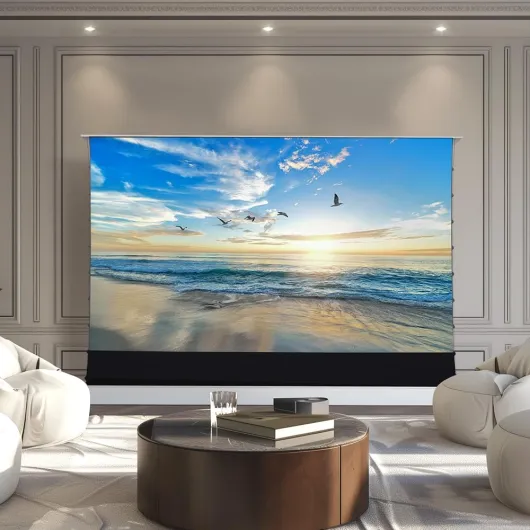
Design-wise, the screen is basically a long metal housing that sits on the floor, with the screen fabric rolling out vertically when you hit the remote. The casing itself is fairly low-profile and white, so it doesn’t scream "home cinema" when it’s closed. In my living room, it just looks like a long, clean box along the wall. It’s not pretty or stylish, but it’s neutral, which is honestly what I want from this kind of product. The top bar that rises with the screen is slim and doesn’t distract once the image is on.
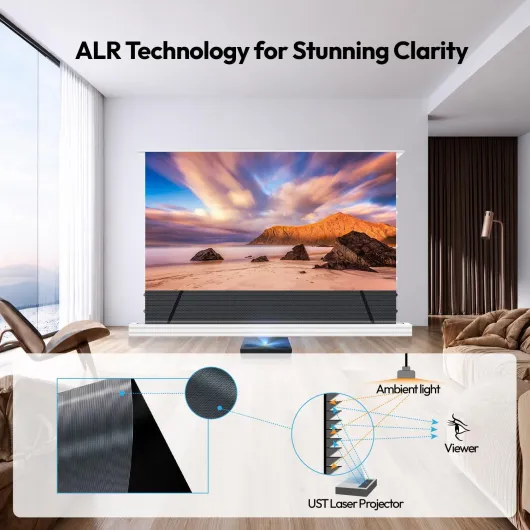
The screen surface is a dark grey/black ALR material with micro-perforations. Up close, you can see the tiny holes, but from a normal seating distance they fade away. When the projector is off, the screen looks like a big dark panel; it doesn’t reflect much stray light, which is good. When it’s on, the UST-optimized structure pushes light toward the seating area and cuts down a lot of reflections from ceiling lights and windows. There’s still some light scatter if you have a lamp right above the screen, but it’s way better than a matte white surface.
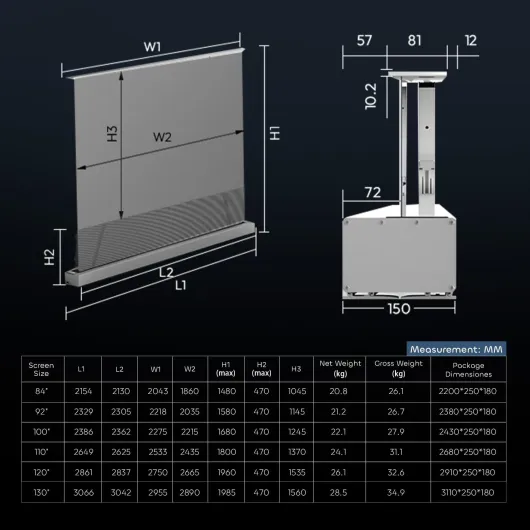
The big downside of the design is the weight. This thing is heavy. That’s good for stability, but if you want to move it around, it’s a pain. One Amazon reviewer mentioned that the three supplied wall supports weren’t strong enough to keep it upright; I agree that if you want to mount it or brace it on the wall, you should plan for extra supports or at least check your wall type. On tile or slippery floors, the base can shift a bit if bumped, so the included “carpet roll” or your own rug under it is a good idea.
Regarding operation, the motor works fine, but it’s not silent. When it goes up, you hear a mechanical scraping or rubbing noise for the first seconds, similar to what one German reviewer mentioned. It’s not ear-splitting, but it doesn’t sound premium either. Going down, the noise is less noticeable. For me, it’s not a deal-breaker because it only lasts a few seconds at the start and end of a session, but if you’re very sensitive to mechanical noises, you’ll notice it every time you raise the screen.
Build quality and long-term feel
In terms of build, the screen feels solid but not luxury-grade. The metal casing is thick enough and doesn’t flex easily, which is reassuring given the weight and the size. The mechanism that raises the screen hasn’t failed on me so far, and I’ve been using it at least once a day. The only thing that worries me a bit is the scratching or scraping noise during the upward movement. No change in 2+ weeks, so it might just be how the mechanism sounds, but it doesn’t give the impression of buttery-smooth engineering.
The screen surface itself seems robust. I’ve brushed off dust a couple of times using the included brush and a microfiber cloth, and there were no marks or scratches. Because it’s a dark ALR material, any smudge or fingerprint shows up more than on a plain white screen, so you really want to avoid touching it with greasy hands. The micro-perforation also means you probably don’t want to go crazy with wet cleaning; I’ve stuck to dry cleaning only. No waves or ripples have appeared so far, and the tension seems even across the surface.
The floor stability is decent. On my hardwood floor with a thin rug under the base, the unit doesn’t move unless you really bump into it. If you have very smooth tile, like one reviewer, the whole thing can slide a little, especially when you’re aligning the projector. It’s not going to fall over by itself, but if someone trips into it, I’d worry more about the projector than the screen. If you’re paranoid or have hyperactive kids or pets, adding extra bracing or using the included wall mounts is a smart move.
Long-term, the main question mark is the motor and the control electronics. There’s a 1-year manufacturer warranty, which is decent but not amazing for something this big and mechanical. I haven’t seen any sign of failure yet, but it’s obviously too early to say how it will behave in 3–5 years. My gut feeling: the physical structure will last, but the motor and dongle are the parts most likely to cause headaches down the line. If you plan to raise and lower it multiple times a day, every day, I’d keep that in mind.
Picture quality in real living-room conditions
The main reason to pay for an ALR screen like this is the picture quality in non-ideal light. With a decent UST projector, the improvement over a white wall is pretty clear. The first thing I noticed was the contrast: blacks look deeper and dark scenes hold up better, especially with some ambient light. The "carbon black" surface really helps cut the washed-out look you get on a white wall or basic white screen. Colors also look more punchy without cranking the projector brightness to the max.
In practice, with blinds half closed and typical evening lighting (one floor lamp and some shelf lights), the image is perfectly watchable. Text is sharp, and 4K content looks detailed. The 170° viewing angle is realistic: I can sit fairly off to the side and the picture doesn’t collapse or fade dramatically. There is a bit of brightness loss off-axis, but nothing dramatic. For family movie nights with people spread on a couch and chairs, everyone has a decent view. That matches what one of the Amazon reviewers said about more family movie nights; it genuinely makes the setup more usable for a group.
During the day with direct sunlight in the room, you still see the limits. If sunlight hits the screen directly, no ALR surface can fully fix that, and the image washes out. But with sunlight coming from the side and not directly on the screen, it stays surprisingly usable. Compared to my old setup projecting on a painted wall, I’d say the screen gives me one or two extra "brightness levels" of tolerance before the picture becomes annoying to watch. I don’t need to black out the room anymore; I just dim or turn off the lights near the screen, and that’s enough.
Regarding resolution, with a 4K UST projector the fine details are preserved. I didn’t see any obvious loss of sharpness from the micro-perforation. If you go right up to the screen, you can see the perforation pattern and some texture, but from 2.5–3 meters away it just looks like a solid, sharp image. For movies and series, it’s great. For text-heavy content like spreadsheets or browsing, it’s okay, but you do notice that this is meant for video more than desktop work. Overall, in terms of image quality, it does what it promises: solid contrast in a normal living room, and a clear upgrade over cheap white screens.
What you actually get out of the box
This is a 120-inch floor-mounted motorized screen with an ALR (Ambient Light Rejecting) surface designed specifically for ultra short throw projectors. On paper: 170° viewing angle, perforated surface for sound to pass through, and a "carbon black" ALR layer that should improve contrast. The manufacturer lists product dimensions around 2.82m wide by 2m high, which matches the footprint you need to plan for. It’s a big piece of kit, and the package that shows up at your door is long and heavy. Be ready to have at least two people to move it safely.
In the box, you get the screen unit, a remote control, an auto-sync USB dongle for the projector, some wall-mounting brackets if you want extra stability, a dust brush, gloves, and a sort of carpet roll to protect the floor and help stabilize the base. The accessories are actually more complete than I expected. The manual is technically in English, but the translation is a bit rough. It’s still usable; you just have to read some sentences twice to understand the steps. Nothing blocking, but don’t expect super clear diagrams and Ikea-level instructions.
The main promise of this screen is that you can just put it on the floor, plug it in, and avoid drilling walls or ceilings. That part is mostly true: out of the box, I had it standing and working in under 20 minutes. The longest part was fiddling with the projector position to match the screen and adjusting keystone as little as possible. If, like me, your projector sits on a low cabinet or directly on the floor, you’ll probably need to tweak the height of the screen a bit so the image fills it correctly without overshooting.
Compared to cheaper manual pull-up screens I’ve tried, this one clearly feels more like a semi-permanent home theater piece rather than a temporary solution. At the same time, it’s not as clean and rigid as a fixed-frame wall screen. You trade a bit of perfect flatness and simplicity for flexibility and the fact that you can hide it when not in use. If you want a screen you can leave out all the time and you don’t care about drilling, a fixed frame might still make more sense. If you rent or just don’t want to mess with the walls, this format is pretty practical.
Motor, auto-sync and daily usability
On the practical side, the screen is mostly effective, but there are some quirks. The basic motorized up/down with the remote works fine. Hit the button, it goes up to the last set height; hit it again, it goes down. You can stop it mid-way to adjust the visible area, which is handy if your projector isn’t at the standard height or if you want to hide the bottom edge. The remote range is decent; I can trigger it from across the room without pointing directly at the unit.
The auto-sync feature with the projector is more hit-and-miss. The idea is simple: you plug the USB dongle into your projector, and when the projector powers on, the screen rises automatically; when you turn the projector off, it retracts. In reality, it depends a lot on your projector’s USB power behavior. One German reviewer mentioned that the screen started rising as soon as the power cable was plugged in and only went down when unplugging, ignoring the actual projector on/off state. I had similar weird behavior with my laser projector: sometimes the screen would go up just by plugging in, or it wouldn’t go down when I turned the projector off but stayed in standby.
After some trial and error, I gave up on the auto-sync and just use the remote. It’s not the end of the world, but the feature feels half-baked. If you’re buying this specifically for perfect auto-sync, be ready to fiddle with USB ports or accept that it might not work the way you expect. The good news is the basic manual control is simple and reliable, so you’re not stuck if the dongle annoys you.
Day to day, the screen is easy enough to live with. It takes about 20–30 seconds to rise fully, so there’s a small wait before you can start watching, but nothing dramatic. The noise from the mechanism is there, but it’s short. Once it’s up, it stays put; I didn’t have issues with it slowly sinking or drifting. The only thing you need to watch is alignment: if your projector or the screen base moves even a few centimeters, you’ll have to redo the geometric correction or reposition things. With pets or kids around, that can be a regular chore. So it’s effective overall, but you need to accept a bit of routine tweaking if your setup isn’t fully fixed in place.
Pros
- Noticeable contrast and color improvement over a white wall or basic white screen, especially with some ambient light
- Floor-mounted, no drilling needed, easy to hide when not in use
- Large 120" size with wide viewing angle and UST-optimized ALR surface
Cons
- Motor makes scraping noises when raising, which doesn’t feel very premium
- Auto-sync USB dongle can behave unpredictably depending on the projector
- Heavy and bulky; not convenient to move and may need extra support on some floors or walls
Conclusion
Editor's rating
After living with the NothingProjector 120" motorized ALR screen for a while, my feeling is pretty clear: it’s a solid piece of kit that makes a UST projector much more practical in a normal living room, but it’s not flawless. The picture quality jump over a plain wall or basic white screen is real, especially in ambient light. Blacks look deeper, colors hold up better, and you don’t have to turn your room into a cave for every movie night. If you already invested in a 4K UST projector, this screen lets it show what it can really do.
On the flip side, you have to accept a few compromises. The unit is heavy, the motor makes some slightly rough noises when going up, and the auto-sync USB dongle is hit-or-miss depending on your projector. Setup also isn’t 100% idiot-proof: you’ll spend some time aligning projector and screen, and if anything moves, you’ll be redoing that now and then. For me, that’s acceptable, but if you want pure plug-and-play, a big TV will still be less hassle.
I’d recommend this screen to people who: use a UST projector as a TV replacement, don’t want to drill walls, and care more about good contrast and convenience than absolute silence or perfect automation. If you only watch in a dark room, are super sensitive to mechanical noises, or you’re on a tight budget, you can clearly get by with a cheaper solution. Overall, it’s a good, practical upgrade that gets the job done and fits nicely into a non-dedicated living room setup.