
Summary
Editor's rating
Is the BenQ W2710i worth the money?
Design and noise: living-room friendly, but you’ll hear it
Build, lamp life and how it feels after a few weeks
Image quality and HDR: strong 4K, but it needs the right conditions
What you actually get with the BenQ W2710i
Everyday use: from setup headaches to actual movie nights
Pros
- Sharp and detailed 4K image with good colour accuracy out of the box
- Android TV with Netflix and major apps built in, no extra box required
- Lens shift, 2D keystone and 1.3x zoom make placement easier in normal rooms
Cons
- Fan noise and optional dynamic iris clicking can bother sensitive users
- Average black levels and contrast, especially in rooms with ambient light
- Manual focus and relatively basic keystone controls for the price

Specifications
View full product page →| Brand | BenQ |
A 4K projector that finally made me use the wall instead of the TV
I’ve been using the BenQ W2710i at home for a few weeks, mostly for films, TV shows and a bit of sports. Before this one, I had an older 1080p projector that I only turned on for big movie nights because the image wasn’t sharp enough for everyday use. With this model, I actually started choosing the projector over my TV in the evening, which is already a good sign. I’m projecting around 100–110 inches on a plain wall, no special screen, lights off or very dim lighting.
Right away, the main thing that stands out is the sharpness and detail in 4K. On decent 4K content (Netflix, Prime, Disney+), you clearly see the jump from 1080p. Text is clean, faces are detailed, and you don’t get that slightly fuzzy look you often see on cheaper projectors. If you sit reasonably close, it really does feel like a giant TV rather than a washed-out cinema screen.
That said, it’s not perfect. It’s still a DLP projector with a lamp, so you have fan noise, some people might see rainbow effects, and you don’t get the inky blacks of an OLED TV. In bright rooms, the picture is just “ok”; you really need to dim the lights to enjoy it properly. Also, the Android TV dongle is handy but not the smoothest or quietest solution I’ve seen, especially with that dynamic iris clicking sound if you leave it on.
Overall, my feeling is: very solid for home cinema, especially if you’re upgrading from an older 1080p projector. If you expect it to replace a high-end TV in a bright living room, you’ll be a bit disappointed. If what you want is a big, sharp, 4K image in a dark room for films and series, then it does the job really well without feeling like you’re paying only for the logo.
Is the BenQ W2710i worth the money?
On value for money, the W2710i sits in that mid to upper mid-range zone. It’s not a budget projector, but it’s also not at the crazy high-end price bracket. For what you pay, you get a proper 4K image, good colour coverage, HDR support, Android TV with Netflix, and a lens that’s flexible enough for most living rooms. If you’re upgrading from an old 1080p beamer, the jump in image quality alone is enough to justify the expense if you actually use it often.
Where the value becomes more debatable is if you compare it to cheaper 4K DLP models or to some short-throw/laser options. There are cheaper 4K projectors that can give you a similar level of sharpness, but often they cut corners on colour accuracy, HDR handling, or build quality. On the other side, there are laser projectors that cost more but bring better brightness, better contrast, and basically no lamp replacements. So the W2710i is kind of in the middle: better calibrated and more complete than entry-level models, but without the perks of the more expensive laser units.
For someone who mainly wants a solid home cinema setup (dark room, 100–120 inch screen, films and series several times a week), I think the price is fair. The factory calibration, the included Android TV, and the overall image quality make it feel like a complete package. If you only watch the occasional film once a month, it’s probably overkill and you might be happier with a cheaper 1080p or a smaller 4K TV. Also, if you are extremely picky about black levels and contrast, you might be better off saving longer for a higher-end model or a good OLED TV.
In short: good value if you use it a lot and you care about picture quality, more questionable if you just want a casual big screen for the odd football match. There’s better out there for pure performance if you spend more, and there are cheaper options if you accept compromises. The W2710i sits in that comfortable middle where you get a lot of features and a strong image without feeling like you’re paying for pure marketing.
Design and noise: living-room friendly, but you’ll hear it
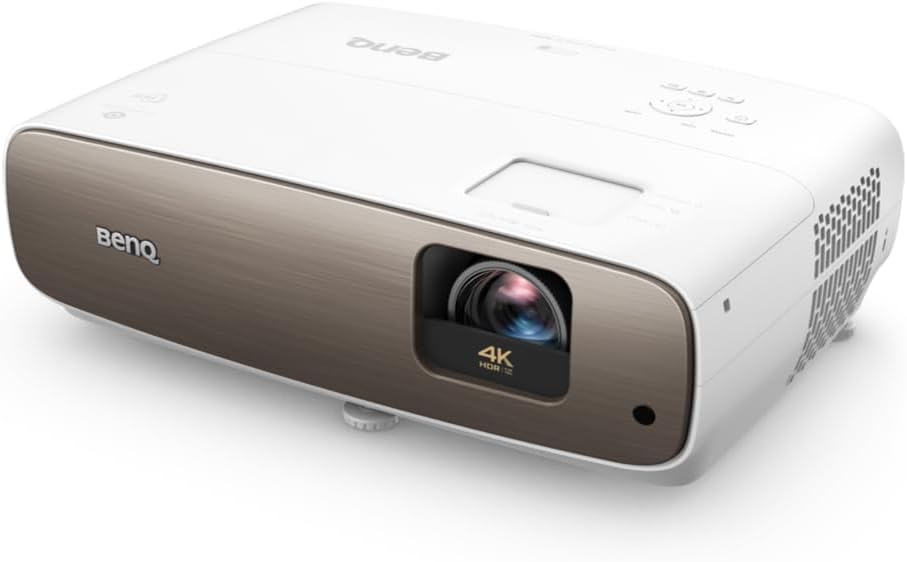
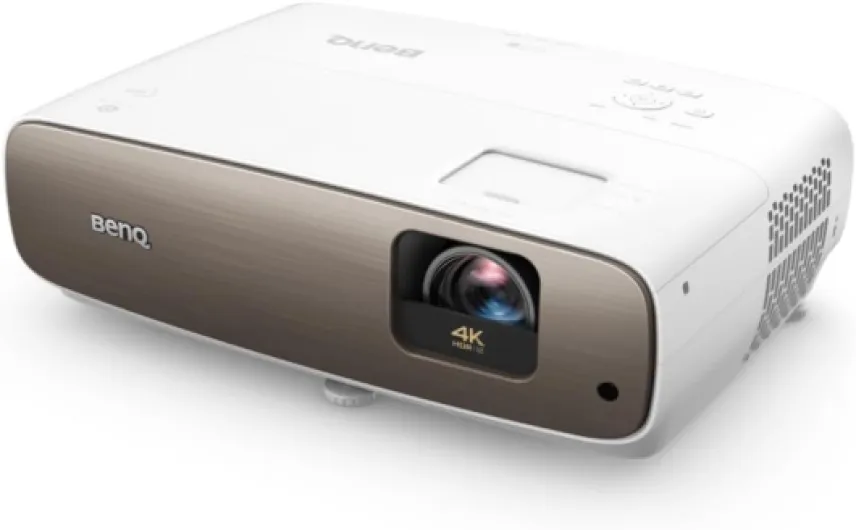
Design-wise, the W2710i is pretty standard for a home cinema projector. It’s a white rectangular box with the lens on one side and vents on the front and sides. It doesn’t scream “premium object”, but it doesn’t look cheap either. It blends in fine in a living room, especially if you leave it on a shelf or a low table. The build feels solid enough; nothing creaks when you move it, and the adjustment wheels for focus and zoom have a bit of resistance, which I prefer over something too loose.
The controls are simple: focus and zoom are manual rings on the lens, and there’s a small set of buttons on top if you misplace the remote. Personally, I would have liked motorized focus or at least some way to adjust focus from the remote, especially if you move the projector from time to time. As it is, you have to get up, lean over, and tweak it manually. It’s not the end of the world, but at this price I expected something a bit more modern on that front.
On the noise side, you have two things: fan noise and the optional dynamic iris clicking. The fan is always there. In Eco mode, it’s noticeable but not crazy; once the film starts and volume goes up, I forget it. In normal mode, you do hear it more, especially in quiet scenes. If you’re very sensitive to noise, you’ll probably want to sit a few meters away or place it in a spot where the sound is less direct. The iris clicking only happens when that feature is on and seems to be more obvious when using the Android TV dongle. I ended up turning it off in the menu, and honestly I didn’t feel like I lost much in terms of picture.
Overall, the design is practical more than flashy. It’s easy enough to place, it doesn’t look ugly in a living room, but it’s not some sleek design piece either. For me that’s fine: I care more about image quality and ease of use. Just be aware that this is still a classic lamp projector: there’s heat, there’s fan noise, and you want to give it space to breathe, not jam it in a tiny closed cabinet.
Build, lamp life and how it feels after a few weeks
On durability, I can’t give you a 5-year story, but I can share what stands out after several weeks and what I know from similar BenQ models. The unit feels solid: no loose panels, the lens mechanism feels tight, and the casing doesn’t flex when you move it. BenQ gives a 2-year manufacturer warranty, which is pretty standard for this type of product. It doesn’t scream “tank-like”, but I don’t feel like I have to baby it either.
The weak point of any lamp projector is, obviously, the lamp. BenQ doesn’t shout the lamp life everywhere in this listing, but typically for this kind of 245 W lamp you’re looking at a few thousand hours in normal mode and more in Eco. In real life, if you watch a couple of hours every evening and keep it in Eco or SmartEco, you’ll probably get several years before needing to replace the lamp. Replacement lamps are not cheap, though, so it’s something to keep in mind in the total cost of ownership.
Heat management seems decent. After long sessions (2–3 hours), the projector is warm but not insanely hot. The fans ramp up a bit, but nothing alarming. Just make sure you don’t block the vents and you give it some space around it. Dust can also be an issue over time with projectors; so far, I haven’t seen any dust blobs or weird spots on the image, but that’s something that usually shows up after longer use. At least the casing design doesn’t feel like a dust magnet.
BenQ also mentions security updates for the Android TV part until end of 2026. That’s a small but nice detail: it means the streaming side won’t be obsolete or insecure too quickly. Worst case, if the dongle ages badly, you can always plug in another streaming device via HDMI and ignore it. Overall, I’d say durability looks decent: solid enough build, standard lamp constraints, and no obvious design flaws that scream early failure, but you still have to accept that this is a lamp-based device that will need a lamp change at some point.
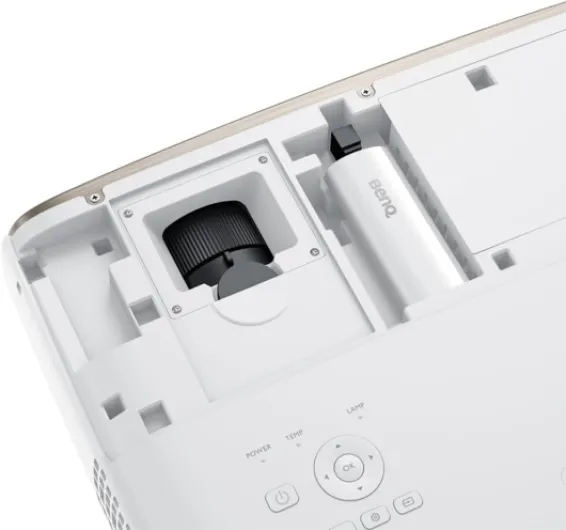
Image quality and HDR: strong 4K, but it needs the right conditions
This is the part that matters most: how it looks on the wall. In 4K, with decent source quality, the W2710i is genuinely sharp. You really get those 8.3 million pixels. On Netflix in 4K HDR or on a UHD Blu-ray, small details like textures on clothes, hair, or text in the background are very clear. Compared to my old 1080p BenQ, the jump is not subtle. At around 100–110 inches, it feels closer to a big TV than a “soft” projector image, as long as you sit at a reasonable distance.
Colours are also pretty solid out of the box. The factory calibration does help: skin tones don’t look too weird, and SDR content in the Cinema mode looks balanced. HDR is where you’ll probably spend more time tweaking. The projector supports HDR10, HDR10+ and HLG, and it has BenQ’s HDR-PRO with tone mapping. In practice, HDR content has more punch and better highlights, but you need to play with the settings (brightness, contrast, HDR mode) to avoid crushed blacks or blown-out highlights. It’s not plug-and-play perfect; you have to tune it for your room.
Contrast and black levels are where you see the limits compared to a good TV. In a fully dark room, black scenes look decent but not deep black. It’s more of a dark grey. If you have any ambient light, the image loses depth quite fast. This is normal for a lamp-based DLP projector, but if you come from an OLED TV, you’ll notice it. For bright content like sports, animation, or daytime scenes, it looks great; for very dark films, you’ll sometimes wish the blacks were deeper.
Motion handling is fine for films and series. I didn’t see major judder issues at normal viewing distances. For sports, it’s ok, but I wouldn’t call it a reference. Input lag is not really advertised as a big gaming feature, and you feel that: it’s playable for casual console gaming, but if you’re a competitive gamer, there are better gaming projectors and TVs. Overall, in home cinema conditions (dark room, 100–120 inch screen, 4K source), the performance is very satisfying. Outside that ideal scenario, it’s good but not mind-blowing, so set your expectations accordingly.
What you actually get with the BenQ W2710i
The W2710i is sold as a True 4K home cinema projector with Android TV built in (via a small BenQ dongle they include in the box). On paper you get 4K UHD (3840 x 2160) with HDR10, HDR10+ and HLG support, 95% DCI-P3 and 100% Rec.709 coverage, plus a vertical lens shift, 2D keystone and 1.3x zoom. In simple terms: it’s meant to give you proper 4K resolution, good colours, and enough flexibility to set it up in a normal living room without needing a super precise ceiling mount.
In the box I had the projector, the Android TV dongle, a remote, power cable and a quick start guide. No HDMI cable, no fancy extras. Setup is pretty straightforward: you slide the dongle into a compartment, connect HDMI and power, and you’re basically done. The menu is clear enough, and you can get an image on the wall in a few minutes. Fine-tuning takes longer, especially if you start playing with HDR modes, colour profiles and keystone, but you can already get something watchable out of the box.
The Android TV part works like a standard streaming stick: Netflix, Prime Video, YouTube, Disney+, etc. Apps open reasonably fast, but it’s not lightning quick. It’s fine for normal living-room use, but if you’re used to a recent Apple TV or a high-end TV OS, you’ll feel a bit of lag here and there. One thing to flag: some users (me included) hear a clicking / crackling noise when using the dongle because of the dynamic iris. You can disable the iris in the menu, and the noise goes away, but you lose that automatic contrast adjustment.
On a more practical note, the projector weighs about 4.2 kg and is not tiny, but still manageable if you want to store it and take it out only for movie nights. It supports up to 300 inches, but honestly beyond 120–130 inches in a normal room, you’re going to start seeing the limits in brightness and contrast. For me the sweet spot is around 100–120 inches, lights off, and sitting at roughly 3–4 meters. In that range, the W2710i makes sense and actually delivers what the spec sheet promises.
Everyday use: from setup headaches to actual movie nights
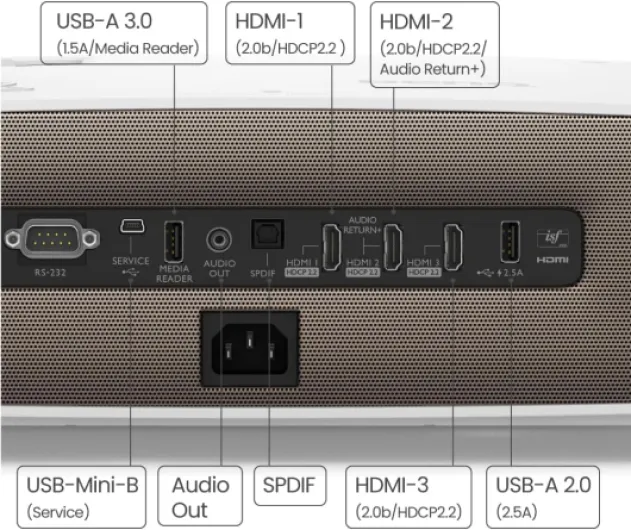
In terms of effectiveness for daily use, I’d say the W2710i does its job well once you get through the first setup and tweaking phase. The initial installation is easy physically, but the fine tuning can be a bit of a rabbit hole. If you’re plugging it into an AV receiver (Denon, Yamaha, etc.) with eARC, HDR, and multiple sources, expect to spend a few evenings testing cables, HDMI ports and settings. Once I had everything sorted, though, I didn’t have to touch it again.
The Android TV dongle is handy if you don’t already have a box or console. You turn on the projector, and you’re directly in Netflix, Prime, Disney+ or YouTube. Wi-Fi streaming in 4K worked fine for me, no big buffering issues. The remote is simple and controls both the projector and the dongle. The only annoying part is that the interface is a bit sluggish compared to a modern streaming stick, and you sometimes feel a tiny delay when navigating. It’s usable, just not ultra snappy.
As for sound, the built-in speakers are better than I expected. For a week I used only the internal speakers, and for casual viewing it’s completely fine: dialogues are clear and volume is enough for a medium-sized room. But let’s be honest: for a projector in this price range, you’ll probably want at least a soundbar or, ideally, a 5.1 system. I switched to using HDMI eARC with my receiver, and the difference is huge. If you already have a home cinema setup, the projector integrates without drama once you’ve sorted the HDMI handshakes.
Day to day, the thing I liked is that I actually used it more than I thought. Before, my old projector was for “special occasions”. With this one, I caught myself launching Netflix on it even for a random episode in the evening, just because the image is sharp and the size is addictive. The main limit is still light: if you can’t darken the room, it loses a lot of its appeal. So it’s effective as a home cinema tool, less so as a TV replacement in a bright living room.
Pros
- Sharp and detailed 4K image with good colour accuracy out of the box
- Android TV with Netflix and major apps built in, no extra box required
- Lens shift, 2D keystone and 1.3x zoom make placement easier in normal rooms
Cons
- Fan noise and optional dynamic iris clicking can bother sensitive users
- Average black levels and contrast, especially in rooms with ambient light
- Manual focus and relatively basic keystone controls for the price
Conclusion
Editor's rating
The BenQ W2710i is a very capable 4K home cinema projector that does the important things well: sharp 4K image, decent HDR once tuned, good colours out of the box, and a built-in Android TV dongle that covers Netflix and the usual streaming apps. In a dark room at around 100–120 inches, it delivers a picture that feels a lot closer to a huge TV than to the washed-out projectors many people are used to. If you’re upgrading from an older 1080p model, the difference is clear and quite satisfying.
It’s not perfect, though. Fan noise is present, the dynamic iris can click if left on, and black levels are only average, especially if you have ambient light. The Android TV experience is handy but not super fast, and some people might wish for motorized focus or better keystone controls at this price. You also have to factor in lamp life and the cost of replacement down the line, which is normal for this type of projector but easy to forget when buying.
I’d recommend the W2710i to people who actually plan to use a projector several times a week, have at least some control over room light, and care more about a big, sharp movie experience than about having the deepest blacks on earth. If your living room is always bright, you’re very sensitive to fan noise, or you only watch the occasional film, you might be better off with a good TV or a cheaper projector. For regular home cinema fans who want a solid 4K machine without going into crazy budgets, it’s a pretty solid choice, with a few quirks you can live with.