
Summary
Editor's rating
Value for money: who should actually buy this
Design & build: looks premium, not really compact
Build quality, LED lifespan & some reliability concerns
Image & sound performance: good hardware, weak auto features
What this projector actually offers on paper
Smart features, wireless casting & everyday usability
Pros
- Sharp 4K image with good colors in a dark room
- Short‑throw lens lets you get a big image from close distance
- Harman Kardon speakers are genuinely good for a projector
Cons
- Dated, laggy smart interface and unreliable app support
- Auto‑focus and auto‑keystone often perform poorly and need manual correction
- Brightness and fan noise limit use in bright rooms and for some users

Specifications
View full product page →| Brand | ViewSonic |
A stylish short-throw projector with a lot of quirks
I’ve been using the ViewSonic X11-4K at home for a couple of weeks as my main living-room projector. I replaced a basic 1080p BenQ lamp projector with this one, hoping to get better 4K image quality, quieter operation, and a more modern “smart” experience. On paper, it checks a lot of boxes: 4K, HDR, short throw, LED light source rated for 30,000 hours, Harman Kardon speakers, Wi‑Fi, Bluetooth… the whole checklist. In practice, it’s a mixed bag.
The first impression is positive: it looks premium, feels solid, and the built‑in speakers are honestly the first thing that made me go “okay, that’s actually good”. Out of the box, setup is simple: plug it in, point it at a wall, it does its auto‑focus and keystone, and you’re basically ready to watch something in a few minutes. But once you start using it daily, the small annoyances begin to stack up.
Auto‑focus and auto‑keystone are supposed to make life easy, but they’re hit‑and‑miss. Several Amazon reviews mention this and I had the same feeling: sometimes it nails it, sometimes you end up fiddling with the settings because the corners are soft or the image is skewed. That’s where you notice that the software interface is dated and a bit laggy, more like a cheap Android TV box than a 2023/2024 projector.
So overall, this is not a disaster, but it’s far from perfect. The X11‑4K is good if you focus on the hardware (image engine + speakers + short throw) and use your own external streamer or console. If you’re buying it as a fully “smart” all‑in‑one cinema box that handles everything smoothly, you’re probably going to be disappointed by the software, the noise, and some quirks like AirPlay and the auto features.
Value for money: who should actually buy this
Given the current market, the X11‑4K sits in an awkward spot. It’s not cheap, and when you look at competing 4K projectors (including some laser models and brighter lamp units), you start asking what you’re really paying for. In my opinion, you’re paying for three things: the short‑throw convenience, the LED long‑life light source, and the genuinely good built‑in speakers. If those three points matter to you, the price can be justified. If you don’t care about short throw and you already have a sound system, there are better value options out there.
The Amazon average rating of 3.4/5 matches my feeling: it’s not a bad product, but it doesn’t feel like strong value, especially when the software is this rough. You end up buying a “smart projector” and then using it like a dumb projector plus a streaming stick. So you’re basically paying for features you won’t really use. Add to that the brightness limitation (1,000 lumens) and the noisy operation that several users complain about, and the value proposition drops if you plan to use it in a bright living room or are sensitive to fan noise.
Where it does make sense is for a specific type of buyer: someone who wants a short‑throw 4K LED unit mainly for movie nights in a dim or dark room, wants decent built‑in sound, and doesn’t mind plugging in an external device for streaming. In that scenario, it’s a nice all‑in‑one box: place it close to the wall, big picture, good audio, long life, and you’re done. If you fall outside that use case (hardcore gamer, daytime TV replacement, or someone who wants perfect wireless casting), the value just isn’t there.
So I’d rate the value as average. Not a rip‑off, but not a bargain either. You’re trading software headaches and some compromises for convenience in placement and sound. If you can find it at a good discount or second‑hand in good condition (and you check the hours used), it becomes easier to recommend. At full price, I’d think carefully about your actual usage before pulling the trigger.
Design & build: looks premium, not really compact
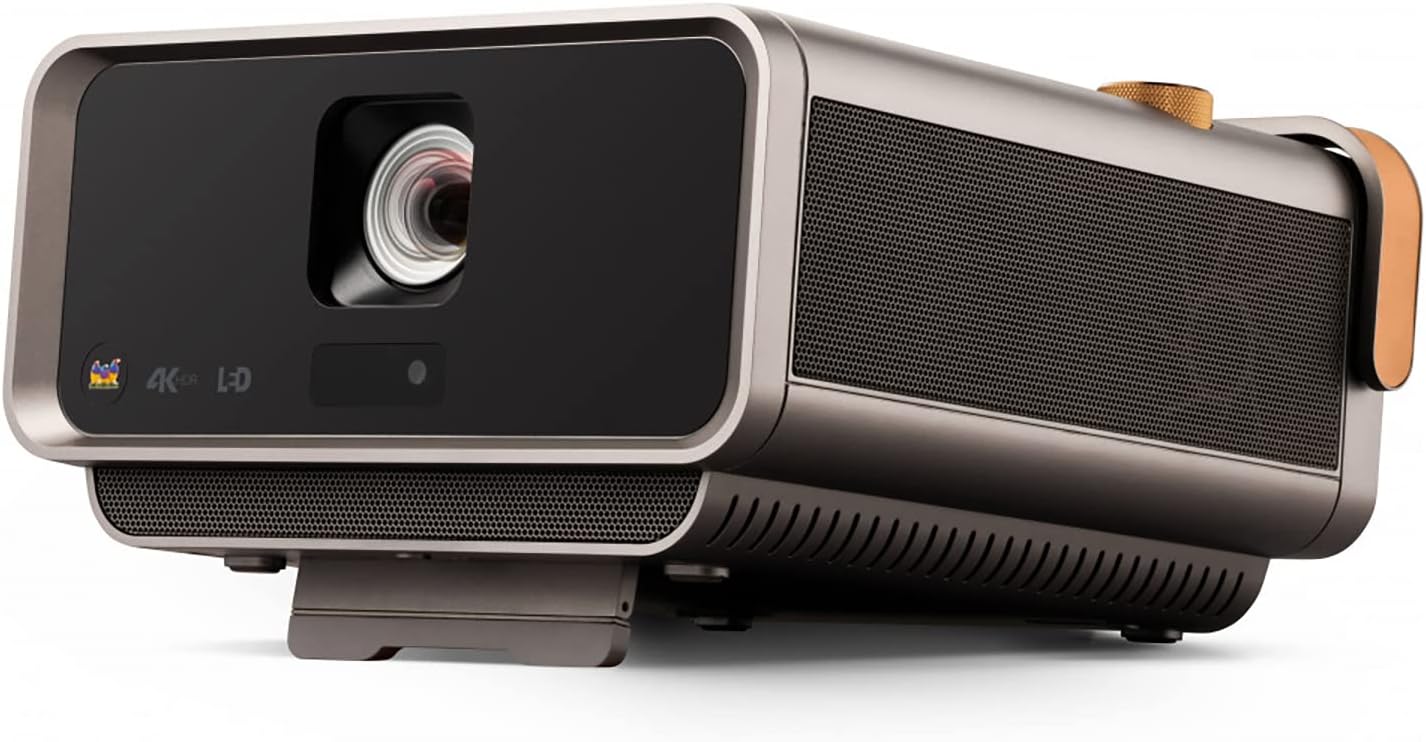
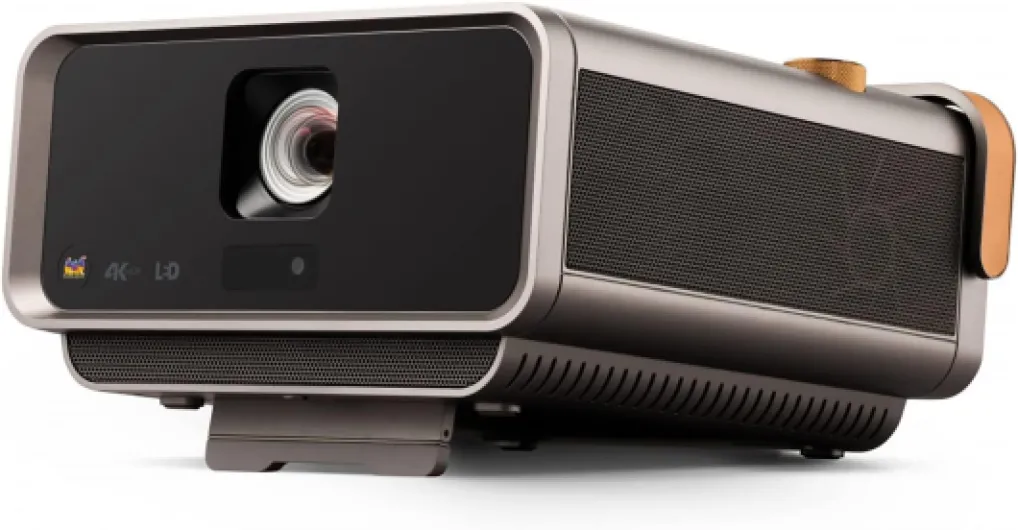
Design-wise, I actually like the X11‑4K quite a bit. It has a boxy, slightly retro look, with a leather‑style handle on top that makes it easy to grab and move. On a TV stand or coffee table, it looks like a serious bit of kit, not a toy. The materials feel solid, and nothing creaks when you pick it up. The weight (around 4.5 kg) gives a sturdy impression, but it also means you won’t be casually throwing it in a backpack. It’s more of a “move it between rooms” device than a travel projector.
The short‑throw lens is on the front with a protective housing, and the ventilation grilles are on the sides. You really notice the engineering there: lots of airflow openings, which explains some of the fan noise people complain about in the reviews. There are rubber feet under the body, so it sits stable on a table without sliding. The handle is useful but doesn’t make it magically light. If you’re thinking of ceiling mounting it, the design is okay for that too, but it’s clearly oriented to tabletop use.
The remote is actually one of the nicer parts of the design. It’s responsive, the buttons are clear, and it feels better than the cheap remotes you often get with budget projectors. You’ll use it a lot because the interface is not super intuitive, so at least it doesn’t get in the way. I never had issues with lag from the remote itself; the lag comes from the projector’s software more than the controller.
Overall, I’d say the design and build are one of the strong points: it looks and feels like a premium home cinema product, not a plastic toy. Just don’t overestimate the “portable” part. If you want something you can throw in a bag and use in random places, this is too big and too heavy. If you just want a good‑looking unit that lives in your living room and occasionally moves to the bedroom, it works well.
Build quality, LED lifespan & some reliability concerns
On paper, the X11‑4K looks good in terms of durability. The LED light source is rated for 30,000 hours, which basically means “don’t worry about the lamp” for the average user. Even if you watch four hours a day, that gives you many years of use. LED also means it turns on and off faster than traditional lamp projectors, and you don’t get that fragile lamp feeling. From a pure light‑engine standpoint, it’s a safe bet compared to older lamp‑based units.
Build quality also feels solid. The casing is rigid, the handle is strong, and buttons and ports don’t feel loose. It doesn’t give the impression it will fall apart easily. It’s not a rugged device, but for normal home use (moving it between rooms, putting it in a cupboard when not in use), it feels robust enough. Weight helps here; it’s not hollow, and that usually means fewer cheap plastic parts inside.
However, there are some reliability red flags on the software and refurb side. One verified buyer received a “like new” unit that already had around 500 hours of use logged, which is pretty bad if you’re expecting almost new gear. That’s more on the seller than the product itself, but it’s worth checking the hours if you buy it renewed or second‑hand. Also, repeated complaints about auto‑focus and auto‑keystone not working properly (both on this model and the previous X10‑4K) suggest these features are not just buggy on one unit; they seem to be a weak point of the whole line.
Long term, I’d trust the light source and physical build more than the software layer. If ViewSonic stops updating the smart platform (and it already feels old), you’ll be fine as long as you use external sources. But if you were hoping for years of smooth built‑in apps and casting, that’s unlikely. So durability is strong on the hardware side, questionable on the software side. I’d rate it decent overall, with the caveat that you basically future‑proof it by ignoring the “smart” part and just treating it as a dumb display.
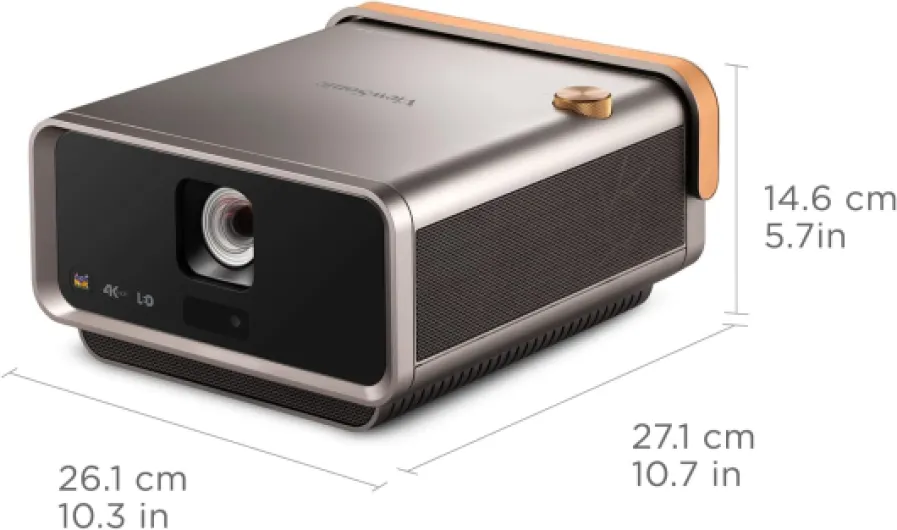
Image & sound performance: good hardware, weak auto features
On the image side, when everything is set up correctly, the X11‑4K looks pretty solid. The 4K resolution is sharp, text and UI elements are clear, and movies in 4K HDR look detailed. Colors are vivid thanks to the wide color gamut, sometimes a bit too vivid out of the box, but you can tweak that in the settings. The big limitation is the 1,000 lumen brightness. In a dark room, it’s fine and quite enjoyable. In a room with daylight or strong ambient light, it starts to look washed out quickly. If you were hoping to use it like a TV during the day in a bright living room, you’ll probably be disappointed.
The main pain points are the automatic features. Auto‑focus is inconsistent. Several users mention it never really focuses right for them, and I had similar behaviour: it hunts, pretends it’s done, but the corners are still soft. You can fix it manually, but that kind of defeats the purpose of having auto‑focus. Same for auto keystone: it sometimes distorts the image more than it helps, especially at the corners. One user even said it made the corners worse, and I can see why. If you can place the projector straight in front of the wall at the right height and avoid heavy keystone corrections, you’ll get a much better image.
For gaming, input lag is noticeable. It’s okay for casual console games, but if you’re into fast shooters or anything competitive, the delay is not great. The Amazon review mentioning “definitely noticeable and not satisfactory” is fair. For movies and series, it’s not a big issue, but I wouldn’t buy this as a main gaming display. Motion handling with frame interpolation is okay, but again, not mind‑blowing. It’s serviceable, not more.
On the audio side, the Harman Kardon speakers are genuinely good for a projector. Several people point this out, and I agree: this is one of the best integrated sound systems I’ve heard on a projector. Dialogue is clear, there’s some bass, and for a normal living room it’s totally usable without an external soundbar. You can still hook it up to a better system, but for casual viewing, you don’t really need to. So in terms of raw performance: good image if the room is dark and you set it up right, and very solid sound. The weak part is the auto features and the brightness ceiling.
What this projector actually offers on paper
The ViewSonic X11‑4K is a short‑throw LED projector with a native 4K resolution (3840 x 2160). It uses 3rd‑generation LED tech with a claimed 30,000‑hour lifespan, so in theory you don’t have to worry about lamp changes. Brightness is rated around 1,000 lumens, which is on the low side compared to some lamp or laser models, but fairly normal for an LED unit. It can project from 30 to 200 inches, and thanks to the 0.8 short‑throw ratio you can get a big image from quite close to the wall.
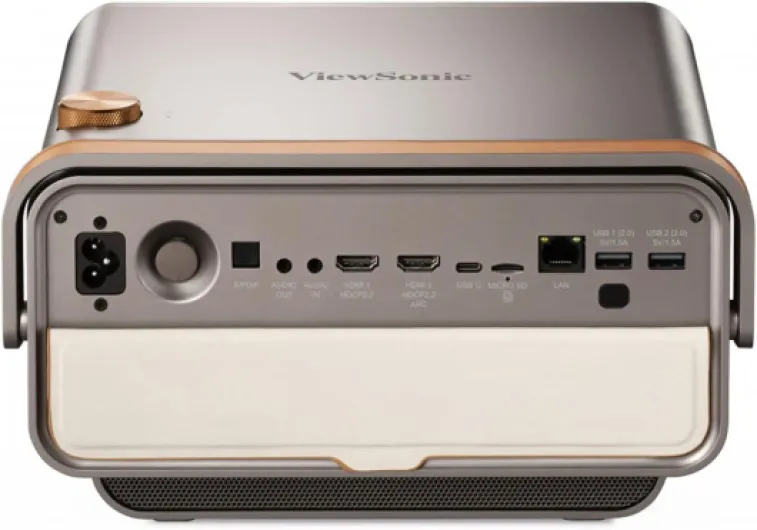
It’s clearly aimed at home cinema and gaming: it supports HDR, has a wide color gamut (ViewSonic claims 125% Rec.709), and includes features like frame interpolation and 3D Blu‑ray support. Connectivity is decent: HDMI, USB, microSD, Ethernet, Wi‑Fi (802.11 ac/b/g/n), and Bluetooth. You also get some “smart” features like apps and wireless casting (including AirPlay, at least in theory). The speakers are branded Harman Kardon, and they’re one of the main selling points in the marketing.
Physically, it’s not tiny. At around 4.5 kg and roughly 27 x 15 x 26 cm, calling it “portable” is a bit optimistic. You can move it from room to room or take it to a friend’s place, but it’s not a backpack toy. There’s no internal battery either, so it’s portable in the sense of “tabletop and easy to move”, not “use it in the garden without power”. That’s important to understand before buying.
Compared to classic 1080p lamp projectors in the same price range, what you’re really paying for here is: 4K resolution, LED long life, short‑throw convenience, and built‑in audio that you can actually live with. Where it’s weaker is the smart interface, the brightness for daytime use, and some of the automatic image correction features that sound good on paper but are not very reliable according to both my use and several Amazon reviews.
Smart features, wireless casting & everyday usability
Where this projector really stumbles is the “smart” side and everyday usability. The interface is based on an older Android‑type system (often referred to as Optoma/Optoid style in some reviews), and it feels dated. Menus are not very intuitive, navigation can be laggy, and the app store situation is mediocre. A couple of Amazon reviewers mention that Android apps simply don’t work well, and my experience was similar: some apps run, some crash, some feel half‑baked. I quickly gave up and plugged in an external streaming stick, which solved most of the headaches.
AirPlay support is another weak spot. One user with an iPhone 15 said it just hung on a loading screen and never connected. I tried casting from an iPhone and an iPad, and it was hit‑and‑miss: sometimes it connected, sometimes it just stayed stuck. For a device marketed as portable and convenient, that’s pretty frustrating. If wireless casting is important for you (especially from Apple devices), I would not rely on this projector alone. Plan to use an Apple TV or a similar box instead.
Keystone and focus automation, which are supposed to make the projector “easy”, end up being another source of friction. Several reviews mention the auto‑focus never really works and the auto keystone making corners worse. I had the same feeling: the more I let the projector decide, the more time I spent correcting afterwards. After a while, I just turned most of the auto stuff off and treated it like a normal short‑throw projector: position it correctly, set manual focus once, and don’t touch it.
In daily use, it’s fine if you use it in a fairly fixed setup with an external streaming device and don’t rely on the built‑in smart features. As a “plug it anywhere and stream directly from the projector with perfect wireless casting and smart apps”, it doesn’t really deliver. So in terms of effectiveness: the hardware can do the job, but the software layer gets in the way. If you’re okay adding a Fire TV, Apple TV, or console and ignoring most of the internal software, the experience improves a lot.
Pros
- Sharp 4K image with good colors in a dark room
- Short‑throw lens lets you get a big image from close distance
- Harman Kardon speakers are genuinely good for a projector
Cons
- Dated, laggy smart interface and unreliable app support
- Auto‑focus and auto‑keystone often perform poorly and need manual correction
- Brightness and fan noise limit use in bright rooms and for some users
Conclusion
Editor's rating
After living with the ViewSonic X11‑4K, my feeling is pretty clear: it’s a solid short‑throw 4K LED projector with very good built‑in sound, wrapped in clunky software and unreliable auto features. If you judge it mainly on the hardware—image engine, LED light source, and Harman Kardon speakers—it does the job. In a dark room, movies and series look sharp and colorful, and the sound is good enough that you don’t urgently need a soundbar. The short‑throw lens is genuinely practical if you don’t have much space between the wall and your TV stand.
Where it falls flat is everything “smart”: the interface feels old and laggy, Android apps are hit‑and‑miss, AirPlay is unreliable, and auto‑focus/auto‑keystone are more of a hassle than a help. Add in modest brightness and noticeable fan noise, and it clearly isn’t an all‑round solution for every situation. I’d recommend it to someone who wants a fixed or semi‑fixed home cinema setup in a dim room, is okay using an external streamer or console, and values the short‑throw + good speakers combo. If you want a bright living‑room TV replacement, a clean smart TV interface, or a low‑latency gaming projector, you should skip this and look elsewhere.