
Summary
Editor's rating
Is the Hisense C1TUK worth the money?
Compact cube design that’s easy to move around
Build quality, noise and how it holds up over time
Image quality, brightness and smart features in real life
What you actually get with the Hisense C1TUK
AutoMagic adjustments, autofocus and daily usability
Pros
- Sharp, detailed 4K image with strong color performance from the triple-laser system
- Built-in VIDAA OS with Netflix, Prime Video, YouTube and others, so no mandatory external streamer
- Decent JBL speakers and long-life laser light source (rated 25,000 hours) make it easy to live with
Cons
- Brightness (1600 lumens) is only average for use in bright rooms or daytime viewing
- Auto alignment and obstacle avoidance are helpful but not always precise, often requiring manual tweaks

Specifications
View full product page →| Brand | Hisense |
A living‑room cinema in a shoebox-sized projector
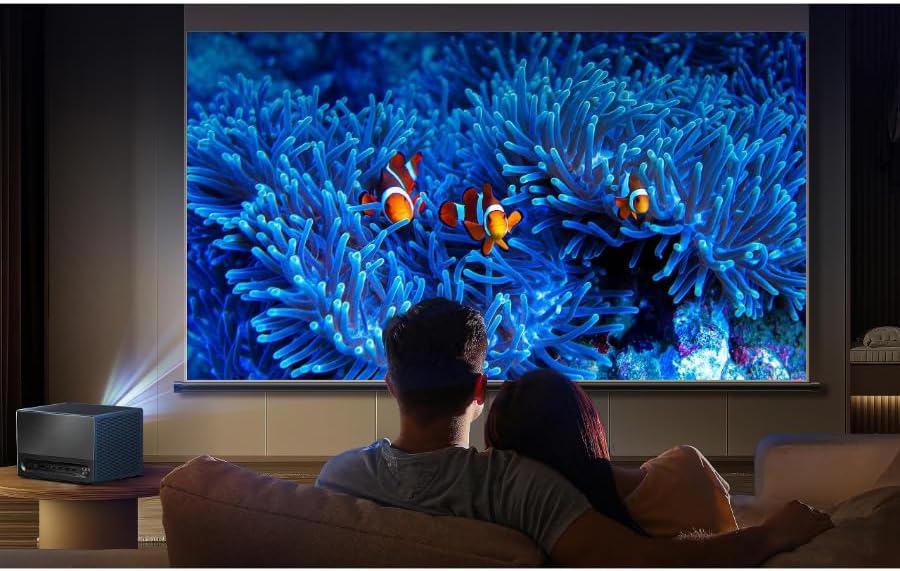
I’ve been using the Hisense 4K Trichroma Mini Laser Projector C1TUK for a while now in my living room, mainly for movies, football and some PS5. I’m not an installer or a home-cinema geek, just someone who was fed up with watching films on a normal TV and wanted a big screen without drilling half the house. This little cube looked like a good compromise: proper 4K, laser, built-in apps, and not as huge or heavy as the giant projectors you see in dedicated cinema rooms.
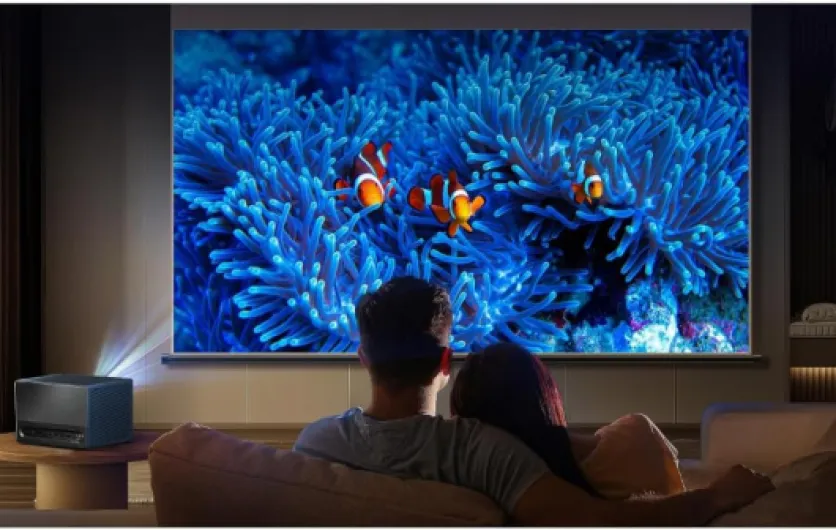
The first thing that struck me is how small the unit is compared to what it throws on the wall. You drop it on a coffee table, plug it in, and you’ve got a 100–120 inch picture pretty quickly. I’ve used cheaper LED projectors before, and they always looked washed out or noisy. Here, the image actually looks like a real TV in terms of sharpness, just much bigger. It’s still a projector, so it has limits, but the jump in quality compared to budget models is obvious.
Over time I started to notice where it shines and where it’s just okay. It’s clearly built for people who want a serious image but don’t want to mess around with ceiling mounts, calibration discs, and darkened bat caves every time. The built-in VIDAA system with Netflix, Prime Video, YouTube and the rest is handy, but not perfect. Same with the auto alignment – it works, but I wouldn’t rely on it 100% if you’re picky about geometry.
If you’re wondering whether this can replace a TV, my honest take is: it depends how you watch. For evening movies and sports, it’s great. For daytime casual TV with a bright room, it’s decent but not magic. I’ll go into the details, but overall it’s a pretty solid home cinema option if you understand its strengths and its limits and you’re not expecting miracles in full daylight.
Is the Hisense C1TUK worth the money?
Price-wise, the Hisense C1TUK sits above the cheap 1080p LED projectors and below the super high-end home cinema monsters. For what it offers – real 4K resolution, triple-laser, Dolby Vision, Dolby Atmos support, built-in JBL speakers and a complete smart OS – I’d say the value is pretty good, as long as you actually use those features. If you just want something to throw the occasional football match on a wall a few times a year, this is probably overkill and you could save money with a simpler 1080p model.
Where it makes sense is if you want a serious home cinema experience without building a dedicated room. Compared to buying a 100+ inch TV, the projector route is still cheaper and more flexible. You can go from 65 inches up to 120–150 inches depending on your space, and you don’t have a massive black rectangle on the wall when it’s off. The downside, of course, is the need to manage room light and the fact that it’s not as convenient as turning on a TV for quick daytime viewing.
Against other projectors, it holds up well in terms of picture quality and features. There are cheaper 4K DLP models, but most of them don’t have triple-laser or as strong color performance, and a lot don’t include a decent smart platform or speakers. You’d end up adding a streaming stick and a soundbar anyway, which narrows the price gap. On the flip side, if you already own a good sound system and a streaming box, some of the C1TUK extras might feel redundant, and you might prefer a simpler, more bare-bones projector with similar image quality.
For me, the C1TUK hits a nice middle ground: not cheap, but not ridiculous for what you get. The main thing is to be honest about how you’ll use it. If you’re mostly watching films and series at night and want a big, sharp image with decent color and no lamp replacements, the price feels justified. If you live in a very bright space and watch mostly daytime TV, you’ll probably feel you paid a lot for something that can’t fully fight your windows. In short: good value for a home cinema-focused user, less so for casual daytime TV watchers.
Compact cube design that’s easy to move around
Physically, the Hisense C1TUK is a fairly compact cube: roughly 24.5 x 17.9 x 21.6 cm and around 4.6 kg. So it’s not pocket-sized, but it’s small enough to move from room to room without feeling like a workout. I’ve carried it between the living room and bedroom quite a few times, and it’s manageable with one hand, though I’d still recommend using both hands to be safe. There’s no dedicated handle, which is a bit of a miss for something they sell as portable. It’s mostly meant to sit on a tabletop and stay there, even if you can move it occasionally.
The design is pretty minimal: a silver body, front lens, ventilation grilles on the sides, and ports at the back. It looks more like a compact speaker than a classic projector, which is nice if you don’t want an ugly plastic box in the middle of the room. It blends in fairly well with other electronics. Nothing feels cheap or flimsy, but it’s not a luxury object either – just a solid, functional box. The finish doesn’t scream premium, but it doesn’t look like a toy either.
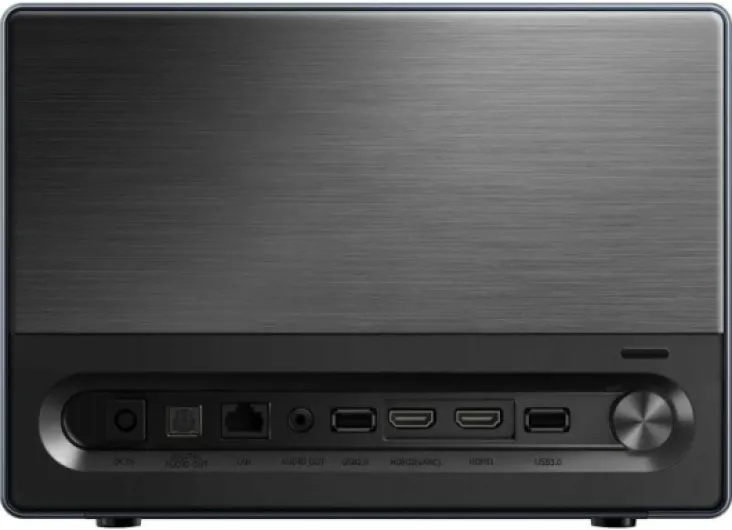
On the back, you’ve got the usual ports: HDMI, USB, Ethernet, plus Wi‑Fi and Bluetooth built in. That covers most use cases: consoles, laptops, streaming sticks, external drives. I used HDMI for a PS5 and a Fire TV Stick, plus Wi‑Fi for built‑in apps. Everything connected without drama. The feet on the bottom are basic but stable; they don’t offer much height adjustment, so I ended up stacking it on a couple of books to get the picture to the right height before using keystone. If you’re planning long-term use in one place, a proper stand or ceiling mount will make your life easier.
One thing to keep in mind: because it’s a standard throw projector (not ultra-short-throw), you need a bit of distance from the wall. For a 100-inch image, you’re looking at around 2.5–3 meters between lens and screen in real-world conditions. So while the projector itself is small, your room needs some depth to really benefit from it. Also, the air vents do push out some warm air, but nothing crazy. It gets warm during a movie night, but I never felt it was overheating or turning the room into a sauna. Overall, the design is practical, fairly discreet, and easy enough to live with day to day.
Build quality, noise and how it holds up over time
The projector is rated for about 25,000 hours of use for the laser light source. To put that in context, if you watch 3 hours a day, that’s over 20 years on paper. Real life is usually less, but it’s still plenty. I obviously haven’t used it that long, but after continuous use over several weeks, I haven’t noticed any brightness drops, color shifts or weird behavior. Laser projectors generally age better than lamp-based models, and that’s one of the reasons I went for this instead of a cheaper lamp unit that would need bulb changes.
Build quality feels solid enough. The chassis doesn’t creak, and the ports don’t feel loose. I’ve moved it around the house multiple times and even took it to a friend’s place in a backpack (wrapped in a towel because there’s no case in the box), and it survived without any marks or issues. I still wouldn’t throw it around; it’s an electronic device with a lens and internal mirrors, not a rugged speaker. But for normal home use, it seems robust enough.
Fan noise is present but not annoying. In Eco or standard modes, once a film or series is playing at a normal volume, you pretty much forget about it. In a completely silent room with the projector on a meter from your head, you will hear a soft whir. Compared to cheaper projectors I’ve tried, it’s quieter and less high-pitched. Heat output is moderate; the vents blow warm air, but the unit never felt dangerously hot. I didn’t experience any thermal shutdowns or throttling.
In terms of software durability, VIDAA has received some updates in the background, and the main apps (Netflix, YouTube, Prime Video) kept working fine. That’s always a concern with smart projectors and TVs – apps can get outdated. For now, everything still runs, but I personally consider the smart side as a bonus and rely more on an external streaming stick for long-term flexibility. Overall, I’d rate durability as pretty solid for home use: no major flaws, no scary overheating, and a light source that should last many years if you’re not running it 10 hours a day.
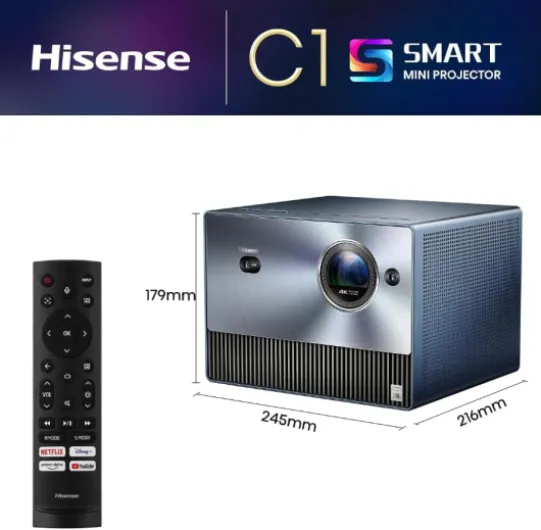
Image quality, brightness and smart features in real life
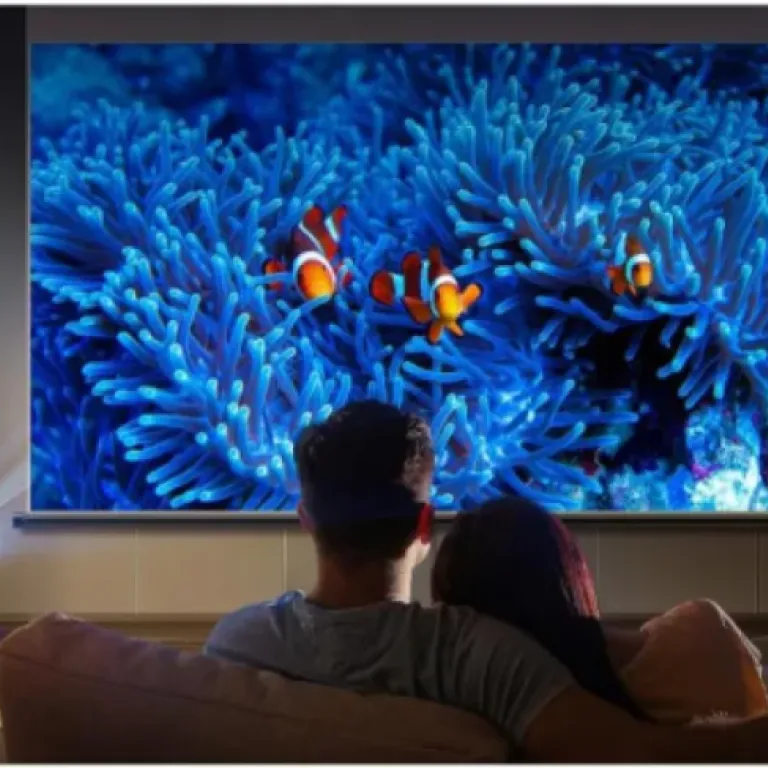
This is where the Hisense C1TUK justifies its price: the image is genuinely sharp and detailed. At normal viewing distances, 4K content from Netflix, Disney+ or a PS5 looks very crisp. Text, UI elements and subtitles are clean, and you don’t get that fuzzy, soft look you see on cheaper projectors. The triple-laser system gives strong colors without needing the lamp to be cranked to the max. Skin tones look fairly natural out of the box, and animated films look particularly good. The claimed 1.07 billion colors and wide color space basically translate into a picture that doesn’t look washed out, as long as you control the light in the room reasonably well.
Brightness is rated at 1600 lumens. On paper that doesn’t sound huge, but for a home cinema projector it’s okay. In a dim or dark room, the picture is bright enough up to around 120–130 inches. With some ambient light (lamps on, blinds half open), the image is still watchable, but contrast takes a hit and black levels turn more into dark grey. Daytime football with curtains partly closed is fine; daytime gaming with full sun on a white wall is pushing it. If you expect it to behave like a high-end TV in bright daylight, you’ll be disappointed – it’s still a projector, and it behaves like one.
Dolby Vision, HDR10 and HLG support do help with HDR content, but don’t expect the same punch as an OLED TV. What I noticed is that HDR films keep good detail in bright scenes and don’t blow out the highlights too much. Dark scenes still require a fairly dark room to look their best. The contrast is decent for a projector in this class, but blacks are not inky. If you’re sensitive to that, you’ll notice. If you’re used to mid-range TVs, you’ll probably be fine and just enjoy the bigger image.
On the smart side, VIDAA OS is usable but not the fastest I’ve tried. Menus respond reasonably quickly, apps launch in a few seconds, but it’s not as snappy as a dedicated streaming stick. After a few days, I got used to it, but for anything more than casual streaming I preferred plugging in a Fire TV Stick or similar. Gaming performance is okay for casual play. Input lag isn’t ultra-low like on dedicated gaming monitors, but for story-driven games or sports games it’s perfectly fine. I wouldn’t pick this as a main competitive FPS screen, but for console gaming on a huge image, it’s fun and fully usable.
What you actually get with the Hisense C1TUK
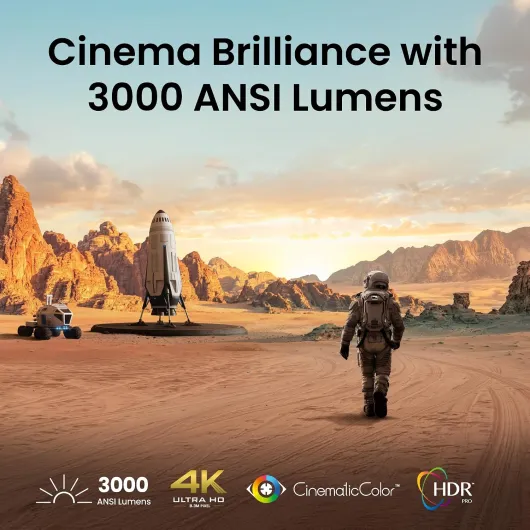
On paper, the Hisense C1TUK packs a lot: 4K resolution (3840 x 2160), triple-laser light source (they call it Trichroma), up to 1600 lumens, and a massive claimed image size from 65 inches up to 300 inches. In practice, I’ve mostly used it between 90 and 120 inches, which feels like the sweet spot before the brightness starts to feel a bit stretched, especially if you have any ambient light in the room. The brand talks about 110% BT.2020 and ΔE≈0.9, which is the kind of spec that sounds fancy, but the main takeaway is: colors look strong and fairly accurate right out of the box, without having to dig into calibration menus.
The projector runs on Hisense’s VIDAA Smart OS, with Netflix, YouTube, Prime Video, Disney+ and the usual suspects directly accessible. That’s handy because you don’t strictly need a separate streaming stick. I still ended up plugging in an external box via HDMI for two reasons: the apps are usable but not the fastest, and I prefer having all my logins and settings on one external device I can move between TV and projector. Still, if you just want to watch Netflix in the evening, the built-in apps do the job.
Sound-wise, you get 2 x 10 W JBL speakers with Dolby Atmos support. For a small box, the sound is actually decent. Dialogues are clear, and for casual watching, you don’t feel forced to add a soundbar. Once I started watching action films and football regularly, though, I plugged it into my existing sound system via HDMI ARC. The internal speakers are fine for a bedroom or a small living room, but they won’t replace a proper surround system if you already have one or plan to build one.
In terms of usage, you control everything with the supplied remote. It’s simple, not fancy, but it works. Auto focus, auto keystone, auto screen alignment and obstacle avoidance try to simplify setup. They work most of the time, but I usually end up doing some manual tweaks for a perfectly straight image. Overall, the package is fairly complete: you get the projector, power cord, an AV cable, and a user manual. No carrying bag, no ceiling mount, no screen – just the basics. So plan a bit of budget for a screen or at least a decent white wall if you want to get the most out of it.
AutoMagic adjustments, autofocus and daily usability
Hisense pushes its “AutoMagic Adjusting System” quite a bit: dual CMOS sensors, ToF laser radar, light sensor, NPU, all the buzzwords. In real life, here’s what it actually does: you put the projector down, point it roughly at a wall or screen, and it tries to detect the projection area, focus the image, correct keystone, and avoid obstacles like picture frames. When it works, it’s convenient. You move the projector, it thinks for a few seconds, the picture shifts and resizes itself, and you’re ready to watch. I’d say it gets it right about 70–80% of the time in my use.
The remaining 20–30% of the time, you end up with a slightly skewed rectangle or edges that don’t perfectly match the screen. At that point, you go into the manual adjustments and fine-tune. The tools are there and not hard to use, but it takes a few minutes. Once it’s set and you stop moving the projector, you’re basically done. So if you plan to leave it in one spot, you’ll use the auto features once and then forget about them. If you move it around a lot (living room, bedroom, friends’ house), be ready to do small corrections fairly often.
Autofocus is generally reliable. When you turn the projector on or nudge it, it refocuses automatically. I only had to manually adjust focus a couple of times when the room lighting was very strange or the wall surface wasn’t ideal. Auto obstacle avoidance is more hit-and-miss. It sometimes shrinks the image too much to avoid a small object on the wall, so I ended up disabling that for my main setup and just keeping the image within my screen area manually. It’s a nice idea, but not essential.
For everyday use, once everything is dialed in, the projector is straightforward: power on, it boots into VIDAA, and you pick your app or HDMI input. Boot time is okay, not lightning fast but not annoying either. The remote works well, and I didn’t have any random disconnects or weird bugs. So in terms of “does it do what it says on the tin?”, yes, it projects a large, sharp, colorful image with decent sound and some helpful automation. Just don’t expect the automatic adjustments to be magic in every scenario; they’re more of a shortcut than a perfect solution.
Pros
- Sharp, detailed 4K image with strong color performance from the triple-laser system
- Built-in VIDAA OS with Netflix, Prime Video, YouTube and others, so no mandatory external streamer
- Decent JBL speakers and long-life laser light source (rated 25,000 hours) make it easy to live with
Cons
- Brightness (1600 lumens) is only average for use in bright rooms or daytime viewing
- Auto alignment and obstacle avoidance are helpful but not always precise, often requiring manual tweaks
Conclusion
Editor's rating
Overall, the Hisense 4K Trichroma Mini Laser Projector C1TUK is a pretty solid choice if you want a big-screen experience without turning your living room into a full-blown cinema cave. The image is sharp, colors are strong, and 4K content actually looks like 4K. In a dim or dark room at around 100–120 inches, it’s genuinely enjoyable, and you quickly forget you’re watching a projector instead of a huge TV. The built-in JBL speakers are decent enough for most people, and the VIDAA smart OS with Netflix, Prime Video, YouTube and others means you can just plug it in and start watching.
It’s not perfect, though. The 1600 lumens are fine for evening viewing but only average in brighter rooms, so don’t expect miracles in full daylight. The auto alignment and obstacle avoidance features help but are not flawless; I often ended up doing some manual tweaks. The smart system is usable but not as quick as a dedicated streaming stick, so heavy streamers may prefer an external device. Still, considering the triple-laser light source, long lifespan, 4K resolution and overall ease of use, the package makes sense.
I’d recommend this projector to anyone who: mainly watches films and series at night, wants a clean, big image without dealing with lamp replacements, and appreciates having an all-in-one box with sound and apps. If you’re a hardcore gamer chasing ultra-low input lag, someone who watches TV mostly in a bright sunlit room, or you’re on a tight budget and just want something casual, there are better-suited options. But if your goal is a serious yet practical home cinema setup in a normal living room, the C1TUK is a strong contender.