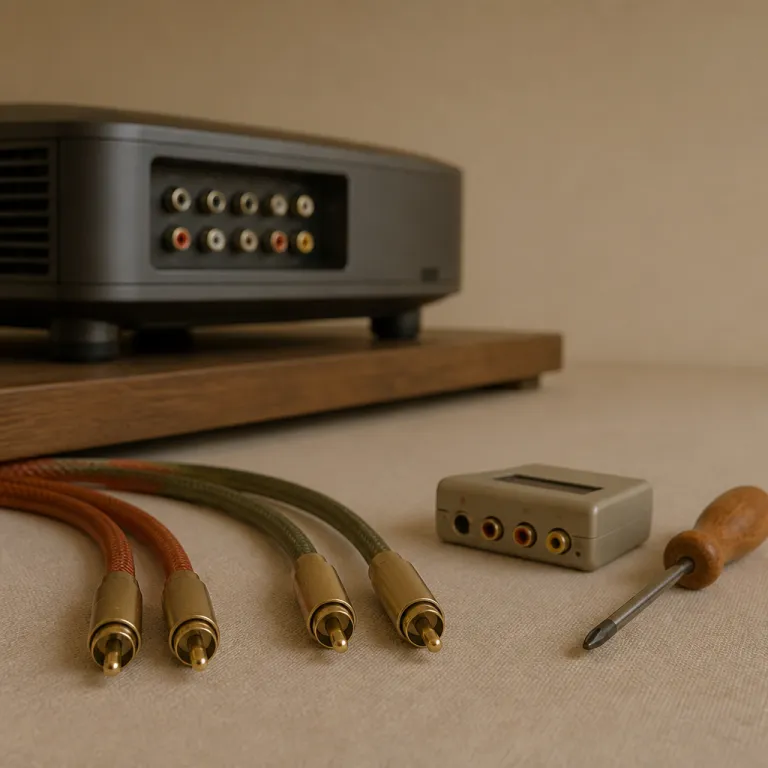
Why the right RCA connector to RCA cable still matters in modern home theaters
Many projector owners assume that an RCA connector to RCA cable is obsolete, yet these analog links remain essential for legacy disc players, older game consoles, and budget receivers. In a mixed system where HDMI handles video but an analog audio cable still feeds a subwoofer or an older amplifier, a simple RCA lead can quietly determine whether your stereo soundtrack sounds clean or muddy. When you understand how different RCA connectors, interconnects, and adapters affect signal integrity, you gain precise control over every audio and video source in your room.
Home theater projectors often sit several metres from the equipment rack, so the length and quality of each RCA run become critical for noise control and channel balance. A basic male RCA to female RCA extension might work for short distances, but longer cables benefit from better shielding, thicker conductors, and sometimes gold-plated contacts to resist oxidation in rooms with variable lighting and humidity. Industry tests on consumer audio leads commonly show 40–60 dB of shielding effectiveness at mains frequencies for mid-range products, which is usually enough for runs up to about 10 metres when routed sensibly. When you compare products from different brands, pay attention not only to price but also to the connector design, strain relief, and whether each RCA plug is firmly crimped or poorly molded.
Analog audio is more vulnerable to interference than digital HDMI, which means that every connector, adapter, and junction in the chain can introduce hum or hiss. A well-built dual RCA audio cable running from a Blu-ray player to an AV receiver can preserve channel separation, while a cheap connector set with loose male adapter plugs may cause intermittent dropouts. In practical measurements, a decent line-level RCA path can maintain a signal-to-noise ratio above 90 dB, whereas poorly shielded or corroded connections may drag that figure down by 10–20 dB. If you still rely on composite audio/video feeds for older game consoles or DVD players, investing in higher quality RCA adapters and shielded cables is often the simplest way to raise perceived sound quality without changing any major components.
Understanding RCA connectors, genders, and adapter types for projector systems
Before you buy any RCA connector to RCA accessory, you need to understand how connector genders and formats interact in a projector rack. An RCA male plug has a central pin and outer ring, while an RCA female jack presents a central socket and surrounding ground, and confusing these roles leads to wasted cables and returns. When you plan your wiring, list every male and female RCA port on your projector, AV receiver, powered speakers, and legacy sources, then match each with the correct cable or inline female adapter.
Most home theater owners will encounter three main RCA connector types in practice, namely single audio cable runs for subwoofers, dual RCA stereo audio pairs for left and right channels, and triple audio/video bundles for composite video plus two audio channels. A simple male adapter can convert an RCA plug to another format, while a female coupler can join two cables when the projector sits farther from the rack than expected. When you read product reviews, look for comments about how tightly the connectors grip, because a loose RCA jack or plug can cause crackling noises whenever someone walks near the rack. Installers often test-fit a sample cable before committing to a full batch, checking that the plug requires a firm push to seat but can still be removed without twisting the jack on the chassis.
Adapters also bridge the gap between analog and digital workflows, especially when you integrate HDMI encoders or modulators into a projector setup. For example, a 4 channel HDMI encoder that distributes video across a network may still rely on separate RCA audio feeds, so choosing robust cables and connectors helps maintain stable levels and consistent lip sync over time. Many multi channel HDMI modulator units specify maximum analog input levels around 2 Vrms, which aligns with typical consumer RCA outputs, so clean connections are vital to avoid distortion. When you combine such digital infrastructure with carefully selected RCA adapters and well-routed analog runs, you keep legacy sources usable while preparing the system for future upgrades.
Balancing price, quantity, and build quality when buying RCA cables and adapters
Shoppers often focus on the headline price of an RCA connector to RCA cable, yet long-term reliability usually depends more on build quality than on minor cost differences. When you compare pricing and quantity options, such as multi-packs of RCA leads or a connector set with several male and female adapter pieces, calculate the effective price per unit and weigh it against expected durability. A very low price for a large quantity of unbranded cables can seem attractive, but frequent failures quickly erase any initial discount.
Many reputable brands offer discount pricing when you purchase a higher quantity of accessories, especially for installers who need multiple RCA adapters and audio cable runs for a projector wall. Look for clear information about quantity discount tiers, such as reduced pricing brackets for ten or twenty cables, and verify that the same shielding and connector materials are used across the entire batch. When you read customer reviews, pay attention to comments about consistency within multi-packs, because some products mix different connector styles or cable thicknesses under one listing. Professional installers often keep a small log of failure rates for each supplier; if more than a few percent of a batch develops faults within the first year, they usually switch brands.
For a typical living room projector, a small connector set with four to six RCA adapters and a couple of dual stereo audio cables usually covers most scenarios. Dedicated media rooms with multiple sources, ceiling-mounted projectors, and separate zones may justify buying larger quantities of RCA cable and spare connectors to keep on hand. If your system also includes a multi channel HDMI modulator feeding several displays, planning quantity-discount purchases of analog accessories can significantly reduce overall wiring costs while keeping quality under control. A simple checklist—covering required lengths, connector genders, shielding type, and any gold-plated pieces for long-term runs—helps prevent last-minute store runs during installation.
Gold plated versus standard RCA connectors and their impact on projector audio
One of the most debated topics around any RCA connector to RCA purchase is whether gold-plated contacts justify their higher price. In practical home theater use, gold-plated RCA connectors mainly offer better resistance to corrosion, especially in rooms with variable temperature, occasional moisture, or strong lighting that can warm metal surfaces. The electrical performance difference between plated and bare connectors is usually small at home-theater signal levels, but long-term reliability can improve when oxidation is minimized.
For short RCA runs between a Blu-ray player and an AV receiver sitting side by side, standard cables with nickel-plated connectors often perform perfectly well. However, when the projector sits several metres away and the audio cable snakes through walls or behind furniture, choosing gold-plated RCA male and female connectors can reduce the risk of noisy joints after years of use. Many installers prefer gold-plated connector sets for subwoofer lines and dual stereo audio feeds, because these cables are rarely unplugged and may be exposed to dust and vibration. In informal A/B tests, users typically report no immediate tonal change between plated and non-plated connectors on fresh cables, but they do notice fewer crackles and dropouts on gold-plated parts after several years in challenging environments.
It is important to remember that plating cannot compensate for poor internal construction, thin conductors, or inadequate shielding. A well-made standard RCA cable from a respected brand will usually outperform a cheap gold-plated alternative with flimsy connectors and inconsistent molding. When you view product pages, compare not only the plating description but also the thickness of the cable, the strain relief design, and the overall reviews from users who run similar projector-based systems. As a rule of thumb, prioritize solid mechanical build and verified shielding performance first, then treat gold plating as a useful bonus for long-term stability.
Practical layouts for RCA audio and video around a home theater projector
Designing a clean layout for every RCA connector to RCA run around a projector helps prevent tangles, hum, and accidental disconnections. Start by mapping each audio and video path from source to projector and speakers, then assign a specific cable color or label for each function, such as yellow for composite video and red or white for stereo audio. When you group related cables into small bundles, keep power cords separate from RCA lines to reduce interference from lighting transformers and amplifiers.
Legacy DVD players and game consoles often rely on triple RCA cables, where one connector carries video and the other two carry left and right audio channels. In such cases, a dual RCA audio cable can still be useful for routing sound separately to a stereo amplifier, while the video connector feeds the projector directly through a different path. If your projector has limited RCA female inputs, a compact connector set with labeled adapters and a few male couplers can help you reconfigure sources quickly without rewiring the entire rack. A common troubleshooting step when hum appears is to temporarily reroute the analog leads away from power strips and dimmer cables; if the noise drops by several decibels, you have confirmed an interference problem rather than a faulty device.
Some enthusiasts pair their analog wiring upgrades with advanced projection screens that handle ambient light more effectively. When you invest in a motorized ambient light rejecting screen, the clarity of your image improves, which makes any audio imperfections more noticeable. In that context, carefully chosen RCA cables, robust connectors, and well-placed accessories become part of a holistic approach to both sound and picture quality. A tidy, labeled cable layout also makes it far easier to swap in new sources or add a streaming box without disturbing existing RCA connections.
Evaluating brands, products, and user reviews for RCA accessories
Choosing the right RCA connector to RCA accessory often comes down to how much you trust specific brands and their quality control. Established manufacturers usually offer clearer specifications for cable construction, connector materials, and supported use cases, which makes it easier to match products to your projector system. When you compare brands, look for consistent feedback about durability, connector tightness, and whether the advertised gold-plated contacts actually resist tarnish over time.
User reviews can be extremely valuable, but they require careful interpretation to avoid misleading impressions. Focus on reviews from people who use similar quantities of RCA cables and adapters in comparable home theater environments, rather than from casual buyers who only tested a single short cable. Pay attention to patterns, such as repeated complaints about loose male plugs or fragile female jacks, because these issues can cause intermittent faults that are difficult to trace once your rack is fully wired. When several reviewers mention that a particular dual RCA audio cable maintained a quiet noise floor even when run alongside power cords, that is a strong indicator of effective shielding.
Some retailers provide detailed view options, including close-up photos of each RCA connector, the strain relief, and the overall cable thickness. Use these images to verify that the connector set you are considering includes the right mix of male and female adapter pieces for your projector, subwoofer, and legacy sources. When discount pricing or quantity-discount offers seem unusually generous, double check that the products are genuine and not low-grade imitations with inconsistent connectors and poorly shielded cables. If possible, test one or two pieces from a new batch with a simple wiggle test and a low-level audio tone before installing the rest behind walls or inside conduits.
Future proofing your projector setup while still relying on RCA connectivity
Even as HDMI and network-based distribution dominate new installations, many projector owners still depend on at least one RCA connector to RCA path for legacy gear. The key is to treat these analog links as part of a broader strategy that anticipates future upgrades, rather than as temporary hacks. When you plan your wiring, leave space in the rack and in the conduits for both additional RCA cables and new digital lines, so you can adapt without tearing everything apart.
One practical approach is to standardize on high quality RCA adapters and connector sets that can be reused when components change. For example, a robust gold-plated male adapter can move from an old DVD player to a newer media streamer that still offers analog outputs, while the same dual RCA stereo audio cable continues to feed a trusted amplifier. By choosing accessories with clear labeling and solid construction, you reduce the risk of confusion when you or a technician revisits the system years later. Many installers also keep a short printed map of every analog and HDMI run taped to the inside of the rack door, which makes future troubleshooting far quicker.
As you evaluate pricing and quantity options for future proofing, remember that buying a modest quantity of well-made RCA connectors and cables usually offers better long-term value than chasing the lowest possible price. A carefully curated collection of RCA male and female adapters, along with a few spare audio/video cables, can keep your projector room flexible as formats evolve. In the end, thoughtful planning around these small components supports a stable, enjoyable home theater experience where every source, old or new, integrates smoothly.
Key figures and technical benchmarks for RCA and projector audio
- Composite video over RCA typically uses 75 ohm coaxial cable, which matches the input requirements of most consumer projectors and helps minimize signal reflections over runs up to around 10 metres when installed correctly.
- Many AV receivers still include at least four to six analog stereo RCA inputs, reflecting retailer surveys that show a significant share of customers continue to connect legacy CD players and game consoles alongside HDMI sources.
- Contact resistance on clean, properly mated RCA connectors is generally designed to be very low; contamination or oxidation can raise this value several times over when connectors are left unprotected in humid environments, which may increase noise or cause intermittent dropouts.
- Shielding effectiveness on quality audio cable designs is often specified in tens of decibels of noise rejection at mains frequencies, which is crucial when RCA runs must cross power lines or dimmer-controlled lighting circuits in a projector room.
- Industry teardown analyses indicate that gold-plated RCA connectors typically add only a small fraction to manufacturing cost, yet they can extend reliable service life in environments with frequent plugging and unplugging or exposure to moisture.
| Use case | Recommended RCA cable | Connector type | Approximate length |
|---|---|---|---|
| Short rack-to-rack audio | Standard stereo pair with basic shielding | Nickel-plated male to male | Up to ~2 m |
| Projector across the room | Thicker cable with improved shielding | Gold-plated male to male | Up to ~10 m |
| Subwoofer line | Single low-noise RCA cable | Tight-fitting male plugs | As short as layout allows |
| Legacy composite video | 75 ohm coaxial RCA lead | Color-coded connectors | Keep under ~10 m where possible |
FAQ about RCA connector to RCA cables in home theater projector setups
Do I still need RCA cables if my projector has HDMI inputs
Many projectors rely primarily on HDMI for video, but RCA cables remain useful for legacy DVD players, older game consoles, and subwoofers that only accept analog inputs. If your AV receiver or powered speakers offer RCA female jacks, a simple RCA connector to RCA cable can integrate these devices without converters. Keeping at least one dual stereo audio cable on hand is wise for troubleshooting and temporary connections.
Are gold plated RCA connectors worth the extra cost
Gold-plated RCA connectors mainly provide better resistance to corrosion rather than dramatically better sound quality. In dry, climate-controlled rooms with short cable runs, standard plated connectors usually perform adequately for projector audio. In humid or dusty environments, or where cables are rarely unplugged, gold-plated RCA male and female connectors can reduce long-term noise and contact problems.
How long can an RCA cable run before quality degrades
For typical consumer-grade RCA cables carrying line-level audio, runs up to about 10 metres are usually safe with well-shielded products. Beyond that distance, signal loss and noise pickup become more likely, especially if the cable passes near power lines or dimmer-controlled lighting. In such cases, choosing thicker cable designs with better shielding and minimizing unnecessary adapters helps maintain quality.
What is the difference between male and female RCA connectors
An RCA male connector has a central pin and outer ring that plugs into an RCA female jack, which has a central socket and surrounding ground. Devices such as projectors, receivers, and players usually present RCA female ports, while cables and some adapters use RCA male ends. Understanding this distinction helps you select the correct male or female adapter when extending or converting connections.
Can I mix different RCA brands and still get good performance
Mixing RCA cables and connectors from different brands is generally safe as long as each product meets basic quality standards. Focus on solid mechanical fit, adequate shielding, and clear labeling rather than on brand uniformity alone. When possible, test each new cable or adapter in your projector system before permanent installation to confirm noise-free operation.