
Summary
Editor's rating
Price vs what you actually get
Small, sleek, and easy to throw in a bag
Battery life and wireless use
Build quality, firmware issues, and long-term worries
Image quality and real-world use
What this projector actually is (beyond the marketing)
Smart features, apps, and sound: does it actually replace other devices?
Pros
- Very compact and light, easy to carry and set up anywhere with a wall
- Decent picture in a dark room at 80–100 inches for casual movies and shows
- Built-in battery, HDMI, USB, Wi‑Fi, and tripod mount make it flexible to use with Chromecast, laptops, and other devices
Cons
- Low brightness (150 ANSI lumens) struggles badly in any kind of ambient light
- Old Android 6.0 system with clunky interface and limited, sometimes unreliable app support
- Weak built-in speaker and some audio quirks, especially when using HDMI and Bluetooth together

Specifications
View full product page →| Brand | KODAK |
Pocket cinema… kind of
I’ve been using the KODAK Luma 350 for a few weeks as a casual home projector and a travel gadget. I mainly wanted something small to throw Netflix or YouTube on a wall instead of watching on my phone or laptop. On paper, this thing looks great: Android built in, Wi‑Fi, Bluetooth, HDMI, battery, and a claimed image up to 150–200 inches. In reality, it’s a bit more mixed than the product page suggests.
The first thing to know is that this is a portable toy for relaxed viewing, not a replacement for a serious TV or a bright living-room projector. If you expect a proper 4K cinema experience, you’ll be disappointed right away. The marketing talks about 4K and Ultra HD, but the actual usable resolution and brightness tell a different story once you turn off the lights and start a movie.
I mostly used it in a bedroom, projecting on a white wall at around 80–100 inches, and occasionally in the living room with curtains half closed. I also tried it once at a friend’s place to watch a game, and we quickly realised that with lights on, the image just gets washed out. So you need to treat it as a dark-room gadget. Once you accept that, it becomes easier to judge it fairly.
In this review I’ll go through how it’s built, how it performs, battery behavior, and whether it’s worth the price. I’ll be straight: there’s stuff I liked, and a few things that really annoyed me, especially the software and some misleading expectations around image quality and app support.
Price vs what you actually get
In terms of value, the Luma 350 sits in a bit of an awkward spot. It’s not dirt cheap, and once you get into that mid-range price, there are a lot of other projectors around—some bigger and brighter, some less portable but with better image quality. What you’re mainly paying for here is portability plus basic smart features in a compact body. If that combo is exactly what you want, it can feel like reasonable value. If you just want the best picture for the money, there are better options.
Compared to no-name mini projectors I’ve tried from random brands, the Luma 350 does feel a bit more polished in terms of design and overall reliability. The DLP image is cleaner and less noisy than some really cheap LED units. But when I compare it to using a brighter budget projector + a cheap streaming stick, the Luma 350 starts to look less attractive. You can often get a higher-brightness 1080p projector for a similar or slightly higher price, as long as you’re okay with something bulkier and not battery-powered.
Where it makes sense is if you specifically want a travel projector for casual use: hotel rooms, small apartments, bedroom ceiling watching, or occasional backyard movie nights (in the dark). In those cases, the size, battery, and built-in Android (even if clunky) are convenient. You can toss it in a bag and have a decent-sized picture almost anywhere with a wall. If that flexibility is worth it to you, then the cost is easier to swallow.
But if your main use is at home, near a plug, and you don’t care about fitting it in a small bag, I’d say the value is only average. You’re basically paying extra for portability and smart features that aren’t that great. In that situation, I’d personally lean toward a brighter non-portable projector plus a Fire Stick or Chromecast. So overall, I’d rate the value as okay but not outstanding: good for a specific use-case, less convincing as a general home cinema solution.
Small, sleek, and easy to throw in a bag
Design-wise, KODAK did a decent job. The Luma 350 is compact and fairly light at around 821 grams, with dimensions roughly 7.9 x 7.9 x 2.2 cm. It’s basically a small flat square that you can slide into a backpack or even a bigger handbag. I’ve taken it to a friend’s place and on a weekend trip without it feeling like extra luggage. It’s way more portable than any traditional projector I’ve used before.
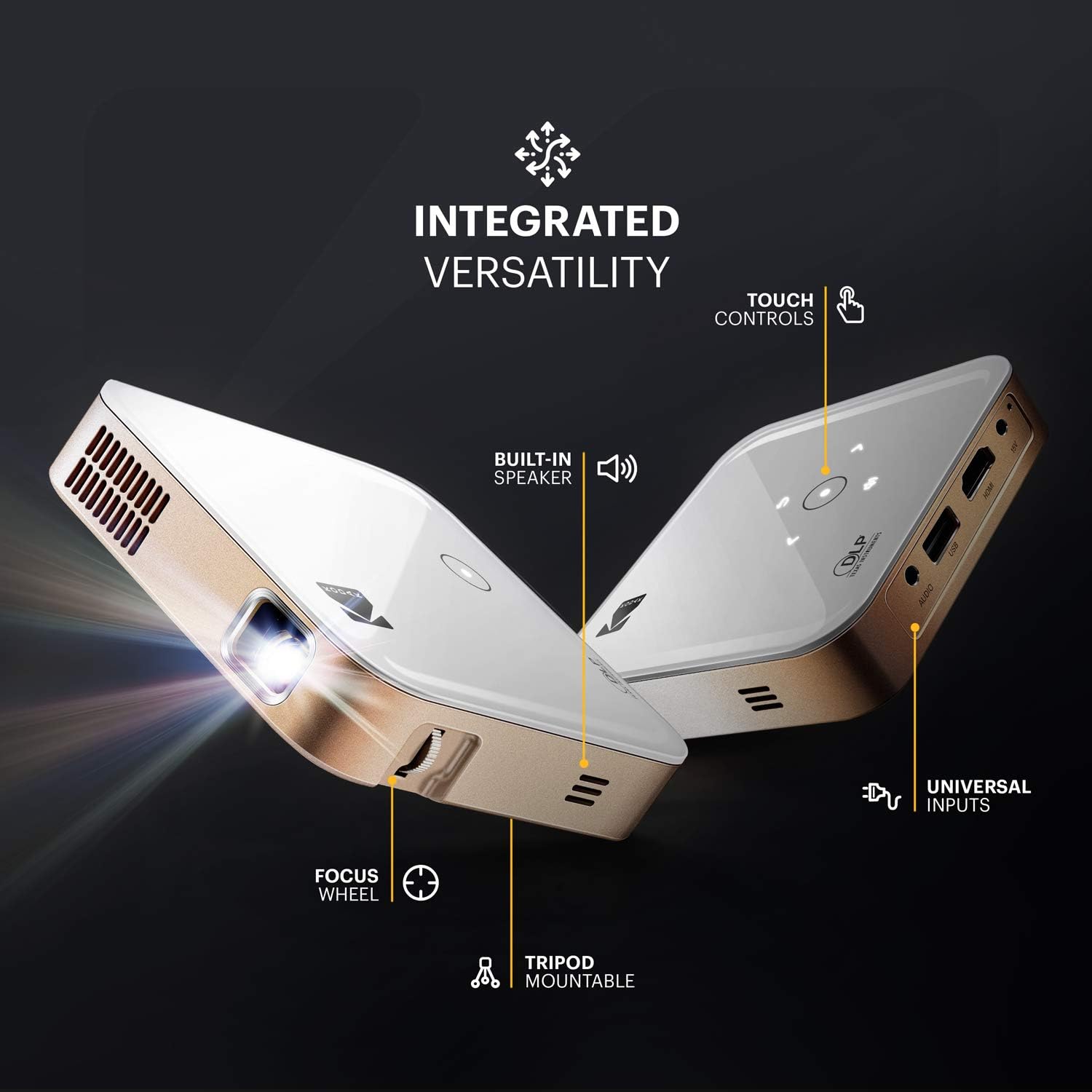
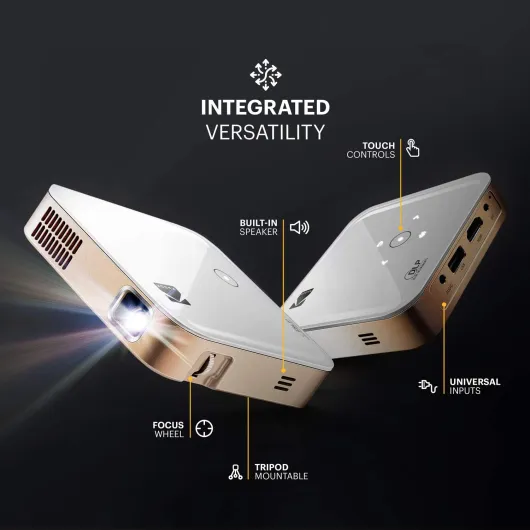
The top has touch controls that light up. They look nice and are easy enough to use in the dark, though I found myself mostly using the remote. The touch buttons are responsive, but sometimes I triggered the wrong one when adjusting volume in the dark. Not a huge problem, just slightly fiddly. On the side and back you get the ports: HDMI, USB, audio jack, and power. There’s also a standard tripod mount underneath, which is super useful. I bought a cheap mini tripod and it made positioning way easier than stacking books.
The overall look is simple and neutral. It’s a black box, no flashy colors, no weird shapes. Build quality feels okay: not premium, not cheap toy-level either. The plastic doesn’t creak, and it doesn’t feel like it’ll fall apart if you toss it in a bag. That said, I wouldn’t drop it from a table on purpose. It’s still a small electronic device with a lens, so you need to treat it with basic care.
One thing I noticed: ventilation noise is present but not terrible. You can hear the fan in quiet scenes, but once you have a movie going with normal volume, it blends in. It’s quieter than some older projectors I’ve tried, but louder than a typical laptop fan at idle. Overall, on design and practicality, I’d say it’s pretty solid. It does look and feel like a modern portable gadget, even if the internal software is a bit outdated.
Battery life and wireless use
The battery is one of the reasons to buy this type of projector, so I paid attention to that. The Luma 350 has a 7500 mAh battery, and in real use I got roughly 1.5 to 2 hours of playback on battery, depending on brightness and whether Wi‑Fi was on. That’s just about enough for a movie if you start at 100% and don’t mess around too much in the menus. If you plan on watching longer stuff or binge-watching, you’ll want it plugged in.
For quick sessions—like a couple of YouTube videos or an episode of a show before bed—the battery is fine. It’s handy to move it around the house without hunting for a plug. I used it once outside on a terrace at night, powered only by the internal battery, and it held up for a short movie plus some menu navigation. After that, it was basically done. So yes, it’s wireless, but not for an entire evening of heavy use.
Charging time isn’t super fast. If you drain it close to zero, you’re looking at a few hours to get it back to full. There’s no fast-charging magic here. I ended up leaving it plugged in most of the time when used at home, and treating the battery more as a backup for when I want to move it or use it somewhere without an outlet right next to me.
One important detail: as the battery gets lower, I felt the system sometimes got a bit sluggish in the menus, though that might just be the old Android system being slow in general. Either way, if you want the smoothest experience, just use it plugged in. I’d say the battery is good enough for portability, but it won’t give you a full cinema marathon. If totally wire-free long sessions are your priority, this will feel a bit limited.

Build quality, firmware issues, and long-term worries
Physically, the Luma 350 feels reasonably solid for a portable projector. The plastic body doesn’t feel super premium, but it also doesn’t feel like it’ll crack just from normal use. The buttons and ports seem well put together, and the lens is recessed enough that you’re not constantly worried about scratching it when you put it in a bag. With normal care—carrying it in a pouch or wrapped in a soft cloth—I don’t see it breaking easily.
The lamp life is rated around 30,000 hours, which is standard marketing talk for LEDs in this category. In reality, you’re more likely to replace the whole projector before you ever hit that number. The bigger concern for me isn’t the physical lifespan, but the software and firmware support. One Amazon user mentioned that after updating the firmware from Kodak’s website, the Wi‑Fi stopped working and they had to return it. That kind of thing makes me cautious about messing with updates.
Android 6.0 is already very old, and I don’t expect many (if any) meaningful updates going forward. So if an app stops working due to compatibility or DRM changes in a year or two, there’s a good chance Kodak won’t fix it. That’s the main long-term risk: not that the hardware dies, but that the “smart” part becomes outdated and annoying. The projector will still work fine as a dumb HDMI screen with a Chromecast or console, but you might lose some built-in app functionality over time.
Officially, there’s a 1-year limited warranty and claims about spare part availability in the EU for seven years. That’s nice on paper, but some reviewers complain about poor customer support, especially when they ran into software issues. So I wouldn’t buy this counting on top-tier after-sales help. I’d treat it as a gadget that you use as-is, and if something goes badly wrong outside the return window, you might just move on to another model. Overall durability: hardware seems okay, but long-term software support is the weak point.
Image quality and real-world use
This is the part most people care about: how does the picture actually look? In a dark room, at 80–100 inches, the image is honestly quite decent for a small projector. Colors are fine, the picture is watchable, and for casual movie nights or cartoons for kids it does the job. I watched a couple of Netflix shows via Chromecast and some YouTube videos directly through the built‑in apps, and I didn’t feel like the image was terrible or anything. It’s just not as sharp or bright as the marketing suggests.
The official brightness is 150 ANSI lumens, and you really feel that limit. With any ambient light—like curtains open in the afternoon or lights on in the room—the image quickly loses contrast. Dark scenes in movies become a grey blur. If you’re planning to use this in a bright living room for football games with lights on, you’ll probably be disappointed. It’s clearly made for dim or dark rooms. Once you accept that and close the blinds, it’s fine for relaxed viewing.
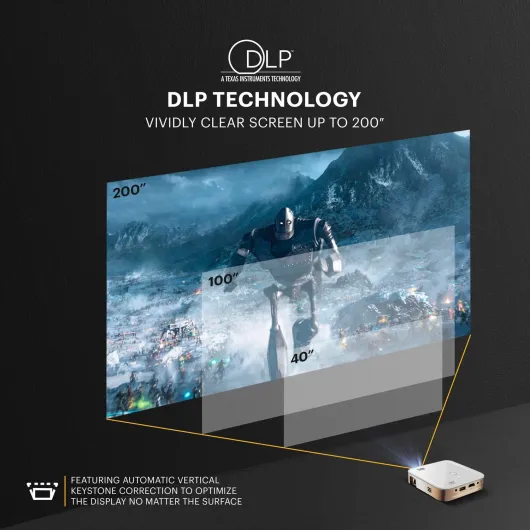
The focus is manual via a wheel on the side. It’s easy enough to adjust, but there’s a bit of trial and error to get the whole image sharp, especially if you’re projecting at an angle. There’s vertical keystone correction (up to about ±15°), which helps if the projector is a bit lower or higher than the center of the wall. Still, like most cheap keystone systems, if you push it too far the image gets slightly distorted or soft at the edges.
As for resolution, I’d call it good enough but not impressive. For movies and TV shows, it’s fine. For text-heavy stuff, like using it as a big screen for your laptop, it’s usable but not pleasant for long sessions. I tried mirroring my laptop to work on a document and ended up going back to my monitor pretty quickly. For gaming, it’s okay for casual console games, but don’t expect super low input lag or esports-level clarity. I’d rate the overall performance as decent for the size, but not something that will blow you away if you’re used to a proper TV or a brighter projector.
What this projector actually is (beyond the marketing)
On the box and product page, the Luma 350 sounds like a mini cinema: Android 6.0, Wi‑Fi, Bluetooth, screen mirroring, HDMI, USB, built‑in speaker, and claims about 4K Ultra HD support. In practice, here’s how it really breaks down. The projector uses DLP technology with a brightness of about 150 ANSI lumens. That’s not a lot. It’s fine at night or in a very dim room, but it’s weak for any kind of daylight or bright space. The contrast ratio is listed as 3500:1, which is decent for a pico projector, but don’t expect deep blacks like on an OLED TV.
Resolution is where things get confusing. The specs mention a maximum display resolution of 854 x 480 and a “native resolution” of 1920 x 1080. Realistically, what I see on the wall looks closer to 720p‑ish sharpness, not proper 1080p, and obviously not 4K. It can accept a 4K signal, but it’s downscaled. If you go in expecting crisp 4K, you’ll feel a bit cheated. Text from a laptop is readable at 80–100 inches, but it’s not razor sharp.
The Android 6.0 system is old and it shows. You can install some apps (YouTube, Plex, VLC, Kodi, etc.), but some streaming apps either don’t work properly or are tricky to install. For example, some users complain they can’t get iPlayer or some TV apps working, and I had trouble with a couple of regional streaming apps too. Also, the interface feels dated and clunky compared to a modern Fire Stick or Chromecast.
So in short: think of the Luma 350 as a compact projector with basic smart features, not a full smart TV replacement. The hardware is okay for casual use, but the software is clearly behind the times. If you’re ready to plug in a Chromecast, Fire Stick, or laptop, it makes more sense. If you want everything to run smoothly just from the projector itself, you might get frustrated pretty fast.
Smart features, apps, and sound: does it actually replace other devices?
On paper, the Luma 350 is a “smart projector” with Android 6.0, Wi‑Fi, Bluetooth, and screen mirroring. In practice, I’d say the smart part is half-baked. Yes, you can install some apps. I got YouTube, Plex, and VLC running without too much trouble. But some streaming platforms either don’t show up properly in the store or don’t behave normally once installed. Also, the interface is clunky and slow compared to any modern streaming stick. It feels like using an old Android TV box from years ago.
Mirroring from my Android phone worked, but not always smoothly. Latency is noticeable, and some protected content (like certain streaming apps) just refuses to mirror, which is standard DRM behavior but still annoying if you were expecting to cast everything. Some Amazon reviews mention they can’t mirror TV/film apps from their phones, and I had similar issues. So if your plan is “I’ll just mirror everything from my phone,” be prepared for some frustration.
Audio is another area where it’s okay but limited. The built-in speaker is usable but weak. For cartoons or YouTube videos it’s fine, but for movies or anything with bass, it feels thin and not very loud. In a quiet bedroom it’s acceptable; in a bigger room or with a few people chatting, it’s not enough. The good news: you have options. You can plug in external speakers or headphones via the audio jack, or use Bluetooth for wireless audio. However, there’s a catch: when using HDMI input (like a Chromecast), some users report Bluetooth audio stops working and sound only comes from the built-in speaker. I ran into that too. It’s annoying but somewhat manageable if you use the audio jack instead.
So in terms of effectiveness as an all-in-one device, I’d say: it works, but it’s not smooth. If you’re okay plugging in a Chromecast, Fire Stick, or laptop and maybe some external speakers, the projector becomes much more pleasant to use. If you expect it to be your only box—apps, sound, and all—then the old Android version, limited app support, and audio quirks will probably annoy you over time.
Pros
- Very compact and light, easy to carry and set up anywhere with a wall
- Decent picture in a dark room at 80–100 inches for casual movies and shows
- Built-in battery, HDMI, USB, Wi‑Fi, and tripod mount make it flexible to use with Chromecast, laptops, and other devices
Cons
- Low brightness (150 ANSI lumens) struggles badly in any kind of ambient light
- Old Android 6.0 system with clunky interface and limited, sometimes unreliable app support
- Weak built-in speaker and some audio quirks, especially when using HDMI and Bluetooth together
Conclusion
Editor's rating
The KODAK Luma 350 is a handy little projector if you know exactly what you’re getting into. It’s compact, easy to carry, and works well enough in a dark room at around 80–100 inches. For casual movies, cartoons, and YouTube on a wall or ceiling, it does the job. The design is clean, the DLP image is decent for the size, and the built-in battery is useful for short wireless sessions. If you pair it with a Chromecast or similar device and maybe some external speakers, it becomes a pretty flexible travel or bedroom setup.
On the downside, the marketing oversells it. The brightness is low, the whole 4K talk is misleading, and the Android 6.0 system feels old and clunky. Some apps are hard or impossible to get working properly, and screen mirroring for protected content is hit-or-miss. The built-in speaker is weak, and there are some annoying quirks like Bluetooth audio not working with HDMI in certain cases. Long-term, the hardware will probably outlive the software, so you should think of it more as a portable screen for external devices than a future-proof smart projector.
Who is it for? People who want a portable, easy-to-carry projector for dark rooms, casual use, and don’t mind using extra devices (Chromecast, Fire Stick, laptop) to handle most of the smart stuff. Who should skip it? Anyone who wants a bright living-room projector, a real 4K experience, or a smooth all-in-one smart TV replacement. If you go in with realistic expectations, it’s a pretty solid travel gadget. If you take the product page literally, you’ll probably feel a bit underwhelmed.