
Summary
Editor's rating
Value: full price is hard to swallow, sale price makes sense
Design: living-room friendly box, not a plastic toy
Sound & noise: fine for a living room, better with a soundbar
Build, lifespan and everyday reliability
Performance: bright, sharp picture with TV-like usability (but greyish blacks)
What the HORIZON Ultra actually offers on paper
Auto features & OS: when it helps and when it just gets in the way
Pros
- Very bright 4K image that works well in a typical living room, not just a dark cave
- Auto focus and screen alignment make temporary setups quick and easy
- Built-in Harman Kardon speakers are actually usable, so you don’t need a sound system on day one
Cons
- Android TV interface is noticeably slow and HDR handling via internal apps can look washed out
- Black levels are only average with visible grey in dark scenes, especially with any ambient light
- Fan gets quite loud in the highest brightness mode and only two HDMI ports limit connections

Specifications
View full product page →| Brand | XGIMI |
A living-room projector that actually feels like a TV (most of the time)
I’ve been using the XGIMI HORIZON Ultra 4K in my living room for a few weeks, mostly as a replacement for a 65'' TV and an older Epson projector I had for movies. I didn’t mount it on the ceiling; it’s just sitting on a low unit a few meters from a 100–120'' screen. So this is a pretty normal home setup, not some dedicated cinema cave with velvet walls and perfect light control.
My first impression: this thing is bright enough to actually use in the daytime, as long as you’re not in direct sun. Compared to my older Epson entry-level 4K projector, the HORIZON Ultra feels a lot more punchy and much easier to live with. You don’t need to kill every light in the room to see what’s going on, which is the main reason I don’t hate using a projector during the week anymore.
That said, it’s not perfect. The Android TV 11 system is clearly the weak point. It works, but it’s a bit slow and sometimes feels like using a mid-range phone from a few years ago. And like every projector, the contrast and black levels are just not at proper TV level. If you’re expecting OLED‑style blacks, you’ll be disappointed. If you accept that it’s a projector and you mostly watch in dim light, it’s fine.
Overall, my feeling after a couple of weeks is this: as a living-room movie machine it’s pretty solid, especially if you can grab it on sale. But you need to know where it shines (brightness, auto setup, portability) and where it’s just okay (OS speed, black levels, fan noise in max brightness). I’ll break all that down below in more detail.
Value: full price is hard to swallow, sale price makes sense
Let’s be blunt: at around £1500–£1700 (or similar in euros), this projector is not cheap. At that price, you’re competing with bigger-brand laser projectors, some ultra-short-throw models, and also very good 75–85'' TVs. For full retail, I think it’s a bit of a stretch given the mediocre black levels and the laggy Android TV. You can find alternatives from Hisense or Dangbei that some people rate higher in pure picture quality at similar or slightly higher prices.
Where it starts to make sense is the discounted price range around £750–£900 that several users mention. At that level, the HORIZON Ultra becomes a pretty strong deal: bright 4K, Dolby Vision support, good auto features, built-in decent speakers, compact design, and an overall easy-to-live-with package. If you were previously on a cheaper Epson or a small XGIMI MoGo/Halo and you upgrade to this on sale, the jump in brightness and general image punch feels big.
In terms of running costs, power draw is reasonable for the brightness, and the long-life light source means you’re not budgeting for lamp replacements. You might end up buying: a screen (strongly recommended if you want the best picture), a streaming stick, a soundbar, and maybe an HDMI switch. So the real cost of the whole setup can climb a bit, but that’s true for pretty much any projector-based home cinema.
So, is it good value? At full price, I’d say it’s decent but not the smartest buy; there are better options if you’re willing to compare a lot. At a strong discount, it becomes a very solid choice for someone who wants a bright 4K living-room projector that feels close to a big TV and doesn’t mind using an external streamer. If you’re patient and wait for Black Friday or similar sales, you’ll likely feel much happier with the money spent.
Design: living-room friendly box, not a plastic toy
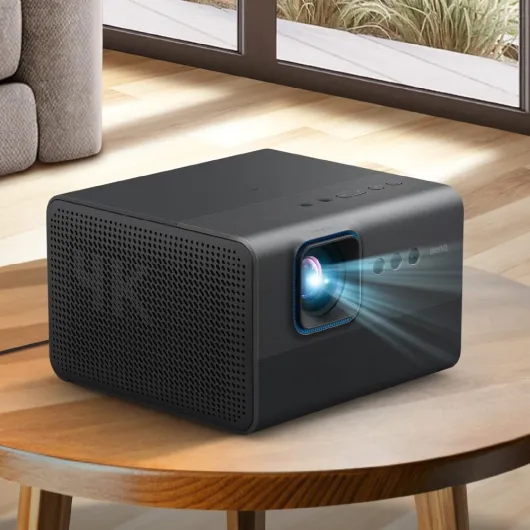
Design-wise, I actually like what XGIMI did here. The HORIZON Ultra is a desktop-style projector, not a long, ugly plastic thing like old office beamers. It’s a compact box (about 26.5 x 22.4 x 17 cm) with a sort of misty gold / beige finish that blends in quite well with furniture. It’s not tiny, but it doesn’t scream “tech gadget” from across the room like some white projectors do.
At 5.1 kg, it’s not ultra-light, but it’s still easy to move from the living room to a bedroom or take to a friend’s place if needed. I did that once for a football night; you just grab it with one hand and the remote in the other. Not as portable as the smaller XGIMI MoGo / Halo line, but clearly still moveable. Once it’s on a stand or TV unit, it feels stable and doesn’t wobble when you press buttons.
The ventilation and fan placement are decent. I had it next to my head for a few sessions, like one user mentioned, and in normal brightness modes I barely noticed it during movies. In high brightness mode, you absolutely hear the fan; it’s not subtle. If you’re sensitive to noise, you’ll probably use the normal or eco profiles unless the room is very bright. The upside is that cooling seems effective; I never felt the case get worryingly hot.
The remote is surprisingly nice. It has a solid feel, not that cheap hollow plastic vibe. Buttons are clear and the layout is simple enough so you don’t have to look at it every time. My only gripe: there’s no backlight on the buttons, so in a dark room you need a bit of muscle memory. Overall, the design feels like it was made to live in a modern lounge without looking like office equipment, and on that front it does the job well.
Sound & noise: fine for a living room, better with a soundbar
There’s no battery in this thing, so I’ll cover sound and noise instead, because that’s what actually matters when you live with it. The built-in 2 x 12W Harman Kardon speakers are better than average for a projector. For casual TV, YouTube, and even a movie if you don’t have a sound system yet, they’re totally usable. Voices are clear, and there’s a bit of bass so it doesn’t sound like a laptop. It’s not hi-fi, but it’s more than "just okay".
In my case, after a few days I still ended up connecting it to a soundbar with HDMI (ARC) to get audio closer to the screen and a fuller soundstage. Once you do that, the experience jumps up a level; it feels much more like a proper home cinema. The downside is that with only two HDMI ports, one gets eaten by the sound system, so you might need an HDMI switch if you also have a 4K Blu-ray player, a console, and a streaming stick.
Fan noise depends heavily on the brightness mode. In normal use with a dimmed room, the projector is pretty quiet. Sitting near it, I could hear a soft hum, but once a movie starts, I forget about it. In "super bright" or max brightness modes, it gets much louder and can clearly be heard over quiet scenes, especially if you’re using the internal speakers. For me, super bright is only useful when there’s a lot of ambient light; for night movies I stick to the quieter presets.
Overall, as a standalone box, it’s good enough to use without extra speakers. But if you already have or plan to buy a soundbar or surround setup, you’ll get a much nicer match for the big image. Just keep in mind the HDMI limitations and the fan noise spike in the highest brightness mode when planning your setup.
Build, lifespan and everyday reliability
In terms of build, the HORIZON Ultra feels solid and well put together. There are no creaks when you pick it up, and the outer shell seems sturdy enough to handle regular moving around the house. It’s not a rugged device you’d throw in a backpack without protection, but for normal home use it gives a decent impression of quality. The finish doesn’t pick up fingerprints too badly, and after a few weeks of sliding it on and off a TV unit, I didn’t notice any obvious marks.
The light source is rated for around 20,000 hours. In real life, that’s several years of heavy use before brightness starts to drop noticeably. If you watch 4 hours a day, you’re looking at well over 10 years on paper. Of course, that’s theory, but it’s in line with other laser/LED projectors and much better than old lamp-based models that needed bulb changes. So from a lifespan standpoint, it’s pretty reassuring.
On the software side, Android TV 11 hasn’t crashed on me, but it does feel a bit outdated already in terms of speed. This is where I worry more about long-term satisfaction: apps get heavier over time, and a system that already feels slightly laggy today won’t magically get faster. That’s another reason I prefer using an external streamer; it basically makes the projector less dependent on future OS updates and aging hardware.
There’s a 2-year warranty, which is decent but not crazy generous for this price range. Other brands sometimes offer similar coverage, so it’s fairly standard. Given the mix of a solid chassis, proven DLP tech, and a long-life light source, I’m reasonably confident it will last, but I wouldn’t buy it expecting top-level manufacturer support beyond those two years. Treat it as a well-built home device that should hold up fine if you don’t abuse it or move it every single day.
Performance: bright, sharp picture with TV-like usability (but greyish blacks)
In use, the brightness is the main strength. The 2300 ISO lumens number isn’t just marketing fluff; in a semi-lit living room with curtains half open, I could still watch news and YouTube comfortably at around 100''. It obviously looks better with blinds down, but compared to cheaper LED projectors I’ve tried, this one holds up much better in everyday light. At night, with lights off, it feels close to watching a big TV, especially on a decent screen.
The 4K sharpness is solid. Native 4K content from a 4K Blu-ray player and from streaming (when the stream is decent) looks crisp, with clean text and no obvious softness in the corners. Colors are punchy out of the box, maybe a bit too boosted in some modes, but you can tweak them. HDR and Dolby Vision do work, but I found that different sources handle them very differently. A proper 4K player (like the Sony UBP-X700 someone mentioned) gives a really nice result. Some streaming sticks and built-in apps tend to wash out blacks and make things look grey, especially in Dolby Vision, so you might end up disabling HDR on external devices for a more natural image.
Now the weak spot: contrast and black levels. Like one reviewer said, blacks are more dark grey than true black, especially if there’s any light in the room. This is normal for DLP projectors, but given how bright and colorful the image is, the greyness stands out more. If you watch a lot of dark shows (space, horror, moody dramas), you will notice it. If you mostly watch sports, cartoons, and brighter movies, it’s much less of a problem. Motion is okay once you turn off or dial down motion compensation; otherwise it has that “soap opera” vibe.
For gaming, the input lag felt low enough for casual console gaming. I wouldn’t play competitive shooters on it, but for story games and racing it’s fine. The key point: this projector handles everyday, mixed use pretty well. Movies, TV, sports, some games – all work nicely as long as you manage expectations on black levels and don’t rely only on the internal apps for perfect HDR behavior.
What the HORIZON Ultra actually offers on paper
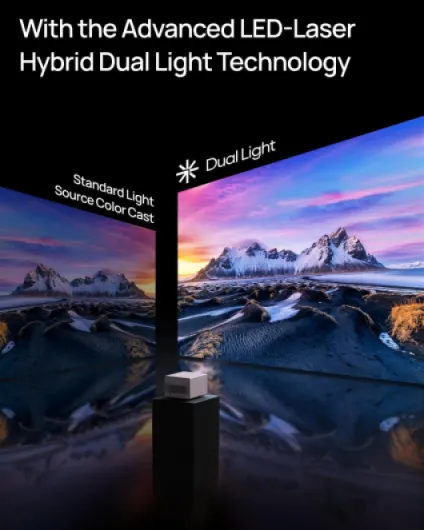
On paper, the XGIMI HORIZON Ultra is loaded. It’s a 4K DLP projector (3840 x 2160) with up to 2300 ISO lumens, which is already above a lot of compact projectors. It uses a dual light system (laser + LED) and supports Dolby Vision and HDR, which is still pretty rare on projectors. The official max image size is 150'', but you can go a bit above if you sit far enough and don’t mind losing some brightness.
It runs Android TV 11.0, so in theory you can just use the projector alone: Netflix, Prime Video, YouTube, Disney+, etc. No need to plug in a Fire Stick or Apple TV unless you’re picky about HDR handling or app speed. Connections are basic but enough for a living room: HDMI, USB 2.0, headphone jack, Bluetooth 5, Wi‑Fi. There are 2 x 12W Harman Kardon speakers built in, which is nice if you don’t have a soundbar yet.
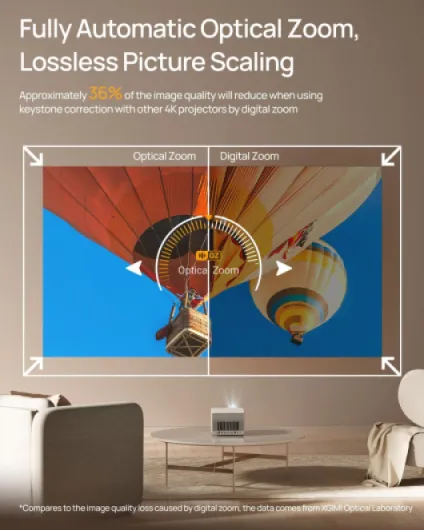
The auto features are really the selling point: ISA 3.0 (Intelligent Screen Adaption) with auto focus, auto keystone, auto screen alignment, and auto obstacle avoidance. In practice that means you put the projector down, it finds your screen or free wall space, adjusts the image, and you’re ready in a minute without touching much. You can override everything manually if you want a fixed setup and a more precise framing.
Specs-wise, it’s not the cheapest toy: list price usually sits around high-end TV territory, but it often drops heavily on sale (people mention around £750–£900 in discounts vs ~£1500–£1700 original). At full price, it competes with some Hisense/Dangbei laser models and even small entry-level laser TVs. On sale, it becomes much more interesting. So the context is important: as a full-price premium projector it’s decent but not unbeatable; as a discounted living-room 4K projector, it starts to look like good value.
Auto features & OS: when it helps and when it just gets in the way
The whole ISA 3.0 thing (auto focus, auto keystone, auto screen detection, obstacle avoidance) is one of the big selling points, and here I’d say it’s very handy for temporary setups, but a bit annoying if you’re going for a permanent fixed screen. If you move the projector often, it’s great: you drop it on a table, it scans the wall, finds your screen, resizes the image with optical zoom, and you’re pretty much done in under a minute. For movie nights on a foldable screen, this is honestly very convenient.
For a fixed setup, it’s another story. Auto keystone and auto alignment tend to leave some wasted projected area around the screen (overshoot) and are rarely pixel-perfect. Like one reviewer, I ended up turning most of the auto stuff off once I had it placed permanently. Manual keystone and zoom let you fill the screen properly without light spilling on the wall. I kept auto focus on at startup, though; it saves time and is usually spot on.
Now the OS: Android TV 11 works, but it’s clearly on the slow side. Menus sometimes lag, opening apps can take a bit, and switching between apps is not snappy. It’s not unusable, but if you’re used to a fast Fire Stick 4K Max or an Apple TV, you’ll notice the difference immediately. I also ran into the same thing others mention: some HDR/Dolby Vision content via built-in apps looks a bit washed out or too dim, especially some series. External devices often handle HDR tone mapping better.
In practice, I ended up doing what a lot of users do: I plugged in an external streamer, turned off most of the motion smoothing and some picture "enhancements", and used the projector mainly as a display with smart features as a backup. So yes, the auto stuff and Android TV are useful, but they’re not perfect. As long as you accept that and are ready to tweak settings a bit, the HORIZON Ultra is effective as a daily home cinema tool. If you want a plug-and-play experience with zero tinkering, you might be a bit frustrated at first.
Pros
- Very bright 4K image that works well in a typical living room, not just a dark cave
- Auto focus and screen alignment make temporary setups quick and easy
- Built-in Harman Kardon speakers are actually usable, so you don’t need a sound system on day one
Cons
- Android TV interface is noticeably slow and HDR handling via internal apps can look washed out
- Black levels are only average with visible grey in dark scenes, especially with any ambient light
- Fan gets quite loud in the highest brightness mode and only two HDMI ports limit connections
Conclusion
Editor's rating
Overall, the XGIMI HORIZON Ultra 4K is a solid everyday home projector if you know what you’re getting into. The main strengths are clear: very usable brightness, sharp 4K image, handy auto-setup features, and built-in speakers that are actually decent. In a normal living room, it can realistically replace a TV for movies, series, and sports, especially if you mostly watch in the evening with dimmed lights. It really starts to shine once you pair it with a proper screen and a soundbar.
On the other hand, it’s not perfect. The Android TV 11 system is usable but a bit slow, and HDR/Dolby Vision handling via internal apps is hit and miss. Black levels are only okay; dark scenes never look truly deep black, and if you’re picky about contrast, you’ll notice. Fan noise in the brightest mode is also quite loud, so you won’t want to run that all the time. Because of all this, at full list price it’s a tough sell against some competitors.
Who is it for? People who want a bright, easy-to-set-up 4K projector for a living room or temporary setup, and who are fine using an external streamer and tweaking settings a bit. Who should skip it? Anyone obsessed with deep blacks, those who want a super snappy smart TV interface, or buyers paying full retail with strong alternatives on the table. If you can catch it on sale, it’s a good, practical choice that gets the job done and feels like a big upgrade over budget projectors.