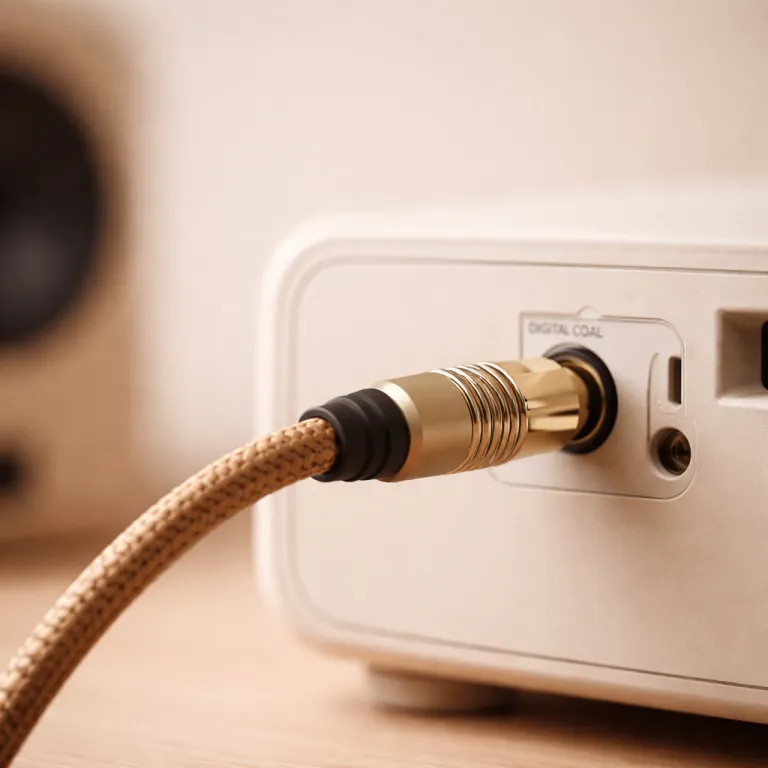
Understanding coaxial digital audio cables in a projector setup
A home theater projector can only impress when the sound matches the image. When you add a dedicated AV receiver and speakers, the humble audio digital cable coaxial suddenly becomes a strategic choice. The right digital audio link keeps your sound clean while your projector throws a bright, cinematic picture.
In many systems, a single coaxial cable carries digital audio from a Blu ray player or media box to the receiver. This digital coax connection uses an electrical signal over a 75 ohm coax cable instead of light, unlike optical links, yet it still transports multichannel formats. For a projector owner who wants reliable sound without HDMI ARC issues, a coaxial digital path can be a stable backbone.
Most coaxial audio cables use an RCA plug, often a male rca connector with color coding that is usually black or orange. The coaxial cable itself is built around a solid core conductor, surrounded by insulation, shielding, and an outer jacket that is often cable black or sometimes silver. Better products may add gold plated contacts to the rca ends, which can improve long term reliability more than raw sound quality.
Because digital cables transmit bits, many people assume any product will do. However, poor quality digital cable construction can lead to signal reflections on the 75 ohm line, especially over longer runs between rack and projector wall. For a quiet, interference free home theater, a well built coaxial audio cable is a modest but meaningful investment.
Signal integrity, ohm matching, and long cable runs to projectors
Projectors often sit several metres from the equipment rack, so cable runs become critical. A coaxial digital audio cable must maintain its 75 ohm characteristic impedance along the entire length to avoid reflections. When the coaxial digital signal bounces inside mismatched cables, you increase jitter and risk dropouts at the receiver.
Quality digital cables use a consistent solid core or carefully stranded core with precise geometry. The dielectric around that core, plus the braided or foil shield, defines the ohm digital behavior that keeps the digital audio waveform intact. In practice, this means choosing a coax cable that is specified as 75 ohm, not a random rca audio video lead designed for short analogue runs.
For ceiling mounted projectors, you may route audio cables through conduits alongside HDMI and power. In these crowded spaces, a robust coaxial audio product with strong shielding helps reject interference from mains lines and high frequency HDMI signals. This is especially important when the subwoofer cable also runs nearby, because low frequency energy can leak into poorly shielded digital coaxial lines.
Installers often favor cable black jackets for in wall runs, as they hide marks and blend with hardware. Others choose silver or color coded products to identify each digital cable quickly when servicing complex systems. Whatever the color, the priority is a coaxial cable that maintains signal integrity from source to receiver, even when the projector sits 10 metres away.
Choosing between coaxial digital, HDMI, and optical for projector audio
Modern home theater systems offer several ways to route sound from sources to amplifiers. HDMI can carry both audio video in one cable, while optical and coaxial digital audio cables focus purely on sound. For projector owners, separating video over HDMI and audio over a dedicated digital cable can simplify troubleshooting and upgrades.
Coaxial digital connections use electrical signals over coax, while optical uses light through fiber. In many products, the same digital audio formats are available on both, but coaxial audio sometimes handles slightly higher bandwidth and can be more tolerant of connector wear. When your projector is linked to an AV receiver via HDMI, you can still send digital audio from a media player to that receiver using a digital coaxial input.
Some compact systems and soundbars only offer one coaxial digital input, so you may need to prioritize which product uses it. In such cases, a high quality audio cable with gold plated male rca connectors ensures a firm grip that resists accidental disconnection when you move the projector. Optical can be useful where electrical isolation is vital, yet a well made coaxial cable remains a flexible, cost effective option.
For long term planning, think about how many digital cables your future systems might require. If you add a dedicated subwoofer, gaming console, and streaming box, each may need its own audio cables or HDMI path. Balancing HDMI, optical, and coaxial digital links gives your projector based theater both reliability and room to grow.
Evaluating build quality, price, and value in digital coax cables
Not all audio digital cable coaxial products are created equal, even if they share similar specifications. When comparing price points, look beyond marketing claims and focus on tangible build quality indicators. A well engineered digital cable should feel solid without being excessively stiff, and the connectors should lock firmly into rca jacks.
Key details include the thickness of the shield, the precision of the solid core or stranded core, and the strain relief behind each male rca plug. Gold plated contacts resist corrosion, which is useful in rooms where projectors and systems generate heat and dust over time. While gold plating does not magically improve sound, it helps maintain consistent digital audio performance by preserving clean contact surfaces.
Color choices such as cable black or silver jackets are mostly aesthetic, but they can help organize multiple audio cables behind an equipment rack. Some products label the direction of the digital coax, although for true digital signals this usually has little technical impact. More important is that the coaxial cable is clearly marked as 75 ohm digital, not just generic rca audio video.
Shipping policies also matter when you buy online, especially for long cables routed to ceiling mounted projectors. Check whether the product arrives coiled gently rather than sharply folded, because kinks can damage the coax core and compromise performance. Balancing quality, reasonable price, and reliable shipping helps ensure your digital cables support your projector system for many years.
Integrating subwoofers and multi speaker systems with coaxial audio
A powerful projector image deserves equally impactful bass, which means a well integrated subwoofer. Many subwoofer cable runs use the same rca style connectors as a coaxial digital audio cable, but the signal is analogue rather than digital. Even so, the physical construction of these cables often mirrors that of digital coax, with a central core and heavy shielding.
In complex systems, you might run a dedicated digital coaxial line from a media player to the AV receiver, while separate audio cables feed subwoofers and surround channels. Keeping cable routing tidy reduces the risk of hum and interference, especially when subwoofer cable paths cross power lines. Using consistent cable black or silver jackets can make it easier to trace each product during maintenance.
When planning a projector based theater, think about how the coaxial audio infrastructure supports future upgrades. If you later add more products, such as an external DAC or network streamer, spare digital cables and coaxial inputs will be valuable. Reading detailed reviews, such as those that examine models like the Optoma EH335 in a dedicated home theater projector guide, can also highlight how audio connectivity interacts with projector placement.
Some enthusiasts prefer solid core designs for both digital cable and subwoofer links, arguing they offer better consistency over long runs. Others prioritize flexibility, especially when routing coax cable through tight ceiling spaces around the projector mount. Whatever your preference, ensure that every coaxial cable, from digital audio to subwoofer lines, matches the performance level of your projector and speakers.
Practical tips for projector owners using coaxial digital audio
For many projector owners, the first step is simply identifying which digital audio outputs and inputs are available. Check whether your source devices offer digital coax, optical, or HDMI, and then map those to the AV receiver that powers your speakers. If a device only has a coaxial digital output, a single audio digital cable coaxial can unlock full surround sound for your projector system.
When installing, avoid running coaxial audio cables parallel to mains power for long distances. Crossing at right angles reduces interference, helping the 75 ohm digital signal remain clean from source to receiver. Label each coaxial cable at both ends, especially when multiple products share a rack and the projector sits across the room.
Regularly inspect connectors for dust or oxidation, particularly on gold plated rca plugs that sit behind warm electronics. If you notice intermittent sound or clicks, gently reseat each male rca connector and verify that the coax cable has not been pinched. In some cases, replacing an aging digital cable can restore stable digital audio without any change to the projector or speakers.
Finally, remember that cables are part of a larger ecosystem that includes projector placement, room acoustics, and speaker calibration. A well chosen coaxial audio product will not fix poor speaker positioning, but it ensures the digital coaxial signal reaches your system without compromise. By treating audio cables, including every coaxial cable and subwoofer cable, as deliberate choices rather than afterthoughts, you respect both your investment and your listening experience.
Key statistics about home theater audio and cabling
- Up to 70 % of home theater owners report audible improvements after reorganizing and upgrading audio cables, including coaxial digital links.
- More than 60 % of projector installations require cable runs longer than 5 metres between source rack and display.
- Approximately 80 % of AV receivers still include at least one coaxial digital input alongside HDMI and optical.
- In structured home installations, over 50 % of signal issues trace back to cabling faults or poor terminations.
- Professional calibrators estimate that optimized audio accounts for nearly 40 % of perceived home cinema quality.
Common questions about coaxial digital audio in projector systems
How does a coaxial digital audio cable differ from HDMI for projector use ?
A coaxial digital audio cable carries only sound, while HDMI carries both audio video. Many projector owners send video over HDMI to the projector and route digital audio over coaxial cable to an AV receiver. This separation can simplify troubleshooting and allows you to upgrade video or audio components independently.
Is a more expensive coaxial cable always better for home theater ?
Price alone does not guarantee better sound, but very cheap products may cut corners on shielding and 75 ohm construction. For long runs to a ceiling mounted projector rack, a mid range, well specified digital cable is usually sufficient. Focus on build quality, reliable connectors, and appropriate length rather than luxury branding.
Can I use a regular RCA cable instead of a 75 ohm digital coax cable ?
Some short runs may work with a standard rca audio video cable, but it is not ideal. A true 75 ohm coaxial digital cable is designed for the signal characteristics of digital audio and reduces the risk of jitter or dropouts. For critical home theater use, especially with projectors and long distances, dedicated digital coaxial cables are recommended.
Where should I place my AV receiver when using a projector and coaxial audio ?
Most people place the AV receiver near the source devices, keeping digital audio and HDMI cable lengths manageable. From there, a single long HDMI run goes to the projector, while shorter coaxial digital cables connect local sources. This layout minimizes clutter near the projector and centralizes audio control at the equipment rack.
Do gold plated connectors improve the sound of coaxial digital cables ?
Gold plated connectors mainly improve durability and resistance to corrosion, not the inherent sound quality. In a projector based home theater, they help maintain reliable contact over years of heat and dust exposure. The most important factors remain proper 75 ohm design, shielding, and appropriate cable routing.