

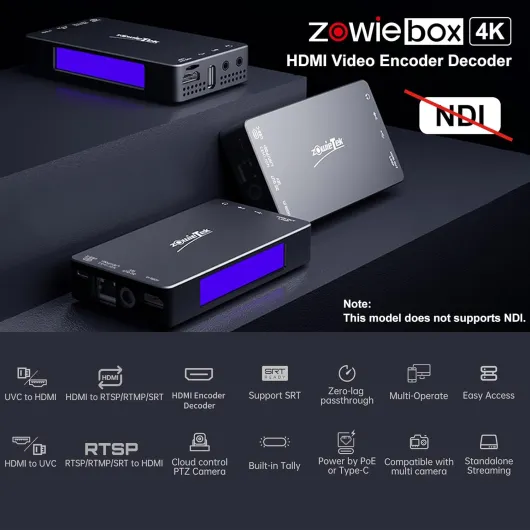
Understanding the role of a 4k streaming encoder in home theaters
Why a 4K Streaming Encoder Matters in Home Theater Setups
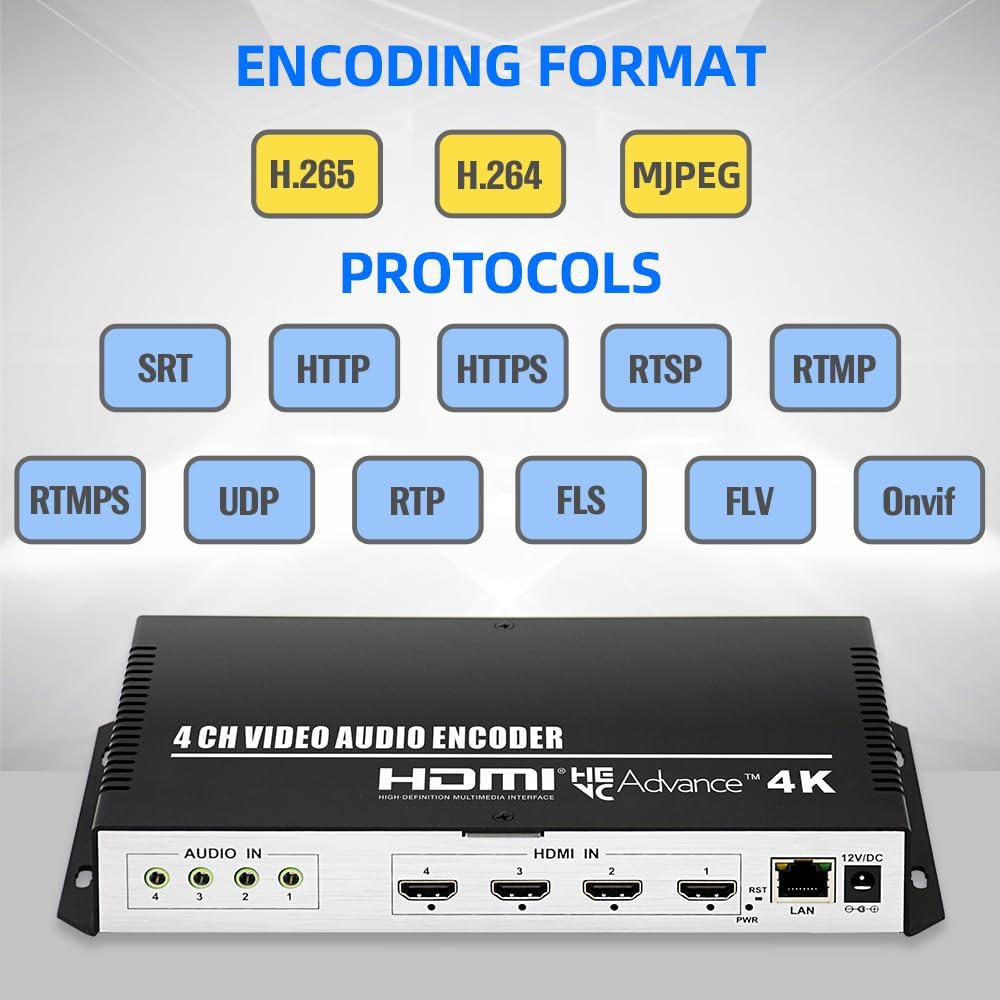
When building a home theater, the quality of your video and audio stream is crucial. A 4K streaming encoder acts as the bridge between your content sources—like a camera, media player, or gaming console—and your projector. This unit takes in HDMI, SDI, or even NDI signals, compresses them, and sends them out as a high-quality video stream. Whether you’re watching live sports, streaming movies, or sharing live video from a camera, the encoder ensures your projector receives a full, ultra-high-definition signal with minimal lag and maximum clarity.
How Streaming Encoders Work with Your Projector
Encoders convert raw HDMI or SDI video and audio signals into formats suitable for streaming over your home network or the internet. They support protocols like RTMP and NDI, allowing you to stream content from your media server, gaming PC, or even a live camera directly to your projector. Many encoders offer HDMI video input and output, so you can connect your source device and projector in a seamless loop. Some units also feature USB support, internal storage for recording, and web GUI control for easy setup and monitoring.
- HDMI/SDI/NDI support: Ensures compatibility with most modern devices and projectors.
- High bit rate encoding: Delivers crisp, high quality video and audio.
- Network streaming: Enables live streaming to your projector or other devices on your network.
- Front panel controls: Allow for quick adjustments without needing a computer.
Choosing the right streaming encoder is about more than just specs. It’s about ensuring your home theater projector receives the best possible signal, whether you’re watching movies, gaming, or hosting a live event. If you’re interested in how projectors can enhance your gaming experience, check out this guide on top projectors for immersive gaming.
Key features to look for in a 4k streaming encoder
Essential specifications for seamless streaming
When evaluating a 4k streaming encoder for your home theater projector, it's important to focus on the technical features that directly impact your viewing experience. A good encoder ensures your video and audio streams are delivered in high quality, with minimal lag or loss. Here are some of the most important features to consider:
- HDMI and SDI Inputs: Look for units that offer both HDMI and SDI support. HDMI video is standard for most home theater setups, while SDI is valuable if you plan to integrate professional cameras or equipment.
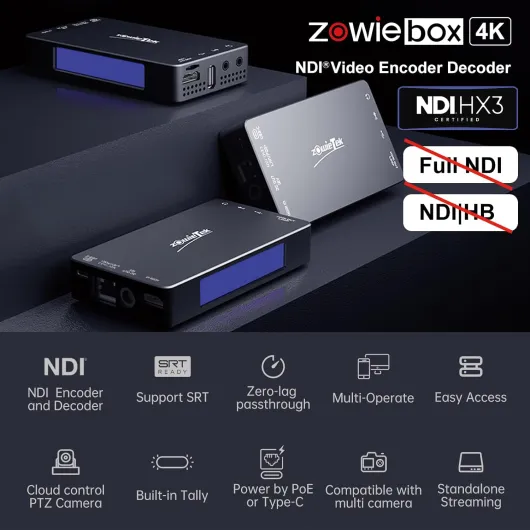
- NDI Support: NDI (Network Device Interface) allows for efficient video streaming over your local network. Encoders with NDI HDMI or NDI SDI capabilities provide more flexibility for live video and multi-room setups.
- Bit Rate Control: Adjustable bit rate lets you balance video quality and network bandwidth. High bit rate options are crucial for full 4k video streaming, especially if you want to maintain ultra encode quality.
- Multiple Output Protocols: Ensure the encoder supports popular streaming protocols like RTMP, HLS, and SRT. This makes it easier to stream to various platforms or devices.
- Audio and Video Sync: Reliable video audio synchronization is essential for immersive viewing. Check for encoders that minimize latency and offer audio embedding features.
- USB and Internal Storage: Some encoders allow you to record streams directly to USB drives or internal storage. This is useful for archiving live events or troubleshooting playback issues.
- Web GUI and Front Panel Control: A user-friendly web GUI or front panel makes it easier to configure and monitor your encoder. This is especially helpful for quick adjustments during live streaming.
- Encoder Decoder Functionality: Some units offer both encoding and decoding, letting you stream and receive video over your network. This can be useful for multi-room or remote viewing setups.
Connectivity and compatibility
Consider how the encoder will connect with your projector and other devices. HDMI signal compatibility is a must, but having SDI HDMI or NDI HDMI options can expand your system's flexibility. Also, check for network support, as a stable wired or wireless connection is vital for uninterrupted streaming.
For a deeper dive into how screen size can affect your home theater experience, you might want to read about the true size of a 100-inch screen and how it pairs with high quality video streaming.
Additional features for advanced users
- CLS Fill and Ultra Encode: Advanced features like CLS fill help maintain video aspect ratios, while ultra encode ensures the highest possible quality for demanding setups.
- Multiple Camera Inputs: If you plan to stream live events or use multiple cameras, look for encoders with several HDMI or SDI inputs and robust switching capabilities.
By focusing on these features, you can select a streaming encoder that delivers reliable, high quality video and audio for your home theater projector, supporting both current and future needs.
Compatibility with home theater projectors and devices
Ensuring Seamless Connections Between Encoder and Projector
When setting up a home theater, the compatibility between your 4K streaming encoder and your projector is crucial for achieving high quality video and audio. Not all encoders and projectors speak the same language, so understanding the available connections and supported formats is essential.
- HDMI and SDI: Most home theater projectors rely on HDMI inputs for video and audio. Many streaming encoders offer HDMI video output, and some units also provide SDI or even HDMI SDI combo ports. If your projector supports SDI, this can be a plus for longer cable runs and professional setups. Always check if your encoder supports the HDMI signal format and bit rate your projector requires.
- NDI and Network Streaming: For advanced setups, NDI support allows video and audio to be streamed over your local network. This is useful if you want to connect multiple devices or integrate live streaming workflows. Make sure your projector or connected devices can receive NDI streams, or use an NDI HDMI converter if needed.
- USB and Internal Storage: Some encoders offer USB ports or internal storage for direct playback. This can be handy if you want to stream pre-recorded content without relying on a network connection.
- Audio Compatibility: Check if your encoder supports full video audio passthrough, especially if you use an external sound system. Some encoders allow you to control audio output separately from video.
- Encoder Decoder Pairing: If you use an encoder decoder unit, ensure both support the same protocols (like RTMP, HLS, or SRT) and output formats. This guarantees smooth video streaming from your source to your projector.
Device Support and Control Features
Modern streaming encoders often come with a web GUI or front panel controls, making it easier to manage settings and monitor the stream. Look for units that allow you to adjust bit rate, video quality, and output resolution to match your projector's capabilities. Some encoders even support remote control via network, which is useful for fine-tuning your setup during live video events.
For those integrating multiple sources, such as a camera or media player, ensure your encoder supports multi-input and can handle the video audio mix you need. Ultra encode models often provide advanced features like simultaneous HDMI and NDI output, giving you flexibility for both local playback and live streaming.
Optimizing for Projector Performance
Matching your encoder's output to your projector's specifications is key for the best viewing experience. Pay attention to supported resolutions, frame rates, and color profiles. For more on how projector brightness and image quality affect your setup, read this guide on ANSI lumens.
In summary, choosing a streaming encoder with the right HDMI, SDI, or NDI support, robust control options, and compatibility with your projector's video audio requirements will ensure a smooth and high quality home theater experience.
Setting up your 4k streaming encoder for optimal performance
Getting the Most Out of Your 4K Streaming Encoder
To enjoy the full potential of your home theater projector, setting up your 4K streaming encoder correctly is crucial. A well-configured encoder ensures that your video and audio streams are delivered in high quality, with minimal lag or interruptions. Here are some practical steps and tips to help you achieve optimal performance:
- Connect with the Right Interfaces: Use HDMI, SDI, or NDI connections depending on your projector and source devices. HDMI video is common for most home theater setups, but SDI and NDI support can offer more flexibility for advanced systems or live streaming scenarios.
- Configure Video and Audio Settings: Adjust the encoder’s video resolution and bit rate to match your projector’s capabilities. For 4K streaming, ensure the encoder supports ultra encode and high bit rates for crisp, detailed images. Set audio output to match your sound system for immersive playback.
- Network Optimization: Connect your encoder to a stable, high-speed network. Wired Ethernet is preferred for consistent video streaming quality. If using Wi-Fi, ensure a strong signal to avoid buffering or dropped streams.
- Choose the Right Output Protocols: Select protocols like RTMP for live streaming or NDI for low-latency video transmission within your network. Some units also support USB output or internal storage for recording streams directly.
- Leverage Control Features: Many encoders offer a web GUI or front panel controls for easy setup and monitoring. Use these tools to fine-tune settings, monitor HDMI signal status, and manage encoder decoder functions.
- Test and Monitor: Before your main viewing or live video event, test the full setup. Check for sync between video audio, verify output quality, and ensure all devices are recognized and supported. Monitor the stream for any issues and adjust settings as needed.
By carefully setting up your streaming encoder and making use of features like HDMI SDI, NDI HDMI, and advanced control options, you can achieve a seamless, high quality home theater experience. Remember, the right setup not only enhances video streaming but also future-proofs your system for new formats and devices.
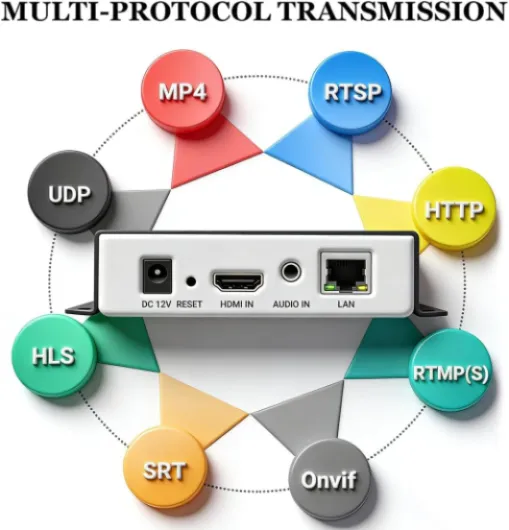
- + Supports 4K resolution
- + Multiple streaming protocols (RTSP, RTMP, HLS, etc.)
- + Hardware converter for reliable performance
- + Live broadcast capability for real-time streaming
- + ONVIF compliant for integration with various systems

Troubleshooting common issues with 4k streaming encoders
Common Problems and Practical Fixes
Even with a high quality 4k streaming encoder, issues can crop up during setup or daily use. Here are some of the most frequent problems users encounter, along with practical solutions to keep your home theater projector experience smooth and enjoyable.
- No HDMI Signal Detected
Double-check that your HDMI cable is securely connected to both the encoder and the projector. Try a different HDMI port or cable if the problem persists. Some encoders support both HDMI and SDI; switching inputs can help isolate the issue. - Audio Out of Sync with Video
Sync issues can often be resolved by adjusting the audio delay settings in your encoder’s web GUI or front panel. Make sure your video audio settings match the source and output devices. If you’re using NDI or SDI, check for firmware updates that improve audio sync. - Poor Streaming Quality or Buffering
Check your network connection and bit rate settings. A low bit rate can cause pixelation or lag, especially with ultra encode or live video streams. If your encoder supports RTMP or NDI, ensure your network bandwidth is sufficient for 4k video streaming. Wired connections are more reliable than Wi-Fi for high quality streams. - Encoder Not Recognized by Devices
Some projectors or AV receivers may not support certain streaming protocols or resolutions. Confirm that your encoder’s output matches the supported formats of your projector. For USB or internal storage playback, verify file compatibility and format support. - Overheating or Unexpected Shutdowns
Encoders and decoder units can get warm during extended live streaming. Make sure your unit has adequate ventilation and is not placed near heat sources. If overheating continues, check for dust buildup or consider using an external fan.
Tips for Reliable Performance
- Regularly update your encoder’s firmware for improved stability and new features like enhanced NDI support or advanced control options.
- Use high quality HDMI and SDI cables to prevent signal loss, especially for long cable runs between your camera, encoder, and projector.
- Monitor your encoder’s status via the web GUI or front panel to quickly identify and resolve issues.
- For live streaming, test your setup before important events to ensure all video audio and streaming encoder settings are correct.
By staying proactive with maintenance and troubleshooting, you can enjoy full, uninterrupted 4k streaming and make the most of your home theater projector setup.
Future-proofing your home theater with the right encoder
Staying Ahead with Evolving Streaming Technologies
Home theater technology is always moving forward, and your 4k streaming encoder should keep up. When choosing an encoder, think beyond your current needs. Look for units that support the latest video and audio formats, such as HDMI 2.1, NDI, and SDI, as well as high bit rate streaming for ultra high quality. This ensures your setup can handle future content standards and devices.
- Multi-protocol support: Make sure your encoder can handle RTMP, NDI, and other popular streaming protocols. This flexibility is key as new platforms and streaming methods emerge.
- Comprehensive input/output options: HDMI, SDI, and USB ports allow you to connect a wide range of sources, from cameras to media players. Units with both HDMI and SDI support are especially versatile.
- Firmware updates: Choose a streaming encoder with regular firmware updates. This keeps your device compatible with new standards and improves performance over time.
- Internal storage and network features: Some encoders offer internal storage for local recording and advanced network control, including web GUI access for remote management. These features can extend the life and usefulness of your unit.
- Encoder/decoder flexibility: Devices that can function as both encoder and decoder give you more options for expanding your home theater system in the future.
Planning for Growth and Integration
As you add new devices or upgrade your projector, compatibility is crucial. Check that your streaming encoder supports the full range of video resolutions and frame rates your projector can display. HDMI signal quality, video audio sync, and support for live video streaming are all important for a seamless experience.
Consider encoders with advanced features like ultra encode, front panel controls, and CLS fill for professional-level control and output. NDI HDMI and SDI HDMI support can also make integration with other video equipment much easier as your system grows.
Making the Most of Your Investment
Future-proofing is about more than just hardware. Read product documentation carefully and stay informed about new streaming and encoding technologies. Regularly check for firmware updates and take advantage of web GUI features for easy management. By choosing a high quality streaming encoder with broad support and upgrade potential, you can enjoy reliable, high quality video streaming for years to come.