
Summary
Editor's rating
Value for money: who should actually buy this
Design: boring to look at, but practical to use
What you actually get in the box (and what’s missing)
Build quality, heat, and how long it should last
Brightness and image quality: strong point with a clear limit
What this projector actually offers in real life
Pros
- Very bright 3,000-lumen 3LCD image that holds up well in rooms with ambient light
- Simple setup with keystone slider and easy controls, suitable for non-technical users
- Long lamp life (up to 12,000 hours) and solid brand reliability for frequent use
Cons
- WXGA resolution (1280 x 800) is clearly lower than Full HD for movies and detailed content
- No HDMI cable or lens dust cap included, and built-in speaker is weak
- Can run hot and may shut down in very warm rooms after long sessions if ventilation is poor

Specifications
View full product page →| Brand | Epson |
A simple projector that just needs to work
I’ve been using the Epson CO-W01 for a mix of stuff: Netflix in the living room, a couple of work presentations, and one long gaming session on a PS5. I’m not a home cinema geek, I just wanted something bright enough to use in a normal room, easy to set up, and not stupidly expensive. This model kept popping up with good reviews and a decent price, so I gave it a try.
Out of the box, it feels like a typical Epson projector: plain white box, plastic shell, nothing fancy. Setup was very straightforward: plug in power, HDMI from laptop/console, adjust focus and keystone, done. I had an image on the wall in under 10 minutes without reading the manual. For someone who doesn’t want to mess around with menus for half an hour, that’s already a good start.
The first thing that stood out is the brightness. The 3,000 lumens and 3LCD tech are not marketing noise; in a room with curtains half open during the day, the image was still very watchable. Of course, it looks much better with the lights off, but you don’t need a pitch-black bat cave to see what’s going on. For PowerPoint and Excel, it’s more than enough, even with some ambient light.
On the flip side, you have to remember this is WXGA (1280 x 800), not Full HD. If you’re used to a 4K TV, you’ll see the difference in sharpness, especially on text and small details. For movies and series at a normal distance, it’s decent and totally fine for casual viewing. For super sharp 4K content, this isn’t the right product, and it doesn’t pretend to be. It’s more about size and brightness than pixel peeping.
Value for money: who should actually buy this
In terms of value, I’d put the Epson CO-W01 in the “pretty solid for what it is” category. It’s not the cheapest projector on the market, especially compared to random brands on Amazon that promise Full HD or 4K for suspiciously low prices. But those often lie about brightness and don’t last. Here, you’re paying for a known brand, realistic specs, and decent reliability. For a projector that will be used often in a home, office, or school, that matters more than fancy features you’ll never touch.
Where it shines is if you need a bright, simple machine for mixed use: movies, presentations, training sessions. You get:
- Good brightness (3,000 lumens) that actually holds up in real rooms
- Decent colours thanks to 3LCD
- Long lamp life and parts availability
- Easy setup with keystone slider and straightforward controls
On the downside, for roughly the same budget (depending on promos), you can sometimes find Full HD projectors (1080p) that will look sharper for movies and gaming. They might not be as bright or as reliable, but if your priority is resolution and you always watch in a dark room, those might make more sense. So it really depends what you care about: if you want absolute sharpness, look elsewhere; if you want a workhorse that can handle bright rooms and mixed tasks, this Epson makes more sense.
So my take: good value for money if you accept the WXGA limitation and don’t expect smart-TV features. It’s a practical tool, not a toy. For a family that wants a big screen sometimes and a teacher or trainer who needs a reliable projector, it’s a nice middle ground. For hardcore home cinema fans or spec chasers, I’d say save more and jump to a higher-end Full HD or 4K model instead.
Design: boring to look at, but practical to use
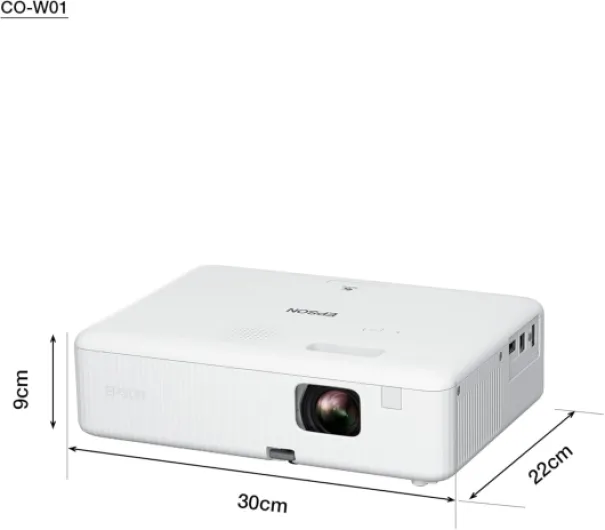
Design-wise, the Epson CO-W01 is as exciting as a toaster. It’s a plain white plastic box, about 29.5 x 21.1 x 8.7 cm, weighing 2.4 kg. The good news: it’s compact enough to move from room to room or throw in a backpack if you’re doing presentations elsewhere. I carried it between home and the office a few times; it’s not ultra-light, but it’s not a brick either. If you’re used to office projectors, this is pretty standard.
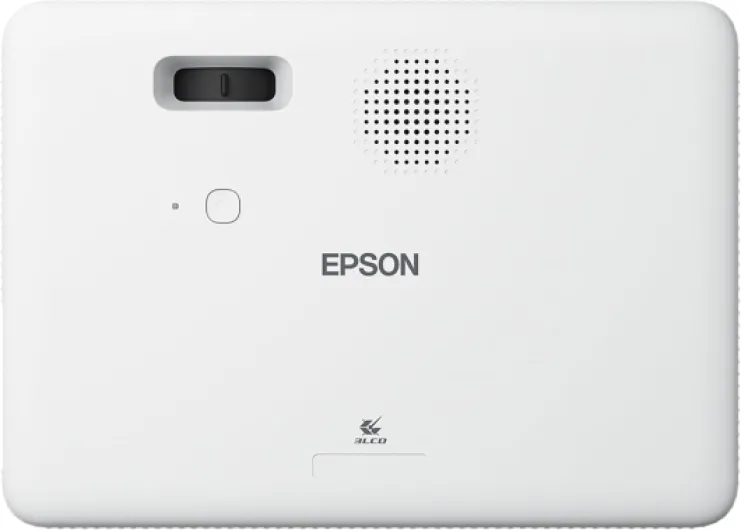
Controls are simple: buttons on top for power, source, menu, navigation, and a manual focus ring on the lens. There’s also a sliding keystone adjustment which is actually handy. You just slide it and it straightens the image without too much fuss. You lose a bit of sharpness with digital keystone, like on every projector, but for quick setups it’s worth it. For a more permanent setup, you’ll want to position it as straight as possible to avoid relying on that.
There are some small annoyances. One user mentioned it and I confirm: no lens dust cap in the box. That’s a bit cheap from Epson. If you’re moving it around or storing it in a bag, the lens stays exposed, so dust and scratches are a risk. I ended up using a microfiber cloth and a small pouch to protect it, but honestly, a simple plastic cap would have been nice. Also, there’s no height-adjustable rear feet, just a front foot, so fine-tuning height sometimes means stacking it on books.
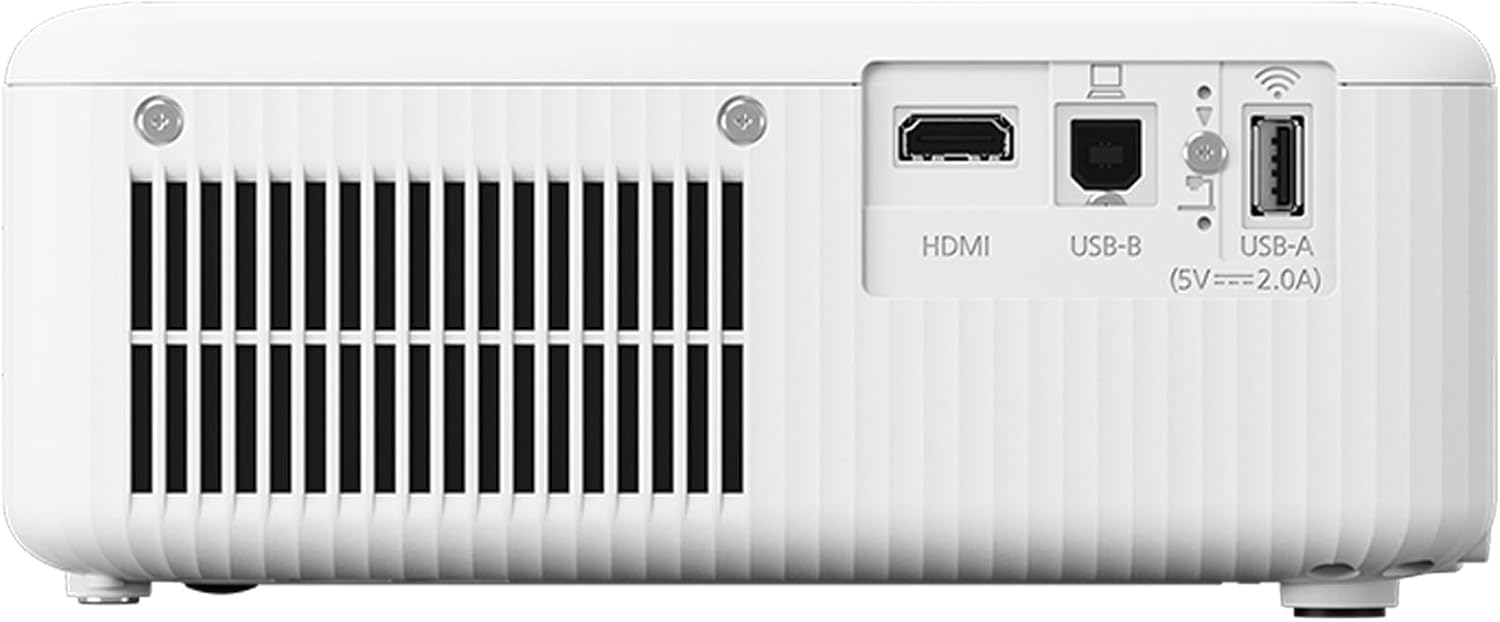
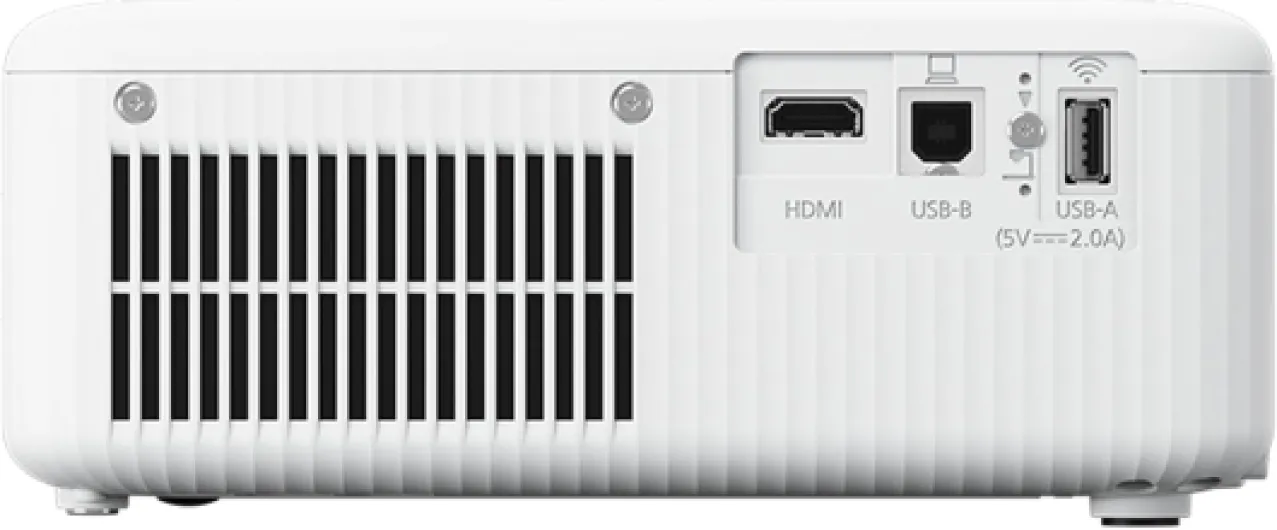
Ventilation is on the side, and you can feel the hot air coming out after a while. In a normal UK/European room it’s fine. But I did notice that in a warmer environment (like the review mentioning Uganda), it can get pretty hot, and the projector will shut down if it feels it’s overheating. So it’s not ideal for very hot rooms without good airflow. Noise-wise, the fan is audible but not crazy loud. In eco mode it’s acceptable; in normal mode you hear it, but once a movie starts you kind of forget it’s there unless you’re very sensitive to noise.
What you actually get in the box (and what’s missing)
The packaging is very standard Epson: a cardboard box, basic protection, and no attempt to look premium. Inside, you get the projector, a power cord, a user manual, and in my case a VGA cable. No HDMI cable, no lens cap, no carrying bag. That lines up with one of the Amazon reviews: they also complained about the lack of HDMI cable and dust cap. For a product that most people will plug into HDMI, not including that cable feels a bit stingy.
The manual is clear enough, but honestly, you barely need it. The on-screen menus are simple, and basic setup is obvious. I only checked the manual once to see some details about lamp modes and keystone. If you’re used to any kind of TV or projector menu, you’ll manage without reading more than a page or two. The remote (if included in your region – mine had one) is small and basic, with the usual buttons: power, source, menu, volume, etc. It’s not backlit, which is slightly annoying in a dark room, but you get used to the layout.
One thing I really missed is some kind of protective accessory. No lens cover, no soft pouch, nothing. If you plan to move it around, you’ll probably want to buy a cheap padded bag or reuse a laptop bag. For a device that’s advertised as portable and used in different locations (home, office, classroom), it would have made sense to include at least a simple fabric sleeve or a lens cap. It’s not a deal-breaker, but it’s the kind of small detail that shows where they cut costs.
Overall, the packaging is functional but bare-bones. It arrives safe, it’s easy to unbox and set up, but don’t expect extra goodies. Factor in the cost of an HDMI cable and maybe a bag if you don’t already have those. If you’re used to gadgets coming with a full set of accessories, this will feel a bit minimal. If you already have cables lying around, you probably won’t care much.
Build quality, heat, and how long it should last
In terms of build quality, the Epson CO-W01 feels like typical mid-range office gear: decent plastic, nothing premium, but it doesn’t feel like it’ll fall apart. The casing doesn’t creak, the buttons respond properly, and the ports don’t feel loose. I moved it around a fair bit, tossed it in a backpack with some padding, and it came out fine. It’s not a tank, but if you’re not throwing it around, it should be okay.
The lamp life is advertised up to 12,000 hours in eco mode. Realistically, even if you watch 2 hours of content a day, that’s over 16 years on paper. In normal mode it will be less, but still a lot. Epson also mentions 18 years of entertainment in their marketing, which is basically the same idea. Of course, that assumes you don’t run it at full brightness all day long and you keep the filters reasonably clean. There’s also an 18-year spare part availability in the EU, which is good if you like to keep gear for a long time.
Now the weak point: heat management. In a normal 20–23°C room, I didn’t have shutdowns. The fan kicks in, it gets warm, but it stays under control. However, the Amazon review from Uganda doesn’t surprise me. In a hot room (28–30°C), after a few hours it can overheat and cut off to protect itself. This is pretty common with compact projectors, but if you plan to use it for long seminars in hot climates with no aircon, you need to be aware of that. Good ventilation and not blocking the side vents are important.
Maintenance-wise, it’s simple: keep the vents clean, don’t block airflow, and avoid dusty environments if you can. There’s a one-year manufacturer warranty, which is a bit short in my opinion for something like this; two years would have been better. That said, Epson has a decent reputation for reliability. I’ve seen Epson projectors in offices running for years without drama. So overall, I’d say durability is pretty solid for the price, as long as you don’t cook it in a sauna-like room and you treat it like electronics, not like a football.
Brightness and image quality: strong point with a clear limit
In terms of performance, the strong point here is clearly the brightness. The 3,000 lumens are not just numbers on the box. I tested it in three situations: living room with blinds half open in the afternoon, fully dark room at night, and a meeting room with neon lights on. In all three, the image was usable. In full daylight with direct sun on the wall, no projector will save you, but in normal indoor lighting this one holds up well. For slides, spreadsheets, and basic videos, it’s more than enough.
Colour reproduction is solid for this price range thanks to the 3LCD technology. Colours look balanced and don’t have that washed-out feel you sometimes get on cheap DLP projectors. Skin tones are decent, and cartoons look quite good. Don’t expect cinema-level contrast, though. Blacks are more like dark grey, especially if there’s some ambient light. For action movies and dark scenes, you notice it, but that’s normal on this type of projector. If you care a lot about deep blacks, you’ll need to spend more on a higher-end model.
The WXGA resolution (1200 x 800 native) is where you feel the compromise. For PowerPoint, web browsing, and streaming at a few meters distance, it’s okay. Text is readable, icons are clear enough. But if you sit close or stretch the image to 120+ inches, you start to see the pixel grid. Compared to a Full HD projector, there is a clear step down in sharpness, especially on subtitles and UI elements. For casual users, it’s fine. For film buffs or gamers who care about detail, I’d say this is “good enough” but not more.
Input lag isn’t specified clearly, but for casual console gaming (FIFA, Mario Kart, some shooters) I didn’t feel it was a disaster. If you’re a competitive gamer, you’ll probably prefer a gaming monitor anyway. For occasional gaming on a big wall with friends, it does the job. The built-in speaker is there but weak; it’s okay for a quick presentation or YouTube video, but for movies you’ll want external speakers or a soundbar. That’s not a surprise at this price point, but worth mentioning.
What this projector actually offers in real life
On paper, the Epson CO-W01 is a 3LCD WXGA projector with 3,000 ANSI lumens, a contrast ratio around 15,000:1, and a lamp life of up to 12,000 hours in eco mode. Translation into real life: bright enough for meeting rooms and living rooms, acceptable blacks for the price, and a lamp that you’ll probably never manage to kill if you’re a normal user. Epson says up to 18 years of entertainment if you watch a couple of hours a day. Honestly, by the time the lamp dies, you’ll probably have moved on to something else.
Connectivity is pretty basic: HDMI, USB-A, and a VGA cable in the box (at least in my package). No smart TV functions, no Wi-Fi, no Bluetooth. So you plug in a laptop, console, streaming stick (Fire TV, Chromecast, etc.), and that’s it. If you’re looking for an all-in-one Netflix box with built-in apps, this is not it. But in practice, I prefer a simple projector and a cheap streaming stick anyway; it’s easier to replace later.
The image size range is huge: from 25 inches up to 378 inches. I mostly used it around 80–100 inches on a plain white wall at about 2.5–3 meters. At that size, the resolution is fine and text is readable. If you push it to giant sizes, you start to see the pixels more clearly, especially on subtitles and menus. So yes, it can technically do a massive image, but the sweet spot for this resolution is more around the 80–120 inch range.
One thing the spec sheet pushes is the idea that it’s for both home and business / education. After using it in both contexts, I agree with that. For a classroom, meeting room, or church hall, it does the job: bright, simple, reliable brand. For home, it’s good for people who want a big screen without getting crazy about ultra HD, HDR and all that. If you’re picky about image quality and want cinematic blacks and 4K, this is too basic. If you just want to watch football on a big wall with friends, it’s more than enough.
Pros
- Very bright 3,000-lumen 3LCD image that holds up well in rooms with ambient light
- Simple setup with keystone slider and easy controls, suitable for non-technical users
- Long lamp life (up to 12,000 hours) and solid brand reliability for frequent use
Cons
- WXGA resolution (1280 x 800) is clearly lower than Full HD for movies and detailed content
- No HDMI cable or lens dust cap included, and built-in speaker is weak
- Can run hot and may shut down in very warm rooms after long sessions if ventilation is poor
Conclusion
Editor's rating
The Epson CO-W01 is a no-nonsense projector that focuses on the basics: strong brightness, decent colours, and simple setup. In practice, that means it works well in real-world conditions: living rooms with some light, classrooms, meeting rooms. The WXGA resolution is clearly behind modern TVs and Full HD projectors, but for typical sizes around 80–100 inches, it’s absolutely usable for movies, presentations, and casual gaming.
It’s not perfect. The lack of HDMI cable and lens cap is a bit cheap, the built-in speaker is weak, and in hot environments the projector can overheat after a long session if the room isn’t well ventilated. Also, if you’re picky about image sharpness or want a real home cinema setup, the 1280 x 800 resolution will feel limited. You’ll find better options for pure movie use if you can stretch your budget and don’t need as much brightness.
Who is it for? People who want a reliable, bright, and simple projector for mixed use: families sharing it between cartoons and Netflix, teachers, trainers, small businesses. If you just want something that gets the job done without a lot of configuration and you trust Epson as a brand, it’s a solid choice. Who should skip it? Anyone chasing top-tier image quality, 4K content, deep blacks, or built-in smart features. For them, this will feel too basic, even if it’s competent at what it does.