


Why speaker wire colors matter in home theater projector setups
Why wire color matters for your home theater audio
When setting up a home theater projector, the details behind your speaker wire colors might seem minor, but they play a crucial role in your audio system’s performance. The color codes on speaker wires—like red and black—aren’t just for looks. They help you connect each speaker cable correctly, ensuring the positive and negative wires match up with your audio equipment. This is vital for preserving sound quality and preventing issues like phase cancellation, which can make your surround sound feel flat or distorted.
Getting the polarity right is especially important when you’re working with multiple speakers and a projector system. If you mix up the positive (often red) and negative (often black or copper) wires, your speakers may end up out of phase, leading to weak bass and muddled audio. That’s why understanding wire color codes is a basic but essential step for anyone aiming for a quality speaker setup.
Speaker wire color codes also help you troubleshoot audio issues more efficiently. If you ever notice a drop in sound quality or a speaker not working, being able to quickly identify the positive and negative wires saves time and frustration. Plus, using the right gauge speaker wire and oxygen free copper cables can make a real difference in the clarity and power of your sound.
For those looking to optimize their home theater experience, paying attention to speaker wire color and cable quality is as important as choosing the right projector or speakers. If you want to dive deeper into creating a truly immersive surround sound environment, check out this guide on how to choose the best Dolby Atmos ceiling speakers for your home theater.
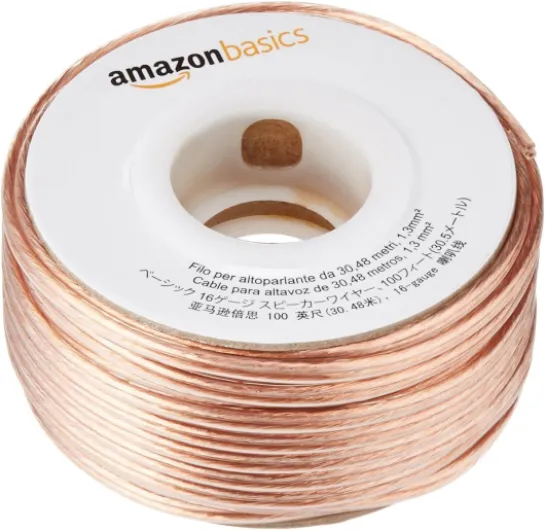
- + Assemblage facile
- + Longueur de 100 pieds
- + Fil de 16 AWG
- + Couleur bronze

Common speaker wire color codes explained
Understanding the Most Common Speaker Wire Color Codes
When setting up your home theater projector audio system, you’ll notice that speaker wires come in different colors. These color codes are not just for looks—they help you identify the positive and negative connections, which is crucial for maintaining proper polarity and sound quality. If you mix up the positive and negative wires, your speakers may sound weak or out of phase, which can ruin the immersive surround sound experience.
- Red and Black: The most common color code for speaker wires is red for the positive wire and black for the negative wire. This red-black pairing is almost universal in audio systems, making it easier to match connections between your speakers and your projector’s audio outputs.
- Clear or Copper: Some speaker cables use clear insulation, revealing the copper inside. In these cases, one side may have a stripe or a printed indicator. The striped or marked side is usually the negative wire, while the plain copper side is positive. Always check the manufacturer’s guide to be sure.
- Other Colors: Occasionally, you’ll find speaker wires with white, blue, or gray insulation, especially in multi-channel or custom setups. These colors help you keep track of different channels, like front, rear, or subwoofer connections. For more on how subwoofers fit into your setup, you can read this guide on the role of a subwoofer in your home theater projector setup.
Properly matching the color codes ensures that the audio signal flows correctly from your amplifier or receiver to each speaker. This is especially important when using quality speaker wire, such as oxygen free copper cables, which are designed to deliver the best sound quality possible. If you’re shopping for speaker wire, pay attention to the gauge as well, since thicker cables (lower gauge numbers) are better for longer runs and higher power systems.
Remember, consistent use of color codes across all your speaker wires makes troubleshooting and future upgrades much easier. Whether you’re using banana plugs or bare wire connections, always double-check the color red for positive and black for negative before powering up your audio system.
How to safely connect speaker wires to your projector system
Ensuring Correct Polarity and Secure Connections
Connecting speaker wires to your home theater projector system might seem simple, but getting it right is crucial for sound quality and system safety. The color codes on your speaker wire—most commonly red for positive and black for negative—help you match the correct terminals on your speakers and audio system. This ensures that the audio signal flows in the right direction, maintaining proper polarity and preventing phase issues that can degrade your surround sound experience.- Identify the terminals: Most speakers and amplifiers use red for positive (+) and black for negative (–) terminals. Double-check the markings on your equipment before connecting.
- Match wire colors: Connect the red wire (or the wire marked with a stripe or text) to the red/positive terminal, and the black or plain copper wire to the black/negative terminal. This keeps the polarity consistent across all speakers.
- Strip the wire ends: Use a wire stripper to remove just enough insulation to expose the copper strands. Avoid cutting too much, as exposed wire can cause shorts.
- Twist and secure: Twist the copper strands tightly to prevent fraying. Insert the wire into the binding post or spring clip, ensuring a snug fit. For a more reliable connection, consider using banana plugs, which make attaching and detaching speaker cables easier and more secure.
- Check your connections: Once all wires are connected, gently tug each one to confirm it’s secure. Loose connections can cause audio dropouts or distortion.
Troubleshooting audio issues related to wire colors
Identifying and Fixing Audio Problems Caused by Wire Color Confusion
When setting up your home theater projector, mixing up speaker wire colors can lead to frustrating audio issues. If your sound quality is poor, or you notice speakers are not working as expected, the root cause might be incorrect wiring—especially with positive and negative wires.- Check Polarity: Most speaker wires use red for positive and black for negative. If these are swapped, you may experience weak bass or odd sound from your surround sound system. Always match the color codes on your speaker cable to the terminals on your speakers and audio system.
- Inspect Connections: Loose or frayed wires can cause crackling or intermittent sound. Make sure each wire is securely connected, and that copper strands are not touching each other or the wrong terminal. Banana plugs can help ensure a solid connection.
- Look for Consistency: If you use different cables or wire color codes, double-check that each speaker is wired the same way. Inconsistent wiring can cause phase issues, where some speakers cancel out others, reducing overall sound quality.
- Test Each Speaker: Play audio and listen to each speaker individually. If one is silent or sounds off, trace the wire back to the amplifier or projector. Confirm that the positive wire (often color red or marked with a stripe) is connected to the positive terminal, and the negative wire (often black or unmarked) is on the negative terminal.
- Check Wire Gauge: Using the wrong gauge speaker wire can also affect audio quality, especially over long distances. Thicker, oxygen free copper cables are better for maintaining signal quality in larger rooms.

- + 16 AWG gauge for optimal sound quality
- + 100 Feet length for versatile installations
- + Compatible with car and home theater systems
- + CCA material for lightweight flexibility
- + Easy to identify with red/black color coding
Choosing the right speaker wire for your home theater
Factors to Consider When Selecting Speaker Wire
Choosing the right speaker wire for your home theater audio system can make a real difference in sound quality and long-term reliability. While it might seem like all wires are the same, the details matter—especially when you want your surround sound to perform at its best.
- Wire Gauge: The thickness of the wire, measured in gauge, impacts how well it carries audio signals. For most home theater setups, a 16-gauge speaker wire is sufficient for short runs (under 50 feet). If you need longer cables or have high-powered speakers, consider a thicker 14-gauge or even 12-gauge wire. Thicker wire means less resistance and better sound quality, especially for powerful audio systems.
- Material Quality: Look for cables made from oxygen-free copper. This type of copper resists corrosion and ensures a clean signal path, which helps maintain sound clarity. Avoid wires with a lot of impurities or aluminum blends, as these can degrade audio performance over time.
- Polarity and Color Codes: Most speaker wires use a color code system—typically red for positive and black for negative. This makes it easier to match the positive wire to the positive terminal and the negative wire to the negative terminal on your speakers and audio system. Consistent color codes help prevent wiring mistakes that could affect sound quality.
- Insulation and Durability: Quality speaker cables have thick, flexible insulation to protect the copper inside. This is especially important if you plan to run wires under carpets or through walls. Durable insulation also helps prevent accidental shorts and damage.
- Connector Options: Consider using banana plugs for a secure and easy connection to your speakers and receiver. Banana plugs can help prevent frayed wires and make it easier to swap out or upgrade your audio system in the future.
Comparing Speaker Wire Types
| Wire Type | Best For | Pros | Cons |
|---|---|---|---|
| Oxygen-free copper | High-quality audio systems | Excellent conductivity, long-lasting | Higher cost |
| Standard copper | Basic setups | Affordable, widely available | May corrode over time |
| Copper-clad aluminum | Budget installations | Low cost, lightweight | Lower conductivity, not ideal for high-end sound |
When you shop for speaker wire, keep these factors in mind. Matching the right gauge, material, and color codes to your audio system will help you get the most from your home theater projector setup. Well-chosen cables can prevent audio issues and make organizing your wires much easier down the line.
Tips for organizing and labeling speaker wires
Keeping Your Speaker Wires Neat and Easy to Identify
Organizing and labeling your speaker wires is a simple step that can save you a lot of time and frustration, especially as your home theater audio system grows more complex. With multiple speakers, cables, and color codes in play, a little effort upfront helps maintain sound quality and makes troubleshooting much easier.- Label Each End: Use adhesive labels, colored tape, or even pre-printed tags to mark both ends of every speaker wire. Write the speaker location (like "Front Left" or "Surround Right") and, if possible, the polarity (positive or negative). This is especially helpful when dealing with red and black wires, as well as other color codes.
- Stick to a Color System: If your cables aren’t already color-coded, assign your own system. For example, use red for positive and black for negative wires. This helps avoid confusion and ensures correct polarity, which is crucial for balanced sound.
- Bundle and Route Wires: Use cable ties, Velcro straps, or cable management sleeves to keep wires grouped and out of sight. This not only looks cleaner but also reduces the risk of tangling or damaging your quality speaker cables.
- Document Your Setup: Create a simple diagram or list showing which wire goes to which speaker and terminal. Keep this with your audio system manual or in a safe spot for quick reference.
- Consider Banana Plugs: Using banana plugs on your speaker wires makes connecting and disconnecting much easier, especially if you move your speakers or upgrade your audio system. They also help maintain a solid connection for consistent sound quality.