

Understanding the role of an RCA adapter in home theater projectors
Why RCA Adapters Matter in Your Home Theater Setup
When setting up a home theater projector, connecting audio and video sources can get confusing. RCA adapters play a key role in bridging the gap between older and newer devices. Many projectors, especially those designed for home use, still rely on RCA jacks for audio and video input. These connectors—often color-coded as red, white, and yellow—make it possible to link DVD players, gaming consoles, or even older stereo systems to your projector.
Connecting Audio and Video: The Basics
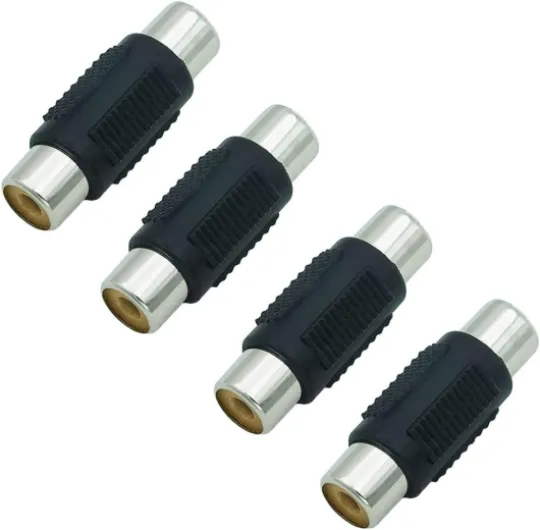
An RCA adapter helps you add flexibility to your setup by allowing different types of cables and plugs to work together. For example, you might need a plug adapter to connect a stereo audio output from a DVD player to the projector’s audio input. Some adapters convert mono to stereo, or combine multiple RCA plugs into a single jack. This is especially useful if your projector or speaker system only has a limited number of RCA jacks.
- Audio adapters can convert between male RCA and female audio jacks, or between stereo and mono plug types.
- Video adapters help connect composite or component video sources to the projector’s RCA video input.
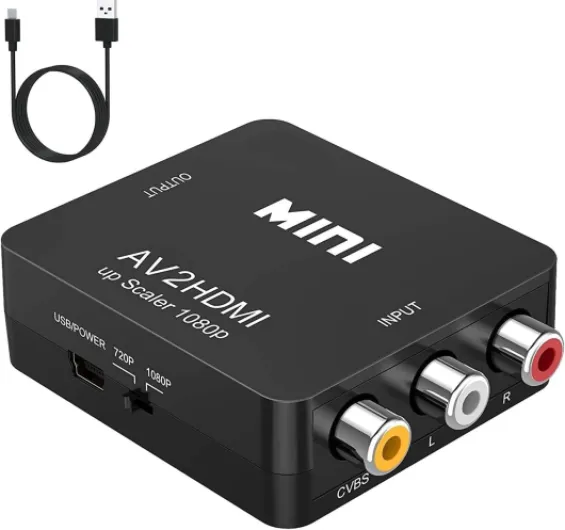
- RCA to HDMI adapters are available for those who want to connect modern HDMI sources to older projectors with RCA jacks. For more on high-quality HDMI solutions, check out this guide on why a fiber HDMI cable is essential for your home theater projector setup.
Understanding Compatibility and Options
Not all RCA adapters are created equal. Some are designed for audio only, while others handle both audio and video. The price and quality of these products can vary, so it’s important to compare options and read reviews—look for products with high stars and positive feedback. You’ll also want to consider whether you need a male or female adapter, and if you require a series stereo or mono plug for your specific devices.
In the next sections, we’ll look at the different types of RCA adapters, their compatibility with various devices, and how to choose the right one for your home theater projector setup.

Types of RCA adapters and their compatibility
Comparing Common RCA Adapter Options
When setting up a home theater projector, choosing the right RCA adapter can make a big difference in audio and video quality. There are several types of adapters, each designed for specific connection needs. Understanding the differences helps you avoid compatibility issues and ensures your projector works seamlessly with your other devices.
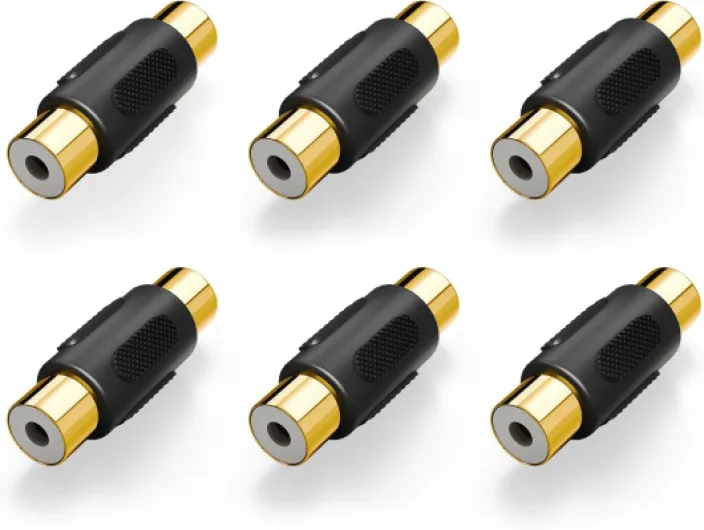
- RCA to RCA: The classic option, these cables connect devices with standard RCA jacks. You’ll find both male and female versions, so check your projector and source device ports before buying.
- RCA to 3.5mm Stereo Plug: Useful for connecting projectors to speakers or audio systems with a headphone jack. These adapters come in stereo and mono versions. For most home theater setups, a stereo audio adapter is recommended for full sound.
- RCA to HDMI: If your projector only has RCA plugs but your source device uses HDMI, an RCA HDMI adapter bridges the gap. These adapters convert analog signals to digital, but check product reviews and stars ratings before purchasing, as quality varies.
- RCA Splitters and Series Adapters: Splitters let you add multiple audio or video outputs, while series adapters help extend cable length. Make sure to compare products and price for the best value.
- RCA to Mono Plug: For older or specialized audio equipment, a jack mono or mono plug adapter may be necessary. These are less common but still important for certain setups.
Compatibility Considerations
Before buying, check if your projector uses RCA jacks (usually color-coded red, white, and yellow for audio video), or if it requires a different plug adapter. Some modern projectors may need a female audio adapter or a male RCA to female connector, depending on the input/output configuration. Always verify the exact jack type and signal (stereo or mono) to avoid mismatches.
For those working with compact or portable projectors, you might encounter micro HDMI connections. In these cases, check out this guide on everything you need to know about micro HDMI to micro HDMI for home theater projectors to ensure you have the right adapters for your setup.
Quick Reference Table: RCA Adapter Types
| Adapter Type | Common Use | Connector Example |
|---|---|---|
| RCA to RCA | Standard audio/video | Male RCA to RCA female |
| RCA to 3.5mm Stereo | Speaker or headphone output | Stereo plug to RCA jacks |
| RCA to HDMI | Modern source to legacy projector | RCA plug to HDMI adapter |
| RCA Splitter | Multiple outputs | 1 RCA male to 2 RCA female |
| RCA to Mono Plug | Mono audio equipment | Mono plug to RCA female |
Choosing the right audio adapter or plug RCA ensures your home theater projector delivers the best possible sound and picture. Take time to compare options, check compatibility, and read product reviews to find the best fit for your needs.
Key features to look for in an RCA adapter
What Makes a Good RCA Adapter for Home Theater?
When you’re comparing RCA adapters for your home theater projector, it’s easy to get lost in a sea of options. Not all adapters are created equal. The right choice depends on your setup, the audio video sources you use, and the devices you want to connect. Here’s what to keep in mind as you shop for the best RCA plug or audio adapter for your needs.
- Connector Type: Check if you need male RCA to female audio, stereo plug to RCA jacks, or a mono plug to RCA female. Some adapters offer a series stereo connection, while others are strictly mono. Make sure the jack matches your projector and speaker inputs.
- Build Quality: Look for adapters with sturdy cable construction and solid RCA plugs. Gold-plated connectors can help reduce signal loss and corrosion, which is important for maintaining clear stereo audio or mono sound.
- Compatibility: Double-check that the adapter supports your devices. Some audio adapters are designed for stereo signals, while others handle only mono. If you’re using a plug adapter for a series of speakers, make sure it can handle the output.
- Length and Flexibility: The right cable length can make a big difference in your setup. Too short, and you’ll struggle to connect devices. Too long, and you risk signal degradation. Flexible cables are easier to route behind furniture or around your projector.
- Audio Quality: A good RCA adapter should deliver clean, noise-free sound. If you notice hum or static, it might be time to upgrade your audio adapters or check your rca jacks for dust and wear.
- Price and Reviews: Compare products by looking at stars and user feedback. Sometimes, a mid-range adapter offers better value than the cheapest or most expensive series.
For those who want to add more bass or improve the overall sound, consider how your RCA adapter will work with your subwoofer and speaker setup. If you’re curious about optimizing your audio, check out this guide on understanding the role of a subwoofer in your home theater projector setup.
Choosing the right RCA or audio adapter is about more than just plugging in cables. It’s about making sure your home theater projector delivers the best possible sound and picture, every time you press play.
Common connection scenarios and solutions
Typical Home Theater Connection Setups
When setting up a home theater projector, connecting audio and video sources can get confusing. RCA adapters play a key role in bridging older and newer devices. Here are some common scenarios you might encounter, with practical solutions for each:
- Connecting a DVD player to your projector: Many DVD players use RCA plugs for audio and video output. If your projector only has HDMI, you’ll need an RCA to HDMI adapter. Make sure the adapter supports both video and stereo audio signals for a seamless experience.
- Linking external speakers: If your projector has a 3.5mm stereo jack but your speakers use RCA jacks, a 3.5mm stereo plug to dual male RCA adapter is the best option. This ensures you get stereo audio output to your speaker system.
- Adding a game console: Older consoles often use RCA plugs. For projectors with only HDMI input, an RCA HDMI converter is necessary. Compare products for compatibility and check user ratings (stars) before buying.
- Connecting a soundbar: Some soundbars accept only RCA or 3.5mm input. Use a female RCA to male 3.5mm audio adapter or vice versa, depending on your cable ends. This helps maintain a reliable stereo audio connection.
- Handling mono sources: If your source device outputs mono audio (single RCA jack), use a mono plug adapter to split the signal into both left and right channels for your projector or speaker system.
Choosing the Right Adapter for Each Scenario
With so many adapter options—male RCA, RCA female, plug adapters, and audio video adapters—it’s important to check compatibility. Always match the plug type (male or female) and signal type (stereo or mono) to your devices. If you’re unsure, compare series stereo and mono plug adapters, and review product specs and price before making a purchase.
Quick Reference Table: Common RCA Adapter Uses
| Scenario | Adapter Needed | Key Features |
|---|---|---|
| DVD Player to Projector (HDMI only) | RCA to HDMI Adapter | Supports audio video, stereo audio |
| Projector to External Speakers | 3.5mm Stereo Plug to Dual RCA Male | Stereo audio, plug and play |
| Mono Source to Stereo Input | Mono Plug to Stereo Adapter | Splits mono to stereo channels |
| Soundbar with RCA Input | RCA Female to 3.5mm Male Audio Adapter | Adapts plug type, maintains audio quality |
Remember, the right RCA adapter ensures your home theater projector setup works smoothly, whether you’re connecting legacy products or adding new audio adapters. Always check the cable and jack types before purchasing to avoid compatibility issues.
Troubleshooting RCA adapter issues
Identifying and Solving RCA Adapter Problems
When setting up your home theater projector, RCA adapters can sometimes cause unexpected issues. Recognizing and resolving these problems early helps maintain a stable audio video experience. Here are some common connection challenges and practical solutions:- No Sound or Distorted Audio: If your speakers or projector aren’t producing sound, first check that the RCA plugs are fully inserted into the correct jacks. A loose plug or mismatched cable (like using a mono plug in a stereo jack) can result in missing channels or static. Try swapping cables or using another adapter to compare results.
- Unstable or Intermittent Connection: Frequent audio dropouts may be caused by worn-out RCA jacks or damaged cables. Inspect the male RCA and female audio connectors for dust or corrosion. Cleaning the contacts gently with a soft cloth can sometimes restore a reliable connection.
- Compatibility Issues: Not all adapters are universal. For example, connecting a stereo audio source to a mono plug adapter can lead to loss of one channel. Double-check the product specs and ensure your adapters audio match your projector’s input and output requirements. If you’re adding HDMI to your setup, consider an RCA HDMI converter for broader compatibility.
- Hum or Buzzing Sounds: Ground loops or poor shielding in the cable can introduce unwanted noise. Try using a different series stereo cable or plug adapter with better shielding. Keeping audio cables away from power cords can also reduce interference.
- Physical Damage: RCA plugs and jacks are prone to wear, especially if you frequently unplug and replug devices. If you notice a loose fit, consider replacing the adapter or cable. Products with gold-plated connectors often provide a more secure and corrosion-resistant connection.
| Issue | Possible Cause | Solution |
|---|---|---|
| No audio | Loose RCA plug, wrong adapter | Check connections, try another cable or adapter |
| Distorted sound | Mono plug in stereo jack, damaged cable | Use correct adapter, replace damaged cable |
| Buzzing noise | Poor shielding, ground loop | Use shielded cable, separate from power cords |
| Intermittent connection | Worn RCA jacks, dirty contacts | Clean contacts, replace worn adapters |
Tips for maintaining a reliable connection
Best practices for keeping your RCA connections stable
Maintaining a reliable connection between your home theater projector and audio devices often comes down to how you handle your RCA adapters, cables, and plugs. Here are some practical tips to help you avoid common issues and keep your setup performing at its best:- Inspect your cables and adapters regularly. Look for signs of wear, such as frayed wires, bent male RCA plugs, or loose RCA jacks. Damaged products can cause audio dropouts or poor video quality.
- Avoid frequent plugging and unplugging. Constantly swapping adapters or cables can loosen RCA female ports and degrade the connection. If you need to switch between stereo and mono plug options, consider using a dedicated plug adapter or audio adapter designed for repeated use.
- Keep connections clean and dust-free. Dust or debris inside RCA jacks or on the stereo plug can interfere with signal transmission. Use a soft, dry cloth to gently clean connectors and avoid using harsh chemicals.
- Organize your cables. Tangled or stretched cables can put stress on RCA plugs and adapters. Use cable ties or clips to keep your audio video cables neat and prevent accidental tugs that could loosen connections.
- Choose quality adapters and cables. Not all RCA adapters or audio adapters are created equal. Compare products by checking user ratings (such as stars), price, and compatibility with your projector’s series and speaker setup. Reliable brands often provide better shielding and longer-lasting connectors.
- Test your setup after changes. Whenever you add a new adapter, switch to a different cable, or try a new audio option, test the system for stereo audio clarity and stable video output. This helps you catch issues early, whether you’re using a mono plug, stereo plug, or even an RCA HDMI converter.